VARIABLE
The VARIABLE statement defines a variable in terms of a scalar algebraic equation for independent use, or as part of the PINPUT, POUTPUT, or ARRAY statement.
Format
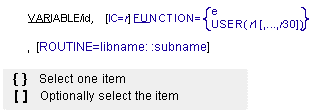
Arguments
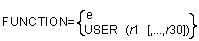 | Specifies an expression or defines and passes constants to a user-written subroutine to define a variable. If you want to define the variable with an expression, FUNCTION must be followed with an equal sign and the expression. If you want to define the variable with a user-written subroutine, FUNCTION must be followed with an equal sign, the character string USER, and the selected values (r1[,...,r30]) that Adams Solver (C++) passes to the user-written subroutine VARSUB. |
IC = r | Specifies an approximate initial value for the VARIABLE. Adams Solver (C++) may adjust the value of IC when it performs an initial condition analysis. Entering an accurate value for IC may help Adams Solver (C++) converge to the initial conditions solution. |
ROUTINE = libname::subname | Specifies an alternative library and name for the user subroutine VARSUB. Learn more about the ROUTINE Argument. |
Extended Definition
The VARIABLE statement creates a user-defined algebraic equation. The value of the VARIABLE statement may depend on almost any Adams Solver (C++) system variable.
You can define the value of the VARIABLE statement by either writing a function expression in the dataset or by calling a VARSUB user-written subroutine. Learn more on User-Written Subroutines and Utility Subroutines.
Function expressions and user-written subroutines can access the value of the VARIABLE statement with the Adams Solver (C++) function VARVAL(id) (see VARVAL) to represent the value, where id specifies the user-selected identifier of the VARIABLE statement. User-written subroutines access single VARIABLE statement values by calling the subroutine SYSFNC.
Caution: | ■Use caution when defining a VARIABLE statement that is dependent on another VARIABLE statement or on an Adams Solver (C++) statement that contains functions. If a defined system of equations does not have a stable solution, convergence may fail for the entire Adams Solver (C++) model. The following example refers to this type of VARIABLE statement: VARIABLE/1, FUNCTION= VARVAL(1)+1 When looked at as an algebraic equation, it looks like the following: V=V+1. However, when Adams Solver (C++) tries to solve this equation using the Newton-Raphson iteration, the solution diverges and Adams Solver (C++) displays a message on the screen indicating that the solution has failed to converge. ■The IC argument should be used whenever a zero value might cause a floating point exception or lead Adams Solver (C++) away from the desired solution. |
Variable removal from equations to solve
Often, users create VARIABLES to simplify the model definition. For instance, a VARIABLE definition can be used in the FUNCTION expression for several forcing functions by using the VARVAL function expression. However, there are cases when a VARIABLE is not used in any forcing function, nor constraints, nor other VARIABLEs in the model.
As an example, consider the equations of motion of a simple 1D spring-mass system as shown below. Notice that variable v2 is not required to be included in the solution process.

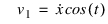
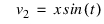
For the case in hands, the first two equations are enough to solve the dynamics of that model.

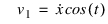
while the third equation
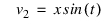 ,
,can be computed afterwards, when computing output results. The removal of VARIABLEs not required to solve the dynamics of the model has performance benefits, hence the removal of such VARIABLEs is the default behavior of the Adams Solver C++. During the mapping phase, while preparing the numerical solution, Adams Solver C++ detects VARIABLES that are not required to be included in the solution process and removes them from the solution algorithm. Notice the removed VARIABLEs will be called only during the output results generation. The removal of VARIABLEs not required in the solution process applies to all types of simulations done by the solver.
The removal of VARIABLEs not required in the solution process is a feature implemented only in the Adams Solver C++. Adams Solver FORTRAN does not remove VARIABLEs from the equations to solve.
However, there are cases when a user does require Adams Solver C++ to keep a VARIABLE in the equations to solve because the user needs to perform some specific computation coded in the corresponding VARSUB for that VARIABLE. For example, a user may need to make a computation to send a signal to another process at every iteration during a simulation. For that kind of scenario, there is a workaround to force Adams Solver C++ to keep a VARIABLE in the solution process. Assume the model has a VARIABLE and a SFORCE definitions as shown below:
VARIABLE/999, FUNCTION=USER(0) ! Specific computation needed at each iteration
SFORCE/12, I=1, J=2, TRANSLATION, FUNCTION=DX(1,2)
SFORCE/12, I=1, J=2, TRANSLATION, FUNCTION=DX(1,2)
Assume that VARIABLE/999 is not required to solve the equations of motion but we would like to keep it in the solution process. The workaround consists of adding VARVAL(999) times a small amount to the SFORCE expression:
VARIABLE/999, FUNCTION=USER(0) ! Specific computation needed at each iteration
SFORCE/12, I=1, J=2, TRANSLATION, FUNCTION=DX(1,2) + 1E-20*VARVAL(999)
SFORCE/12, I=1, J=2, TRANSLATION, FUNCTION=DX(1,2) + 1E-20*VARVAL(999)
The added term will keep a dependency on VARIABLE/999 and the corresponding VARSUB will be called at each iteration. Notice we did not write 0*VARVAL(999) because Adams Solver C++ will determine the expression is identical to zero and it will replace 0*VARVAL(999) by 0, eliminating the call to the VARSUB.
Notice that the optimal solution for the scenario above is to use a CBKSUB instead of a VARSUB. For more details see CBKSUB. A CBKSUB provides more flexibility allowing the specific code to be executed say only once per time step, at the end of an iteration, etc.
Examples
VARIABLE/4, FUNCTION = IMPACT(DZ(10,90),
, VZ(10,90), 1, 3E5, 1.2, 1,.05)
, VZ(10,90), 1, 3E5, 1.2, 1,.05)
This VARIABLE statement defines an impact function. You may refer to this function as VARVAL(4) in other function expressions. This may make the other expressions more concise and readable, and might avoid repeated impact function calculations.
See other Generic systems modeling available.