OpenCRG Road Model
The OpenCRG Road Model (CRG = 'Curved Regular Grid') is based on the open source code delivered at http://www.opencrg.org/
The website states about the background of this road model:
'Its objective is the provision of a series of open file formats and tools for the detailed description of road surfaces.
The predecessor of OpenCRG® is a format called CRG which has been used internally for several years by Daimler AG. An entire suite of MATLAB® and FORTRAN tools had been developed for the handling, evaluation and generation of CRG data.
This knowledge and a whole new series of tools including a new C-API shall be made available to the broad public by means of the OpenCRG® initiative. Users shall be enabled to use all data, libraries and code samples on this website with minimum opensource licensing restrictions.'
For details about the use and format of the CRG road files is referred to the users manual available at the website. Below the use of CRG within Adams is explained.
The OpenCRG road can be used with any Adams Tire tire model.
Positioning of the OpenCRG road
In general the position of the CRG measured road data will not match with the required position for your (vehicle model). There are two options to change the position of the road:
1. Change the position and/or orientation of the road/tire reference marker (std_tire_ref) in your Adams model.
2. Define the x, y, z reference point in the .crg file, by adding the following data block:
$ROAD_CRG_MODS | ||
refpoint_x | = -666.0 | !translation in x direction wrt road reference marker [Meter] |
refpoint_y | = -132.5 | !translation in y direction wrt road reference marker [Meter] |
refpoint_z | = 29.8 | !translation in z direction wrt road reference marker [Meter] |
refpoint_phi | = 0.0 | !rotation around z axis of the road reference marker [Radian] |
The Adams OpenCRG road file reader applies these $ROAD_CRG_MODS settings to the road data by default (call to crgDataSetModifiersApply()). To avoid applying these $ROAD_CRG_MODS settings, the environment variable MSC_OPENCRG_APPLY_MODIFIERS can be used, by setting it to: MSC_OPENCRG_APPLY_MODIFIERS=NO.
Other modifiers and more details about repositioning of the OpenCRG road can be found in the OpenCRG user's manual at http://www.opencrg.org )
Notes: | 1. The units for length and angle in the OpenCRG road file are always fixed to respectively meter and radian. 2. Some .crg files contain binary formatted data blocks. Adding ascii statements in such .crg file may easily destroy the format and make the file un-readable for the OpenCRG code. One may avoid editing the existing .crg file by using the $ROAD_CRG_FILE feature in a master .crg file. An example of a master file is the sample_country_road_repositioned.crg in the acar_shared/tires.tbl folder. |
Messaging by OpenCRG
By default the messaging level is set to writing out (fatal) errors only (level 1). Changing the messaging level can be done by setting the environment variable MSC_CRG_MESSAGE_LEVEL:
MSC_CRG_MESSAGE_LEVEL = 0 dCrgMsgLevelNone
1 dCrgMsgLevelFatal
2 dCrgMsgLevelWarn
3 dCrgMsgLevelNotice
4 dCrgMsgLevelInfo
5 dCrgMsgLevelDebug
OpenCRG road visualization
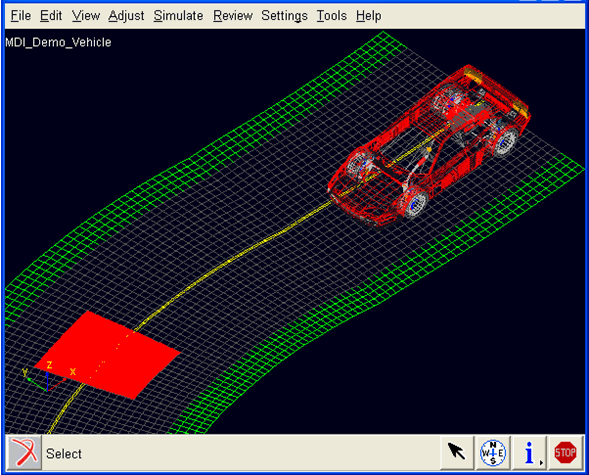
Visualization of the OpenCRG roads is supported within Adams Car and Adams View. The OpenCRG road grid will be visualized using default settings for grid and overall road size. The maximum number of grid datapoints used in these default settings can be changed using an environment variable MSC_CRG_MAX_VIS_POINTS:MSC_CRG_MAX_VIS_POINTS = 10000.
However, the user can specify his own detailed preferences for visualization by adding his specification in a $ROAD_CRG_VISUALIZATION data block in the .crg file.
$ROAD_CRG_VISUALIZATION
visualization_increment_u = 0.25 !for grid size in long. direction
visualization_increment_v = 0.25 !for grid size in lat. direction
visualization_start_u = -10.0 !point where visualization starts
visualization_start_v = -5.0 !point where visualization starts
visualization_end_u = 700.0 !point where visualization ends
visualization_end_v = 5.0 !point where visualization ends
Notes: | ■If the visualization_start and visualization_end values exceed the measured road area the output of CRG is shown in a difference color (green). ■If the increment values are smaller then the measured grid value, the measured grid value is taken. ■The $ROAD_CRG_VISUALIZATION can also be specified in the a master .rdg file that is referring to another file using the $ROAD_CRG_FILE block. |
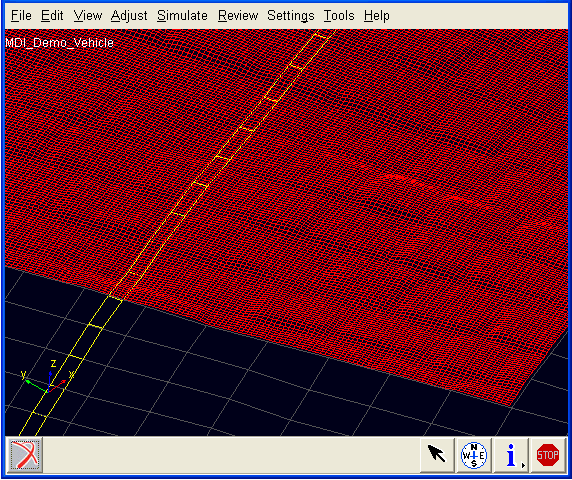
Patches (in red) with detailed grids can be shown by adding $ROAD_CRG_VISUALIZATION_PATCH_# blocks within the $ROAD_CRG_VISUALIZATION data block, see the example below.
$ROAD_CRG_VISUALIZATION_PATCH_1
visualization_increment_u = 0.014
visualization_increment_v = 0.0132
visualization_start_u = 20.0
visualization_start_v = -1.0
visualization_end_u = 22.0
visualization_end_v = 1.0
The defined start, end and increment values of patches may be modified by the visualization routines to fit the patch in the global grid size of the road.
Definition of Road Friction
By default the friction on the CRG road is one: The interaction forces predicted by the tire model are scaled with a factor one. It is possible to define specific road friction scaling factors by supplying Adams Tire a second '.crg formatted file' that contains friction scaling factors (instead of road height values).
This '.crg formatted file' should have the same name as the .crg file with the road height values, but the extension of the file should read .crgf.
If the user supplies a <road_file_name>.crg file for a simulation, Adams Tire will look for a second file with the name <road_file_name>.crgf with road friction scaling values. If that file is not found, the road friction scaling will be set to one.
Adams SmartDriver support
The .crg files can also be used for the desired path on the x-y plane in case of a ‘Full-Vehicle Analysis → Course Event' or a ‘Full-Vehicle Analysis → Adams SmartDriver’ analysis. The x and y coordinates are derived by converting the u at v = 0 coordinates towards the x, y coordinate system. Also the ‘Full-Vehicle Analysis → Path Optimization’ tool can deal with the .crg files.
Adams Car quasi-statics
When quasi-statics does not converge, setting the following environment variable may help:
MSC_ADAMS_TIRE_QS_USE_EFFRAD=YES
Road Normal calculation and Road Boundaries
The road normal setting of RGR road is upwards by default. If one would need to include the effect of the road height changes, following environment variable needs to be set:
MSC_ADAMS_TIRE_OBSTACLE_NORMAL=YES
Note: | 3D drum roads in the OpenCRG format are not supported, 2D road offers a drum road. |
Complaints about Not a Numbers (Nans)
OpenCRG assumes the same width over the whole length of the road. In practice it may occur that at some sections of a road no data could be measured over the complete width. Typically those data points are stored as Nans. Within Adams Tire, by default these Nans will be replaced by zero road height values. OpenCRG also offers another option for treating the Nans: keeping the road height as last value.
In other to change the Nan treatment option one can use the environment variable MSC_OPENCRG_NAN_MODE. Following options are available:
MSC_OPENCRG_NAN_MODE=0 | No change the Nan road height value, not recommended, this will cause trouble in simulation or visualization |
MSC_OPENCRG_NAN_MODE=1 | Default: replaces the Nan by a zero road height value |
MSC_OPENCRG_NAN_MODE=2 | Replaces the Nan by last road height value. |
OpenCRG Messages
In some cases the OpenCRG will list messages about the content of the file. The messages as shown below or similar can be ignored and have no effect on the outcome of your simulation:
| parseFileHeader: ignoring line 32: <visualization_increment_u = 0.09
| >.
| parseFileHeader: ignoring line 33: <visualization_increment_v = 0.15
| >.
| parseFileHeader: ignoring line 34: <visualization_start_u = 0.0
| >.
| parseFileHeader: ignoring line 35: <visualization_start_v = -3.50
| >.
| parseFileHeader: ignoring line 36: <visualization_end_u = 320.0
| >.
| parseFileHeader: ignoring line 37: <visualization_end_v = 3.50
| >.
| parseFileHeader: ignoring line 39: <visualization_increment_u = 0.015
| >.
| parseFileHeader: ignoring line 40: <visualization_increment_v = 0.015
| >.
| parseFileHeader: ignoring line 41: <visualization_start_u = 20.0
| >.
| parseFileHeader: ignoring line 42: <visualization_start_v = -2.4
| >.
| parseFileHeader: ignoring line 43: <visualization_end_u = 30.0
| >.
| parseFileHeader: ignoring line 44: <visualization_end_v = 2.4
| >.
| parseFileHeader: ignoring line 68: <reference_line_start_lon =
| 2.2785461210000002e+000 >.
| parseFileHeader: ignoring line 69: <reference_line_start_lat =
| 4.8530721400399997e+001 >.
| parseFileHeader: ignoring line 70: <reference_line_end_lon =
| 2.2805517298864131e+000 >.
| parseFileHeader: ignoring line 71: <reference_line_end_lat =
| 4.8533225854119749e+001 >.
| parseFileHeader: ignoring line 72: <reference_line_start_alt =
| 1.8138793429402364e+002 >.
| parseFileHeader: ignoring line 73: <reference_line_end_alt =
| 1.8103199828769903e+002 >.