Regular Grid Road Model
Similar to OpenCRG Roads, Regular Grid Road (RGR) has been developed for describing measured road surfaces. RGR has been developed by cosin scientific software, and is available within the cosin FTire distribution in Adams. In addition an open source library is released under the terms of the 'GNU Library Public License (LGPL)', see also www.cosin.eu.
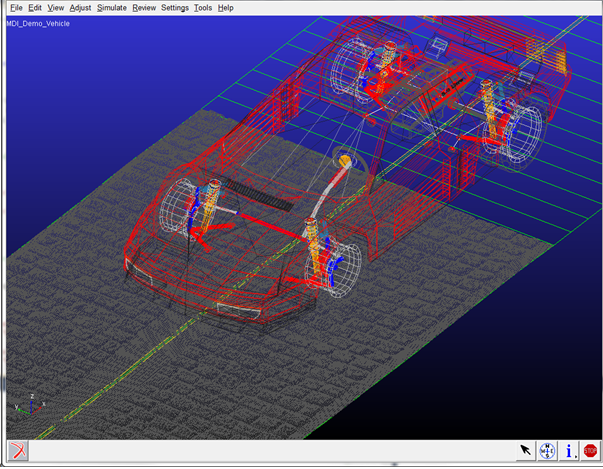
Next to FTire, also the standard Adams Tire models support the RGR road format the RGR roads are visualized within Adams Car.
An .rgr formatted file contains information about the size of the grid, the number of data points, and the (measured) road height values in ascii or binary format. An .rgr file does not contain information about the road centerline: an .rgr road will always have a square shape in the x-y road plane.
In general the road centerline is described in a TeimOrbit format that is similar to a 3D Spline .rdf file format, see the example below:
$-------------------------------------------------------------------COSIN_HEADER
[MDI_HEADER]
FILE_TYPE = 'rdf'
FILE_VERSION = 5.00
FILE_FORMAT = 'ASCII'
(COMMENTS)
{comment_string)
'3d smooth road'
$--------------------------------------------------------------------------UNITS
[UNITS]
LENGTH = 'meter'
FORCE = 'newton'
ANGLE = 'degree'
MASS = 'kg'
TIME = 'sec'
$---------------------------------------------------------------------DEFINITION
[MODEL]
METHOD = '3D_SPLINE'
VERSION = 1.00
RGR_DATA_FILE = 'road_data.rgr'
RGR_LENGTH_UNIT = 'mm'
$----------------------------------------------------------------ROAD_PARAMETERS
[GLOBAL_PARAMETERS]
CLOSED_ROAD = 'YES'
SEARCH_ALGORITHM = 'fast'
ROAD_VERTICAL = '0.0 0.0 1.0'
FORWARD_DIR = 'NORMAL'
MU_LEFT = 1.0
MU_RIGHT = 1.0
WIDTH = 15.0
$---------------------------------------------------------------------DEFINITION
[ROAD_RGR_VISUALIZATION]
INCREMENT_U = 0.01
INCREMENT_V = 0.01
$--------------------------------------------------------------------DATA_POINTS
[DATA_POINTS]
{ X Y Z WIDTH BANK MU_L MU_R }
-20.0000 0.0000 0.0000 12.0000 0.0000 0.900 0.900
-18.0000 0.0000 0.0000 12.0000 0.0000 0.900 0.900
-16.0000 0.0000 0.0000 12.0000 0.0000 0.900 0.900
-14.0000 0.0000 0.0000 12.0000 0.0000 0.900 0.900
-12.0000 0.0000 0.0000 12.0000 0.0000 0.900 0.900
-10.0000 0.0000 0.0000 12.0000 0.0000 0.900 0.900
...
Also 2D Road TeimOrbit files can be used to refer a .rgr file, however the 2D Road file has not an option to define a centerline.
For the visualization within Adams Car a default grid size is used derived with a maximum number of grid points. This maximum number of grid data points used in these default settings can be changed using an environment variable MSC_RGR_MAX_VIS_POINTS.
For example:
MSC_RGR_MAX_VIS_POINTS = 10000.
The grid size can be changed by adding a [ROAD_RGR_VISUALIZATION] section in the .rdf file as shown in the example file.
Next to the fact that the centerline can be easily modified and another advantage of the RGR road is the feature to split a large road data file into several patches:
$--------------------------------------------------------------------------MODEL
[MODEL]
METHOD = '3D_SPLINE'
VERSION = 1.00
RGR_DATA_FILE_1 = 'patch1.rgr'
RGR_DATA_FILE_2 = 'patch2.rgr'
RGR_DATA_FILE_3 = 'patch3.rgr'
RGR_LENGTH_UNIT = 'mm'
During a simulation, the RGR road routine will just store the patch that is required and swap to a next patch, if the vehicle enters the next patch area, which will be beneficial in terms of memory usage for large roads.
Example RGR road property files can be found in the cosin Ftire/tools installation:
<install_dir>/cosin/roads
For more details about the RGR road model and file formats is referred to the cosin documentation available at www.cosin.eu.
Road Repositioning
The position and orientation of the road can be changed by defining the reference system in the optional [REFSYS] block:
Keyword: | Description: |
|---|---|
OFFSET | Three values, respectively the translational offset value in longitudinal direction, the translational offset value in lateral direction and the translational offset value in vertical direction, all default 0. |
ROTATION_ANGLE_XY_PLANE | The rotational offset around the Z-axis, default 0. |
In the TeimOrbit formatted road property file, this section will list as follows:
$-------------------------------------------------------------refsys
[REFSYS]
OFFSET = 1.0 0.0 0.3
ROTATION_ANGLE_XY_PLANE = 25.0
Road Normal calculation and Road Boundaries
The road normal setting of RGR road is upwards by default. If one would need to include the effect of the road height changes, following environment variable needs to be set:
MSC_ADAMS_TIRE_OBSTACLE_NORMAL=YES
When a wheel passes a road boundary (kerbside), the wheel-road contact will be lost and thus the vehicle will start to drop down. The solver may encounter stability problems in some cases and start reducing step size or even run into stability problems. By setting the environment variable MSC_ADAMS_TIRE_ROAD_EDGE_STOP solver will abort the simulation if a wheel passes a road boundary:
MSC_ADAMS_TIRE_ROAD_EDGE_STOP=YES