Delta mode
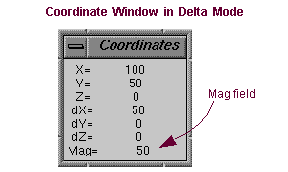
A mode in which the Coordinate window displays the differences between Points. The coordinate window is in delta mode when you are moving an object or drawing the selection box.
When Adams View starts delta mode, it displays the distance between the current location of the cursor and its original location. Adams View adds the distance information to the coordinate window below the coordinate values. It places a D in front of the coordinate values to differentiate them.
Adams View also displays a MAG field near the bottom of the window, which displays the magnitude of the cursor displacement. The magnitude is the square root of the sum of the squares of the three coordinate values.