RPC III Format
MTS Systems Corporation created the Remote Parameter Control (RPC) III file format. This format has become a standard for writing time history information of loads, forces, and accelerations. With RPC III, you can input data from durability test machines and output data to any RPC III-compatible programs. This topic contains an overview of the RPC III format. For a detailed description of the RPC III format, see www.mts.com.
RPC III files are sequential and fixed-length with 512-byte records. The files begin with a standard header that describes the file contents. The header includes a FORMAT flag that specifies one of four data formats:
■BINARY_IEEE_LITTLE_END - used on Windows systems
■BINARY_IEEE_BIG_END - used on Linux systems
■BINARY - used on VAX systems
■ASCII
Adams View and Adams Durability can read any of the binary formats, so from the point of view of an Adams user, these files are portable between platforms. These products can also write RPC III files in the BINARY_IEEE_LITTLE_END format because MTS only provides RPC III software for the Windows platform.
The RPC III file format supports multi-channel time history data with a fixed sample rate or time step. Adams View and Adams Durability support an unlimited number of channels. These binary files map real data into a short (2-byte) signed integer with the header providing a scaling factor for each channel. Because the scaling factor essentially determines where the decimal point appears in these signed numbers, the maximum resolution of data in an RPC III file is 0.0000305 () when the scaling factor is 1.
A key point to remember is that data that varies less than the magnitude of the channel resolution won’t be reflected in an RPC III file. For example, with a scaling factor of 1, changes less than ±0.0000305 won’t register in the RPC III data file.
The time history format of RPCIII files is limited to fixed time step and fixed size frames. Some of the effects of these limitations as they pertain to Adams results are explained on the following two sections.
Fixed Time Step
RPC III file time history data format supports fixed time step data only. To meet this limitation Adams Durability will set the constant time step of the RPC file, dt to be the minimum output step that occurred in the Adams simulation. Ideally, this results in a dt set to the output time step specified for the Adams simulation, dtout. However, there are cases when the Adams output result step is not constant. Examples are models with sensors that trigger an output step different from dtout or simulations specified with different dtout. In these cases Adams Durability will linearly interpolate the result data in order to output to the RPC file at dt increments.
Fixed Size Frame Data
RPC III file format organizes time history channel data into blocks or groups. Each group is divided into frames. The size of a frame can range in powers of 2, ranging from 256 to 65536 points, but is fixed in a particular RPC file. This can result in extra points being output to the RPC file because the last frame is filled with these extra point to meet the fixed frame size. This artifact is illustrated in Figure 2.
In this example, the RPC file contains 4 channels of time history data, and each group or block of data has four frames. Each frame contains 1024 points. Figure 1 plots the last two blocks (groups) of the channel data. It assumes 2304 data points of the time history data remain in the last group, labeled Block m. It shows how the data is stored in the four frames. Frame 1 and 2 are filled with 1024 points each. This leaves 256 data points stored in frame 3 and zero (0) in frame 4. However, because the RPC file format requires all frames to be filled, Adams Durability will repeat the last value of each channel to fill the remaining 768 data points in the third frame and all 1024 data points in the fourth frame. Note that repeating the last value of each channel is a slight variation from what the MTS RPC specification suggests doing. The spec suggests setting the extra points to zero, but doing this could be misleading since a zero value could have some significance.
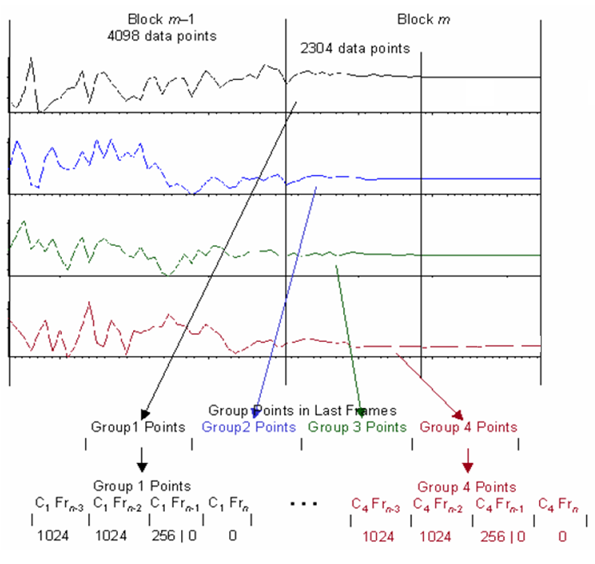
Figure 2 Extra Data Points in RPC File; taken with permission from MTS RPC® FILE FORMATS, page 19, with some minor modifications.
Channel Naming Convention for Adams Car Requests
RPC III file format has a limitation of 96 characters for naming channels. A channel name is based on the characteristics of the result or request statement. Adams tries its best to come up with unique channel names. This can be difficult to do when a Car model has nested request data. To illustrate, Figure 3 provides a simple case of a Car assembly with two subsystems and four request definitions where one request name is common between the two subsystems.
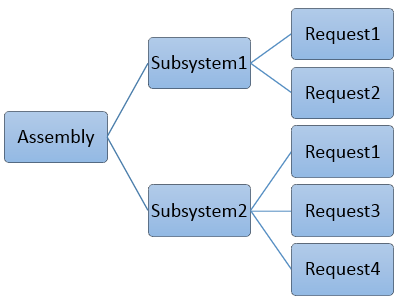
Figure 3 Example of Adams Car Assembly with Requests
To keep the channel names unique Adams will export an RPC III file composed of the following names for channels. Adams prepends the subsystem name to the request name and component:
1. Subsystem1.Request1.component1
2. Subsystem1.Request1.component2
3. […]
4. Subsystem1.Request2.component1
5. Subsystem1.Request2.component2
6. […]
7. Subsystem2.Request1.component1
8. Subsystem2.Request1.component2
9. […]
10. Subsystem2.Request3.component1
11. Subsystem2.Request3.component2
12. […]
13. Subsystem2.Request4.component1
14. Subsystem2.Request4.component2
15. […]
If the combination of subsystem, request and component names exceed the 96 character limit, Adams will shorten the subsystem name to fit the channel name length by truncating the subsystem name from the left. This could result in channel names like the following
1. ystem1.Request1.component1
2. ystem1.Request1.component2
3. […]
4. bsystem1.Request2.component1
5. bsystem1.Request2.component2
6. […]
7. system2.Request1.component1
8. system2.Request1.component2
9. […]
10. Subsystem2.Request3.component1
11. Subsystem2.Request3.component2
12. […]
13. Subsystem2.Request4.component1
14. Subsystem2.Request4.component2
15. […]
If Subsystem1.request1.componenti takes up 100 characters total, 4 characters will be stripped from Subsystem1, starting from the left, and so on.