MAT File Format
The MAT file format was created by Mathworks© for processing in MATLAB®. It is designed as a binary file format that can be easily transferred between different operating systems. Adams supports version 7.3 which is based on the HDF5 format. This section contains an overview of the MAT file format. For a detailed description of the MAT file format, see here.
Adams support the MAT file format for multi-variable time history data, which is stored in double-precision format. When Adams Durability exports request data to MAT file, one of the variables in the file is called TIME. It represents the time of each time step in the file, and each Adams request component is written out to MAT as a separate variable, so that one or more variables can be plotted in MATLAB against TIME.
Although the MAT file format does not limit the size of variable names, MATLAB restricts variable name lengths to 63 characters. Due to this restriction, Adams will limit all variable names to 63 characters by default. You can set the environment variable, ADAMS_MAT_FILE_FULL_VARIABLE_NAME to override this default behavior. When set to any value, Adams will output the full name of the variable to the MAT file which is the name of the REQUEST, plus the name of the component. This is useful for programs that support the MAT file format and do not have a restriction on the length of variable names.
MAT File Variable Naming Convention for Adams Car Requests
MATLAB has a limitation of 63 characters for naming variables. A variable name is based on the characteristics of the result or request statement. Adams tries its best to come up with unique variable names when exporting requests to MAT file. This can be difficult to do when a Car model has nested request data. To illustrate, Figure 1 provides a simple case of a Car assembly with two subsystems and four request definitions where one request name is common between the two subsystems.
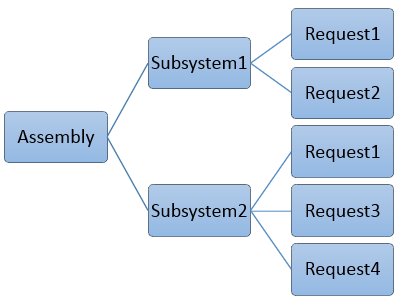
Figure 1 Example of Adams Car Assembly with Requests
To keep the variable names unique Adams will export a MAT file composed of the following variable names. Adams prepends the subsystem name to the request name and component:
1. Subsystem1.Request1.component1
2. Subsystem1.Request1.component2
3. […]
4. Subsystem1.Request2.component1
5. Subsystem1.Request2.component2
6. […]
7. Subsystem2.Request1.component1
8. Subsystem2.Request1.component2
9. […]
10. Subsystem2.Request3.component1
11. Subsystem2.Request3.component2
12. […]
13. Subsystem2.Request4.component1
14. Subsystem2.Request4.component2
15. […]
If the combination of subsystem, request and component names exceeds the MATLAB 63 character limit, Adams will shorten the subsystem name to fit the variable name length by truncating the subsystem name from the left. This could result in channel names like the following
1. ystem1.Request1.component1
2. ystem1.Request1.component2
3. […]
4. bsystem1.Request2.component1
5. bsystem1.Request2.component2
6. […]
7. system2.Request1.component1
8. system2.Request1.component2
9. […]
10. Subsystem2.Request3.component1
11. Subsystem2.Request3.component2
12. […]
13. Subsystem2.Request4.component1
14. Subsystem2.Request4.component2
15. […]
For example, if Subsystem1.request1.componenti takes up 67 characters total, 4 characters will be stripped from Subsystem1, starting from the left, and so on.