Orientation Methods
Orientation
Orientation of rigid or flexible body using three rotation angles. Adams View orients the body starting from the initial coordinate system and applying three successive rotations.
Depending on the convention you select, the rotations occur about space-fixed or body-fixed axes in any combination of the x, y, and z axes. By default, you supply body 313 (body-fixed z, x, z) angles.
Adams View applies your orientation angles with respect to the coordinate system in the Orientation Relative To or Relative To text box.
Along Axis Orientation
Orientation of a rigid or flexible body by directing one of its axes. Adams View assigns an arbitrary rotation about the axis.
Two points are needed to define an axis but you can enter either one or two points to direct the axis. If you enter two points, the axis points from the first location to the second. If you enter one point, Adams View uses the location you specified in the Location text box as the first point and the new location as the second point.
Along Axis Orientation
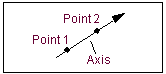
Adams View applies the location coordinates in the coordinate system you identify in the Location Relative To or Relative To text box.
Note that this does not completely dictate the orientation of the coordinate system. Adams View positions the coordinate system with an arbitrary rotation about the axis. If you must completely control the coordinate system orientation, select Orientation or In Plane Orientation.
By default, you direct the z-axis of the coordinate system. You can use the DEFAULTS ORIENT_AXIS_AND_PLANE AXIS_AND_PLANE_SETTING command to change this convention. For example, selecting either X_AXIS_XY_PLANE or X_AXIS_XZ_PLANE directs the x-axis. The plane-convention setting does not affect this parameter.
You can also direct the axis graphically using the marker’s position handle. Simply point the appropriate axis on the marker in the desired direction.
In Plane Oriention
Orientation of the rigid or flexible body by directing one of the axes and locating one of the coordinate planes.
In Plane Orientation
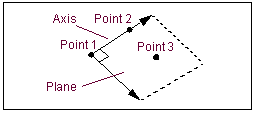
To define an axis and a plane, you need three points. You can enter either two or three locations, however. If you enter three locations, the axis points from the first location to the second and the plane is parallel to the plane defined by the three locations. If you enter only two locations, Adams View uses the location you specified in the Location text box as the first point and the other two locations as the second and third points.
Adams View applies the location coordinates in the coordinate system in the Relative To text box.
By default, you direct the z-axis of the coordinate system marker and locate the zx plane. You can use the DEFAULTS ORIENT_AXIS_AND_PLANE AXIS_AND_PLANE_SETTING command to change this convention. For example, selecting X_AXIS_XY_PLANE directs the x-axis and orients the xy plane.