Adams Command Server
The Adams Command Server is an Adams View (or Adams Car) component that manages communication between Adams View and external software. Examples of external software include user-written applications created in Microsoft Visual Basic, Python, C, Java or similar. The server listens for either commands or queries from an external application and manages the command or query interaction with the Adams model.
The server has a simple interface that is accessible from other programming languages that implement the TCP/IP communication protocol. The server also contains an interface for Microsoft Visual Basic that simplifies the communication protocol.
Starting the Command Server
The Adams View command language contains the following three commands:
1. command_server show
2. command_server start
3. command_server stop
The command_server show command displays the following dialog box in Adams View:
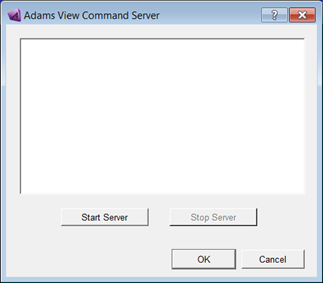
The Start Server and Stop Server buttons (or corresponding commands above) will start a new TCP/IP server in Adams View that listens for commands. Simple output from the server is displayed in the main window of the dialog box above. Starting the server yields output like the following:
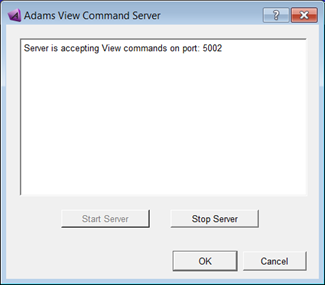
The server has started and is listening for client connections on the TCP/IP port 5002.
Note: | The intended usage of the Adams View Command Server is to run one Adams Command Server session per Adams View database. |
Command Server - Language
The Adams View Command Server understands three general commands as follows. These commands are sent as text strings over a TCP/IP connection; complete client code examples are found in the 'Example' sections below.
1. Commands: command strings beginning with the string "cmd" are assumed to be valid Adams View Command Language, for example:
“cmd file command read file=’load_model.cmd’”
Returns: “cmd: 0” (on success)
“cmd: 1” (error detected in View command)
2. Queries: command strings beginning with the string "query" are assumed to be valid Adams View Expressions; the Command Server attempts to evaluate these expressions and return the result to the client. Example:
"query part_9.mass"
See Detailed Query Response Handling, for details on how query data is returned.
3. Binary mode: on or off. Commands beginning with the string "binary" toggle binary mode for queries on and off. See section Detailed Query Response Handling for binary vs text queries. Example:
"binary on"
Important: | As shown in the examples, Encode() the query while sending and Decode() the query while receiving. |
Issuing Commands - Python Example
An example of a connection from a client, written in Python, that sends a command to Adams View looks like the following:
1. client_socket = socket.socket(socket.AF_INET, socket.SOCK_STREAM)
2. client_socket.connect(("localhost", 5002))
3. cmd = "cmd marker modify marker_name = mar_13333 vx = 0"
4. client_socket.send(cmd.encode())
5. response = client_socket.recv(1024).decode()
The code above does this:
■Line 1 creates a socket object of the proper type in Python
■Line 2 connects this socket object to the computer named "localhost" on port 5002
■Lines 3 & 4 formulate valid Adams View command language that starts with the string "cmd"'. This string is then sent over the socket connection in line 4.
■Line 5 receives feedback from the server. The server responds with the string "cmd: 0" for successful command processing. The client socket must accept the response and the socket connection is destroyed.
Issuing Multiple Commands - Python Example
Each command must be sent to the server over a new socket. The following example illustrates how multiple commands are handled:
cmds = ["cmd variable set variable=dv_x real=33",
'cmd marker modify marker_name = mar_13 vx = 0',
]
for cmd in cmds:
client_socket = socket.socket(socket.AF_INET, socket.SOCK_STREAM)
start_time = time.time()
dt = time.time() - start_time
while dt < 60: # wait up to 60s for a server connection:
dt = time.time() - start_time
try:
client_socket.connect(("localhost", __PORT__))
break
except socket.error:
pass
print "Connected to socket, sending cmd: %s" % cmd
client_socket.send(cmd.encode())
data = client_socket.recv(1024).decode()
print "Response from cmd was: %s" % data
Issuing Queries - Python Example
An example of a query operation from a client written in Python looks like the following:
1. client_socket = socket.socket(socket.AF_INET, socket.SOCK_STREAM)
2. client_socket.connect(("localhost", 5002))
3. the_query = "query strut_upper.location"
4. client_socket.send(the_query.encode())
5. Query_description = client_socket.recv(1024).decode() # Description of result
6. client_socket.send("OK".encode())
7. query_data = client_socket.recv(1024).decode()
8. # Optionally parse query data based on type:
9. description_list = str.split(query_description, ':')
10. data_type = str.strip(description_list[1])
11. data_length = int(description_list[2])
12. data_bytes = int(description_list[3])
13. print "Query returned %i values of data type %s" % (data_length, data_type)
14. print "Query data as a string is: %s" % query_data
The code above does the following:
■Lines 1 & 2 create a socket & connect to the proper port/host
■Line 3 & 4: queries must always start with the string "query" followed by an Adams View expression.
■Line 5: server replies with a description of the data that is to follow. Examples of possible responses (see examples below for more description):
■query: float : 3 : 12
■query: str : 1 : 0
■query: str : 4 : 0
■Line 6: server waits for an "OK" command before sending the actual data.
■Line 7: accepts the actual server data. The client socket attempts to read a block up to 1024 bytes in size, stores all data into the string variable named query_data. Python application must now parse query_data based on the query_description information.
■Lines 8-14: parse the query_description to determine data type and number of values sent. Format into readable variables and print a description.
Detailed Query Response Handling
Step: | Client Sends: | Server Responds: | Comment: |
|---|---|---|---|
1 | query part_9.mass | Initial query from client as a string | |
2 | query: float : 1 : 0 | Server sends description of data to come: ■Server processed a query ■Return type is float (single precision) ■1 element being returned. ■Size of element is 0 (undefined for this mode). | |
3 | OK | Client acknowledges receipt of above. | |
4 | 235731.808 | Server sends actual data as a string. |
Note: | Query data is returned from the server in string form by default. The server can also return data in binary mode for greater efficiency. Examples below, unless noted otherwise, are presented in the default text (not binary) response mode. Communication with the Command Server for queries must follow this pattern (default text query response mode shown, not binary mode): |
The server response follows this pattern:
query: str/int/float : len : size
query: | Keyword that server is responding to a query request |
str/int/float | String representing the type of value being returned |
len | Number of returned elements. This is the length of string for strings, number of elements in array for int & float. |
size | Size, in bytes, of packed variable or packed array structure. See notes below for cautions. |
The size parameter in text query mode generally returns a value of 0 and can be ignored. If binary queries are turned on then the size parameter represents the size of the packed array structure to be sent from the server to the client. The client can use this information when reading the data stream from the server.
Issuing Queries in Binary Mode - Python Example
If the server has been placed in binary mode then arrays are returned as binary chunks of data, not strings. An example of a query operation from a client written in Python looks like the following:
1. # Turn on binary mode:
2. client_socket = socket.socket(socket.AF_INET, socket.SOCK_STREAM)
3. client_socket.connect(("localhost", 5002))
4. client_socket.send("binary on".encode())
5. response = client_socket.recv(1024).decode()
6. # Query for an array of single precision numbers:
7. client_socket = socket.socket(socket.AF_INET, socket.SOCK_STREAM)
8. client_socket.connect(("localhost", 5002))
9. the_query = "query strut_upper.location"
10. client_socket.send(the_query.encode())
11. query_description = client_socket.recv(1024).decode() # Description of result
12. client_socket.send("OK".encode())
13. # Must parse description to get type/number of elements:
14. description_list = str.split(query_description, ':')
15. data_type = str.strip(description_list[1])
16. data_length = int(description_list[2])
17. num_bytes = int(description_list[3])
18. # Handle binary chunks using description above:
19. if (data_type in ('int', 'float')) and (data_length > 1):
20. packed_struct = client_socket.recv(num_bytes).decode()
21. if data_type == 'int':
22. int_struct = struct.Struct('%sI' % data_length)
23. int_list = int_struct.unpack(packed_struct)
24. actual_data = int_list
25.
26. elif data_type == 'float':
27. float_struct = struct.Struct('%sf' % data_length)
28. float_list = float_struct.unpack(packed_struct)
29. actual_data = float_list
The code above does the following:
■Lines 1-5: ensure that binary mode is on for queries.
■Lines 7-12: send query string to server, get back query_description string.
■Lines 14-17: parse query_description to determine the data return type (data_type), the number of returned elements (data_length) and the size of the data in bytes (num_bytes)
■Lines 19-24: if query_description indicates an integer array, read the proper number of bytes from the server (line 20). Next, unpack the raw binary data into a Python list (int_list) using the struct module.
■Lines 26-29: similar to above, but for float data.
Query Examples
1. Query for an array of numbers, such as a location (server is in text query mode):
Client Sends: | Server Responds: | Comment: | |
|---|---|---|---|
1 | query strut_upper.location | Initial query from client as a string. | |
2 | query: float : 3 : 12 | Server description indicates data is: ■Of type float (single precision) ■Array containing 3 elements. ■Size of the response is 12 bytes | |
3 | OK | Client acknowledges receipt of above. | |
4 | (-153.441294, 388.437049, -0.05) | Server sends data as a string. Client must parse string to remove comma characters. |
2. Query for a string (server is in text query mode):
Client Sends: | Server Responds: | Comment: | |
|---|---|---|---|
1 | query suspension.name | Initial query from client as a string | |
2 | query: str : 1 : 0 | Server description indicates data is: ■Of type string ■1 string being returned ■Size undefined (max 1024 bytes) | |
3 | OK | Client acknowledges receipt of above. | |
4 | suspension | Server sends data as a string. |
3. Query for array of objects (server is in text query mode):
Client Sends: | Server Responds: | Comment: | |
|---|---|---|---|
1 | query db_children(suspension, 'part') | Initial query from client as a string | |
2 | query: str : 4 : 0 | Server description indicates data is: ■Of type string ■Array contains 4 elements ■Size undefined (max 1024 bytes) | |
3 | OK | Client acknowledges receipt of above. | |
4 | ('.suspension.ground', '.suspension.Lower_Arm', '.suspension.Upper_Arm', '.suspension.Spindle_Wheel') | Server sends data as a string. Client must parse string to split comma and other characters. |
4. Query for array of object IDs (server is in text query mode):
Client Sends: | Server Responds: | Comment: | |
|---|---|---|---|
1 | query {strut_lower.id, strut_upper.id, steering_rack.id} | Initial query from client as a string | |
2 | query: int : 3 : 12 | Server description indicates data is: ■Of type integer ■Array contains 3 elements ■Total size of response is 12 bytes | |
3 | OK | Client acknowledges receipt of above. | |
4 | (19, 20, 17) | Server sends data as a packed integer array. Client must unpack array to retrieve elements. |
5. Query for an invalid expression (server is in text query mode):
Client Sends: | Server Responds: | Comment: | |
|---|---|---|---|
1 | query jibberish | Initial query from client as a string. Testing an invalid expression. | |
2 | SERVER_ERROR | Server could not evaluate this expression | |
3 | OK | Client acknowledges receipt of above. Client must always send this acknowledgement. | |
4 | No data from View | Server sends generic string error message. Client must always accept this information string. |