Using Macros with UDEs
To create UDEs for which users can modify data or ones that require an (I,J) marker interface (like forces, for example, designed to connect to the outside model), we need to make use of Adams macros. A macro is an Adams View object, written in Adams View Command Language, that takes certain inputs (either interactively from the user or hard-coded) and performs some action.
If a macro is written to take inputs from the user, Adams View will automatically create a dialogue box from which the user can input data. This dialogue box can be customized if desired. If the macro is named "mymacro", the dialogue box will be named "dbox_mymacro".
Macros can be written within Adams View or brought it in externally from a file. Macros can even be created by recording actions done interactively in Adams View. Once a macro is completed, you can assign it a command name that can then be run from the Command Navigator.
Much more information about Adams View macros can be found in Automating Your Work Using Macros.
The rest of this section focusses specifically on how to apply macros to UDE usage.
Typically, you will need at least a "Create" macro, a "Modify" macro, and a "Dbox" macro. The following subsections provide details and examples of such UDE-related macros.
Method Macros
To facilitate the instantiation of UDEs, several "methods" are available. These methods are actually implemented as macros, however. If macros by the names provided below exist under your macro definition, then they will be automatically called:
Method: | Description: |
|---|---|
create | Called after issuing "ude create instance" command. |
modify | Called after issuing a "ude modify instance" command. |
copy | Called automatically when user tries to copy UDE instance. |
replace | Called after issuing a "ude replace instance" command. The replace method of the new definition is called. |
pre_delete | Called prior to issuing the "ude delete command" for a given definition. |
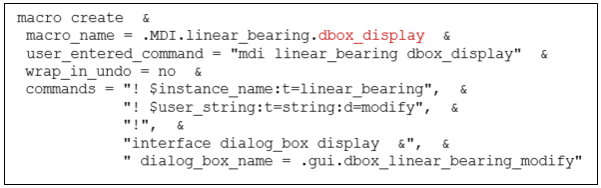
dbox_display | Called when "right clicking" on the UDE instance and choosing "modify". This macro usually displays the dialog box for this particular UDE definition type. |
Notes: | The word "modify" has two contexts when discussing UDE instances: ■Change things about the UDE, other than its input parameters. This would cover for example, relocating the UDE. This includes things specified in Command Navigator >UDE > Modify > Instance (or the equivalent "ude modify instance" command). This is where the "modify" method macro helps. ■Change parameters within the UDE (stiffness, damping, for example). This is done via a "modify" utility macro (see the Utility Macros section). |
Below are examples of a few of the method macros:
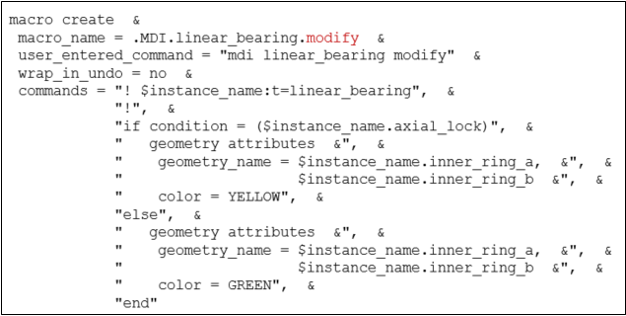
Modify Method Macro: Macro to be run after "ude modify instance" command. In this case, the macro simply changes colors on objects based on user-entered parameters. The "ude modify instance" command will be called by the "modify" utility macro (see the Utility Macros section).
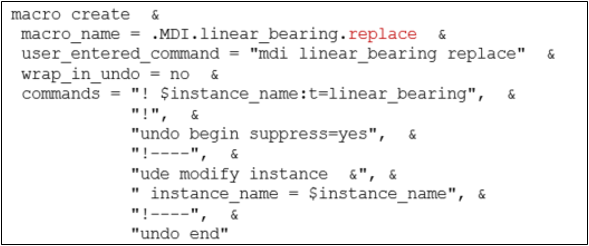
Replace Method Macro: Macro to be run after "ude replace instance" command to replace one instance with another.
Dialog Box Display Method Macro: Macro to be run when right clicking on the UDE in the model browser and selecting "Modify". This displays the dialog box of a utility macro so that the user can change parameters (see the Utility Macros section).
Utility Macros
Utility macros are necessary for two scenarios:
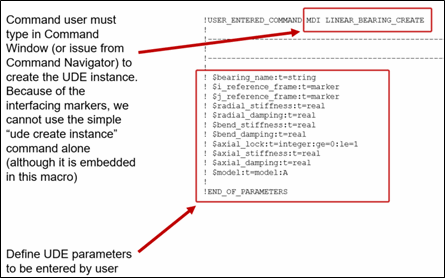
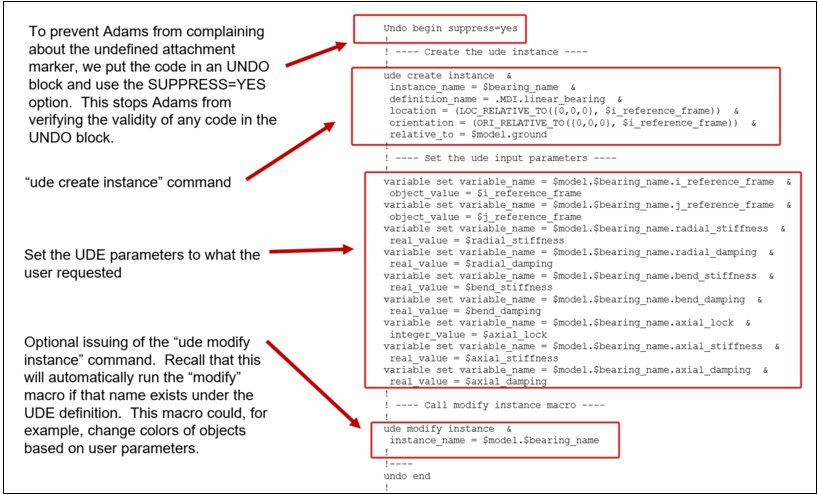
■Create Utility Macro: When creating the UDE instance, this macro is necessary to handle interfacing markers and bring up a dialogue box for entering parameter values
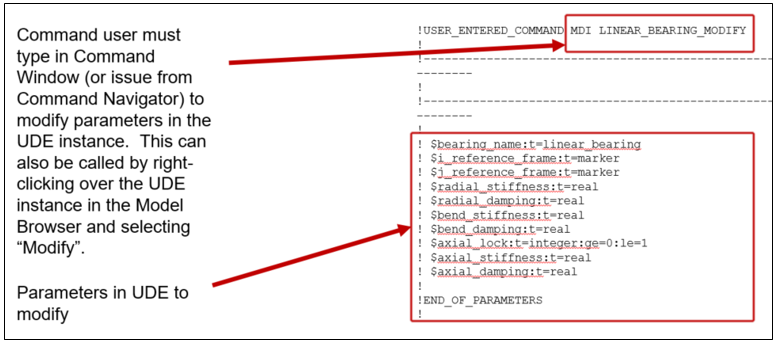
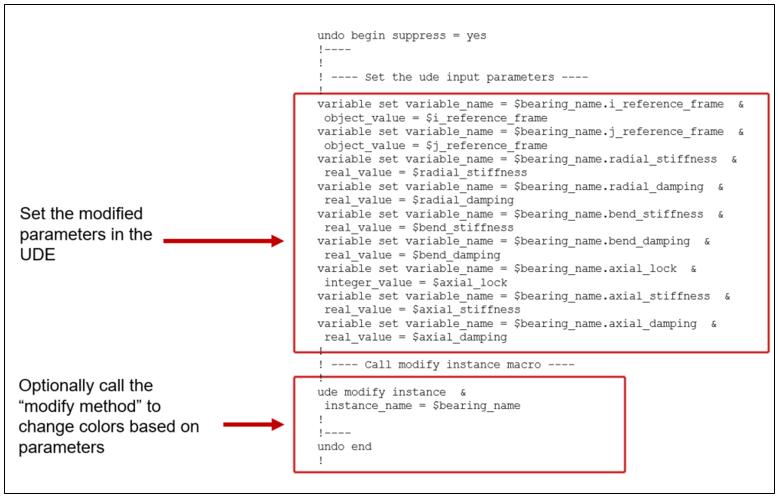
■Modify Utility Macro: When the user wants to modify parameters in the UDE, a utility macro is needed to do this. This macro will be called by the "dbox_display" method discussed previously in Method Macros section.
Below are examples of each marked up to explain their contents.
Create Utility Macro: The first part of the create utility macro defines which parameters are entered by the user. The second part creates the UDE instance and sets the user-entered parameters.
Modify Utility Macro: Similar to the create utility macro, the first part of the modify utility macro includes which parameters are entered by the user. The second part modifies the UDE instance and sets the user-entered parameters.