Section 1: The basic plugin
The following files constitute a basic plugin,
1. Plugin xml (plugin_plg.xml)
2. One or both of the ‘plugin binary file’ (plugin.bin) and the ‘The plugin View Dll’ (plugin_view.dll)
3. Solver DLL (plugin.dll)
Plugin xml
The plugin xml serves to publish the existence of a plugin to the product (View, Car, PPT and so on.). The plugin manager makes use of the xml files that belong to the individual plugins to create a consolidated list of plugins that is available for use with the current product.
Among other things, the xml contains information such as the plugin name, version and author as well as the list of products with which the plugin is compatible. This information is made use of by the plugin manager to display the information about the plugin in its UI as shown below,
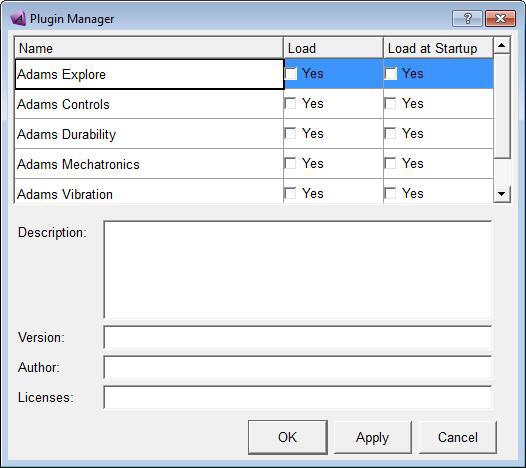
It is recommended, that while creating new plugins, existing plugin xml files be used as reference.
Explanation for some of the most common tags in the xml file is given below,
■Description - Specifies a short multi-line description of the plugin.
■Version - Specifies the version number of the plugin.
■Author - Contains information such as the name of the person/organization that created the plugin.
■LicenseFeature - Contains information related to the licensing feature used by the plugin. The plugin manager uses this information to denote the number of available licenses.
■ValidWith / NotValidWith - List of the products that the plugin is valid for use with and otherwise. Only plugins specified in the ValidWith list are displayed in the plugin manager.
The naming convention for the plugin xml file is (plugin_plg.xml), where plugin is the placeholder for the actual name of the plugin.
The plugin View Dll
The view dll contains a collection of custom written functions/routines to be registered with Adams View. The custom routines are written in C or FORTRAN and can reside in any number of files. Registering a function with Adams View makes it accessible from the Adams View command language for use in expressions.
Apart from the custom functions, a view dll must contain 2 other functions named plugin_initialize and plugin_terminate (where plugin is a placeholder for the name of the actual plugin). The initialize function takes care of the function registration, performing license checkouts if necessary etc. The terminate function on the other hand does exactly the opposite, in un-registering the functions and any other clean up tasks involved in unloading of the plugin.
The plugin view DLL is created using the ‘adams2024_1 –c aview cr-u’ command. The naming convention for the view dll is plugin_view.{so, sl, dll}, with the extension specific to the platform under consideration.
View GUI
The view GUI is a full or a partial binary file containing a View library object. The library has the same name as that of the plugin (.plugin). The library object typically contains all the macros, UDE definitions and dialog boxes which the plugin makes use of.
The library object also contains a load macro (.plugin.load). The load macro is typically responsible for making changes to the parent UI (like adding plugin specific menus to the parent UI) during the plugin load operation. It is important that the load macro uses a User-Entered Command, for instance:
mdi myplugin load
The user-entered command is required to have the load macro called upon plugin startup. For this, it might reference other menu or command files. After Adams View loads the binary, the plugin library will be searched for this macro for the load process to continue.
The View library object will also contain a corresponding unload macro (.plugin.unload). The unload macro is complementary to the load macro and usually restores the parent environment when the plugin is unloaded.
Also, plugin dialog boxes should have commands which call plugin specialized macros instead of building long command structures in the dialog boxes itself. The plugin load operation automatically sets an environment variable within the Adams View session which helps locate the binary file from which the plugin was loaded. The variable name is plugin_BIN_DIR where plugin is the upper-cased version of the plugin name. This can be used in the plugin load macro, for instance, to read gui components that are inside the plugin library.
Example:
macro create macro = .plugin.load &
user = “mdi plugin load” &
com = “file binary read &”, &
“ file = (getenv(\” PLUGIN_BIN_DIR \”) // \” plugin.bin \”) & “, &
“ entity = .gui.main.mbar.my_menu”
This plugin binary must be named plugin.bin (where plugin is the name of the plugin).
Note that no database object in the plugin library references any object outside of the library, otherwise an unresolved dependency would be introduced between the plugin and the parent application.
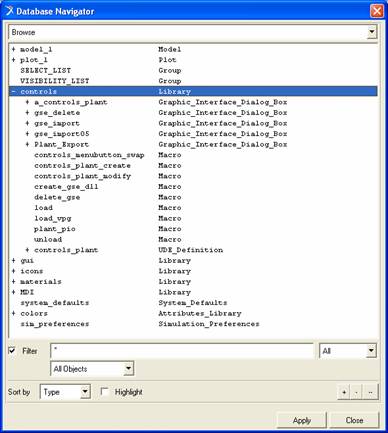
The bitmap below shows the controls plugin components as seen through the database navigator. Note the library name (which is the name of the plugin) and the load/unload macros beneath the library.
Solver DLL
This binary contains the custom written functions/routines which are used by the solver during analysis. The functions can be written in C or FORTRAN and can reside in any number of files. The solver dll is created using the ‘adams2024_1 –c cr-u’ command.
The naming convention for the solver dll is plugin.{so, sl, dll}, with the extension specific to the platform under consideration. The convention is not a requirement. It is a recommendation, just so that the solver dll is easily distinguished from the view dll.
It is recommended that the solver dll have the two standard functions DLL_INIT and DLL_TERMINATE, although having them is not a requisite. The INIT and TERMINATE functions have the same role as the initialize and the terminate functions of a View dll. Typical initialization operations for a solver dll include allocating memory for the plugin, checking out licenses and opening device handles while termination operations include de-allocating the memory, returning licenses and closing any open device handles.
The init function is called by the solver as soon as the statements FUNCTION = USER(…), ROUTINE = libname::fname1 are encountered by the solver. Solver will not initialize the same DLL more than once.
Conversely, DLLs are automatically unloaded under the following conditions,
■A new database is opened
■Solver changed from C++ to FORTRAN or vice-versa.
■The STOP command is issued
■The FILE command is used to read a new model
Again, solver will not call the DLL_TERMINATE function more than once for each dll. Also note that the terminate function will be called only if the init function was called in the first place.