Constraint Create Complex Joint Gear
Ribbon menu → Connectors Tab → Couplers container →Joint Gear 
or
(Classic) Right-click joint → Modify
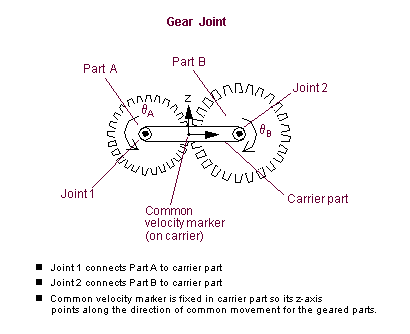
Creates a gear pair that relates the motion of three parts and two joints using a marker, called the common velocity (CV) marker, to determine the point of contact. Learn more About Gears.
For the option: | Do the following: |
|---|---|
Gear Name | Enter the name for the gear. If you are creating a gear, Adams View assigns a default name to the gear. |
Adams Id | Enter a positive integer for the ID or enter 0 to let Adams Solver set the ID for you. See Adams Solver ID. |
Comments | Add any comments about the gear to help you manage and identify the gear. See Comments. |
Joint Name | Enter the two translational, revolute, or cylindrical joints to be geared together. Adams View automatically separates the joint names with a comma (,). |
Common Velocity Marker | Enter the marker defining the point of contact between the geared parts. You need to make sure the z-axis of the CV marker points in the direction of motion of the gear teeth that are in contact. The following figure shows how the z-axis of the CV marker is tangent to the pitch circle of the spur gears. To create a marker, right-click the Common Velocity Marker text box, and then select Create. Tip: If you encounter a warning message that the gear has a suspicious configuration, the z-axis of the CV marker is probably oriented incorrectly. |