About Gears
Gears in Adams View connect two of the parts, which are called the geared parts, by coupling together the allowable Degrees of freedom in two joints.
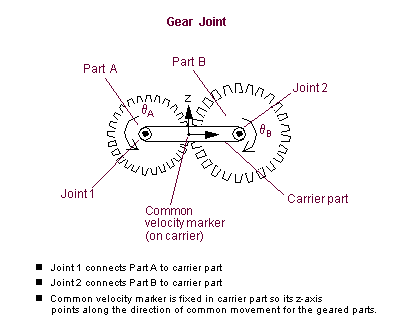
The coupled joints are attached to the third part, called the carrier part. The joints can be translational, revolute, or cylindrical joints. Using different combinations of joint types and orientations, you can model many different physical gears, including spur, helical, planetary, bevel, and rack-and-pinion.
When you create the joints to be geared together, you must create them so the first part you select is a geared part and the second part is the carrier part. Therefore, the I marker parameters of the joints must belong to the geared parts and the J marker parameters must belong to the carrier part. In addition, the CV marker must belong to the carrier part.
The gear uses the location of the CV marker to determine the point of contact or mesh of the two geared parts. The direction of the z-axis of the common velocity marker points in the direction of the common motion of the geared parts. This is also the direction in which the gear teeth forces act.
The location of the CV marker is constant with respect to the carrier part. Its location does not change when the direction of power flows through the gear changes.
An Adams gear joint does not model backlash.
Creating and Modifying Gears
When you create or modify a gear, you specify or change the two translational, revolute, or cylindrical joints located on the carrier part and the marker defining the point of contact between the geared parts.
To create or modify a gear:
1. Do one of the following depending on whether you are creating or modifying a gear:
 on the
 The Constraint Create Complex Joint Gear dialog box appears.
■To modify a gear, display the Constraint Modify Complex Joint Gear dialog box as explained in Accessing Modify Dialog Boxes.
Both the gear create and modify dialog boxes contain the same set of options.
2. If you are creating a gear, in the Gear Name text box, change the name for the gear. Adams View assigns a default name to the gear.
4. In the Comments text box, add or change any comments about the gear to help you manage and identify the gear. Learn about Comments.
5. In the Joint Name text box, enter or change the two translational, revolute, or cylindrical joints to be geared together. Adams View automatically separates the joint names with a comma (,).
6. In the Common Velocity Marker text box, enter or change the marker defining the point of contact between the geared parts. You need to make sure the z-axis of the common velocity marker points in the direction of motion of the gear teeth that are in contact. Z-axis of the common velocity marker is tangent to the pitch circle of the spur gears. See the picture in About Gears.
Tips on Entering Object Names in Text Boxes.
Note: | If you encounter a warning message that the gear has a suspicious configuration, the z-axis of the CV marker is probably oriented incorrectly. |
7. Select OK.
Equations for Gears
The algebraic equation that the gear joint adds to your model, in general, looks like the following:
S1q1 + S2q2 = 0
where:
■q1 and q2 are the rotational or translation displacement variables defined by the allowable Degrees of freedom in the geared joints.
■S1 and S2 represent scalar multipliers that act to couple these displacements together. S1 and S2 are defined indirectly by the spatial relationship between the locations of the joints with respect to the common velocity marker.
You do not explicitly define the scalar multipliers (gear ratio) when creating a gear. Instead, Adams View automatically determines the gear ratio as the distance between the origin of the common velocity marker and the origins of the coupled joints. The gear ratio is shown below.
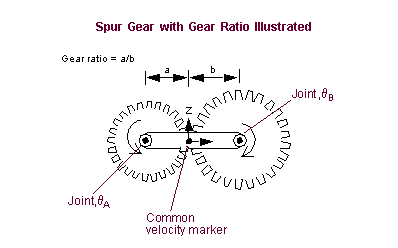
The figure also shows a specific case of creating a spur gear. For this gear, the general equation is:

or, to write it in the general form:
