Fillet Tool
Ribbon menu → Bodies tab → Features container → Fillet Tool 
or
(Classic) Build → Bodies/Geometry → Fillet Tool
Creates rounded (filleted) edges and corners
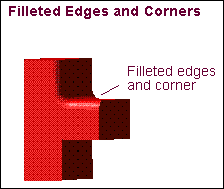
You can think of creating filleted edges as rolling a ball over the edges or corners of the geometry to round them.
When filleting an edge or corner, you can specify a start and an end radius for the fillet to create a variable fillet:
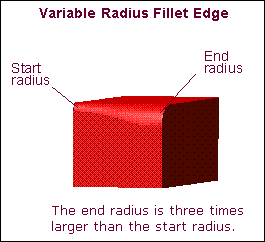
Adams View begins creating the variable fillet using the start radius and then slowly increases or decreases the size of the fillet until it reaches the end radius. Using the ball analogy again, Adams View starts rounding edges and corners using one size ball and finishes using a different size.
Note: | You will get different results when you fillet one edge at a time than when you fillet all edges at once. Also, you may not be able to fillet an edge if an adjoining edge has already been filleted. It depends on the complexity of the filleting. |
Learn about:
For the option: | Do the following: |
|---|---|
Radius | Enter the radius for the fillet. |
End Radius | To create a variable fillet, enter the end radius. The Fillet tool uses the value you enter for radius as the starting radius of the variable fillet. |