Single-Component Torque tool
Ribbon menu → Forces tab → Applied Forces container → Single-Component Torque Tool 
or
(Classic) Build → Forces → Single-Component Torque Tool
Applies a rotational force to either one part or two about a specified axis. You specify the point of application and the direction. The following figure shows an example of a single-component torque applied to one part.
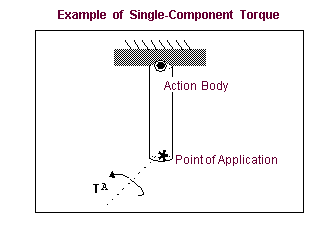
Learn more about:
.
For the option: | Do the following: |
|---|---|
Run-Time Direction | Specify the number of parts and the nature of the force direction. You can select the following: ■Space Fixed ■Body Moving ■Two Bodies |
Construction | Set how you want the force oriented. You can select: ■Normal to Grid - Lets you orient the force normal to the current Working grid, if it is displayed, or normal to the screen. ■Pick Feature - Lets you orient the force along a direction vector on a feature in your model, such as along an edge or normal to the face of a part. |
Characteristic | Specify the characteristics of the force: ■Constant torque - Lets you enter a constant torque value or let Adams View use a default value. ■Spring-Damper - Lets you enter stiffness and damping coefficients and lets Adams View create a function expression for damping and stiffness based on the coefficient values. (Not available when you are using the Main toolbox to access the force tool.) ■Custom - Adams View does not set any values for you, which, in effect, creates a force with zero magnitude. After you create the force, you modify it by entering a function expressions or parameters to a User-written subroutine that is linked to Adams View. You can also specify an alternative library and name for the user subroutine. Learn about specifying routines with ROUTINE Argument. |
If you selected Constant Torque, the following option appears: | |
Force Value | Enter a constant torque value. |
If you selected Spring-Damper, the following two options appear: | |
Translational K | Enter the stiffness coefficients. |
Translational C | Enter the damping coefficients. |
Notes: | Unit-bearing expressions get resolved down to a real and AView does not adjust them to match the units assumption within ASolver functions. |