Create/Modify Point Mass
Ribbon menu → Bodies tab → Construction container → Create/Modify Point Mass 
or
(Classic) Build → Point Mass → New/Modify
Point masses are points that have mass but no inertia properties or angular velocities. They are computationally more efficient when rotational effects are not important.
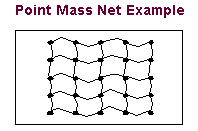
For example, you could use point masses to represent the concentrated masses in a net. You could then represent the ropes between the masses as forces or springs.
For the option: | Do the following: |
|---|---|
Name | If you are creating a point mass, enter a name for the point mass. |
Mass | Set the mass of the point mass. Note: By default, Adams View creates a point mass with a mass of 1 in current units. |
Location | Set or adjust its location as desired. Note: By default, Adams View places the point mass in the center of the main window. |
 | Select to enter comments to help you manage and identify the point mass. See Comments. |
If you are modifying a point mass, the following also appear: | |
 | Displays the Precision Move dialog box to let you change the position of the point mass. |
 | Displays the Point Mass Measure dialog box to let you create a measure for the point mass. Learn about creating Object Measures. |
Position ICs/ Velocity ICs | Displays the Modify Body dialog box set to let you change the initial position or velocity of the point mass. |