Solver Settings - Equilibrium
Settings → Solver → Equilibrium
Specifies error tolerances and other parameters for Static equilibrium and Quasi-static simulations.
A static or quasi-static equilibrium analysis is appropriate only when inertia forces, such as, d’Alembert forces, are not important and the system has one or more Degrees of freedom (degrees of freedom after Adams Solver has removed any redundant constraints). Static and quasi-static equilibrium simulations solve for displacement and static forces, but not for velocity, acceleration, or inertia forces, which are all assumed to be zero.
To set the Jacobian matrix for dynamic simulations, see Solver Settings - Pattern for Jacobian.
For the option: | Do the following: |
|---|---|
Category | Set to Equilibrium. |
Equilibrium Type | Select either: |
If you selected Static, the following options are available: | |
Error | Specifies the relative correction convergence threshold. The iterative process carried out during the equilibrium analysis can not converge prior to all relevant relative corrections being smaller than this value. The default is 1.0E-04 and the range is Error > 0 |
Tlimit | Specifies the maximum translational increment allowed per iteration during static simulations performed using static simulations. The default is 20 and the range is Tlimit > 0. |
Alimit | Specifies the maximum angular increment allowed per iteration. The default is 10 degrees, and the range is Alimit > 0. Enter the value in the current modeling units (degrees by default). |
Maxit | Specifies the maximum number of iterations allowed for finding static equilibriums. The default is 25 and the range is Maxit > 0. |
Stability | Specifies the fraction of the mass and damping matrices Adams Solver adds to the stiffness matrix. Adding a fraction of the mass and damping matrices to the stiffness matrix can stabilize the iteration process and prevent the iteration from diverging. Often the stiffness matrix is singular for a system because the system is neutrally stable (for example, the system moves in certain directions without affecting the potential energy). Adding a fraction of the mass and damping matrices to the stiffness matrix removes this singularity and makes it possible to solve for equilibrium positions. The value of Stability does not affect the accuracy of the solution, but it does affect the rate of convergence of the iteration process. The default is 1.0E-05 and the range is Stability > 0. |
Imbalance | Specifies the equation imbalance convergence threshold. The iterative process carried out during the equilibrium analysis can not converge prior to each equation imbalance being smaller than this value. The default is 1.0E-04 and the range is Imbalance > 0. |
Static Method | Select either: 1. ORIGINAL, for running only the ORIGINAL Solver 2. ADVANCED, runs, in order, the following methods until one shows progress: a. ORIGINAL b. ORIGINAL+Krylov c. ORIGINAL+UMF d. Newton+Krylov e. Tensor-Krylov block-3 f. Tensor-Krylov block-2+ 3. AGGRESSIVE, runs, in order, the following methods until one shows progress: a. ORIGINAL b. ORIGINAL+Krylov c. ORIGINAL+UMF d. Newton+Krylov e. Tensor-Krylov block-3 f. Tensor-Krylov block-2+ g. Broyden-Armijo h. Trust-Region 4. ALL, runs, in order, all the available methods, until one shows progress: a. ORIGINAL b. ORIGINAL+Krylov c. ORIGINAL+UMF d. Newton+Krylov e. Tensor-Krylov block-3 f. Tensor-Krylov block-2+ g. Broyden-Armijo h. Trust-Region i. Hooke-Jeeves |
If you selected Advanced, the following options are available: | |
Atol | Specify the absolute tolerance value. The default is 1.0E-06 and the range is  |
Rtol | Specify the relative tolerance value. For all solvers, except ORIGINAL and ORIGINAL+Krylov, the tolerance is defined as : TOL=ATOL+||xIC||*RTOL. For ORIGINAL and ORIGINAL+Krylov solvers the tolerance is equal to ERROR. The default is 0.0 and the range is 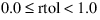 . . |
Maxitl | Specifies the maximum number of allowed inner loops in all the solvers, except ORIGINAL, ORIGINAL+Krylov and ORIGINAL+UMF. For Hooke-Jeeves method, allowed budget of function evaluations is set to MAXITL*N, where N is the size of the problem (number of unknowns). The default is 40 and the range is  . . |
Etamax | Specify the maximum threshold for the error tolerance of the linear Krylov solver (for Newton+Krylov and Tensor-Krylov methods), that solves the linear systems, required by Krylov algorithm. Maximum error tolerance for residual in inner iteration. The inner iteration terminates when the relative linear residual is smaller than eta*| F(x_c) |. eta is determined by the modified Eisenstat-Walker formula if etamax > 0. If etamax < 0, then eta = |etamax| for the entire iteration. The default is 0.9 and the range is  . . |
If you selected Aggressive or All, along with the above options (i.e Atol, Rtol, Maxitl and Etamax) following additional options will also be available: | |
Eta | Specify the initial residual tolerance for the linear Krylov Solver for Tensor_Krylov method. The Tensor-Krylov ETA parameter is maintained adaptively by the Krylov algorithm but ETA is the indicated starting value, while ETAMAX is the maximum threshold for ETA. Default: 1.0e-4 Range: 0.0 < ETA < 1.0 Specify the dimensionless radius of the trust-region for Trust-region method. The smaller the value, the more the refinement of Trust-region solution (hence more work). Range: 0.0 < ETA < 0.25 |
If you selected Dynamic, the following options are available: | |
Global Damping | Specify the coefficient for global damping applied to all bodies during static simulations performed using dynamic analyses. The default is 0 and the range is Global Damping > 0. |
Settling Time | Specify the maximum time allowed to reach equilibrium during static simulations performed using dynamic analyses. The default is 100 and the range is Settling Time > 0. |
Acceleration Error | Specify the maximum acceleration error allowed during static simulations performed using dynamic analyses. The default is 1.0E-02 and the range is Acceleration Error > 0. |
Kinetic Energy Error | Specify the maximum kinetic energy error allowed in static simulations performed using dynamic analyses. The default is 1.0E-02 and the range is Kinetic Energy Error > 0. |
Notes: | Convergence happens when both of the following occur: ■Maximum (Static Equation Residual Values) < Imbalance AND ■Maximum (Relative State Errors) < Error |