Orientation Measures
To learn about creating orientation measures:
About Measuring Orientation Characteristics
Orientation measures capture the orientation characteristics of one part or marker relative to another coordinate system in a specified convention. For example, you could use orientation measures to determine the:
■Yaw angle associated with a yaw, pitch, roll, or body-fixed 321 rotation sequence.
■First Euler parameter.
■Second rotation associated with a body-fixed 123 rotation sequence.
All such orientation characteristics are simply transformed from the direction cosine matrix.
The following example shows two markers whose orientation relative to each other you can capture using orientation angles. When associated with a body-fixed 313 rotation sequence, the example returns the rotation angles  1 = +90 °, 1 = +90 °, and 1 = +90°.
1 = +90 °, 1 = +90 °, and 1 = +90°.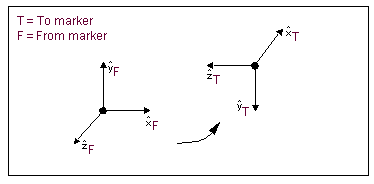
Orientation Characteristics You Can Measure
The orientation characteristics that you can measure are shown in the table below.
The object: | Has the measurable characteristics: |
|---|---|
Part or marker | ■Euler angles ■Yaw, pitch, roll ■Ax, ay, az projection angles ■Bryant angles ■Euler parameters ■Rodriguez parameters ■Direction cosines Note: ■Euler parameters are P0, P1, P2, and P3. P0 is the cosine of one-half the angle of rotation of the rotated frame with respect to the reference frame. P1, P2, and P3 are the x, y, and z components, respectively, of the unit vector around which the rotation occurs, multiplied by the sine of one-half the angle. Rodriguez parameters (R1, R2, and R3) define the relative rotation between two frames of reference. The relationship between Rodrigues parameters and Euler parameters is R1 = P1/P0, R2 =P2/P0, and R3 = P3/P0. Rodriguez parameters become undefined when P0 = 0, that is, when the angle of rotation about the vector is 180 degrees. ■Many dynamics textbooks define some or all of these orientation schemes. Refer to: ■Meriam, Kraige. Engineering Mechanics, Vol. 2 . John Wiley & Sons, 1992. ■Greenwood. Principles of Dynamics, Second Edition. Prentice-Hall, Inc., 1988. ■Kane, Likins, Levinson. Spacecraft Dynamics. McGraw-Hill, 1983. ■Nikravesh. Computer-Aided Analysis of Mechanical Systems. Prentice-Hall Inc., 1988. |
Creating an Orientation Measure
To access the orientation measure create dialog box, do one of the following:
1. Click Design Exploration tab. From the Measures container, click the Orientation tool  .
.
.or
(Classic interface) From the Build menu, point to Measure, and then select Orientation, and then select New.
2. When creating an object or point measure, select the Orientation button.
The Orientation Measure dialog box appears.
To define the measure:
1. In the Measure Name text box, enter a name for the measure.
2. Set Characteristic to the characteristic convention with which to associate the component.
3. Set Component to the rotational component you want to measure.
4. In the To Marker text box, enter the coordinate system to which to measure. In the From Marker text box, enter the coordinate system from which to measure.
6. Select OK.