Point Masses
Point masses are points that have mass but no inertia properties or angular velocities. They are computationally more efficient when rotational effects are not important.
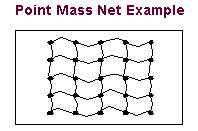
For example, you could use point masses to represent the concentrated masses in a net. You could then represent the ropes between the masses as forces or springs. The following figure shows a model of a net with point masses.
To create or modify a point mass:
1. Click the Bodies tab. From the Construction container, click the Point Mass tool .
.
. or
(Classic interface) From the Build menu, point to Point Mass, and then select either New or Modify.
The Create/Modify Point Mass dialog box appears. Both dialog boxes contain the same options.
3. If you are creating a point mass, enter a name for the point mass.
4. Set the mass of the point mass in the dialog box and adjust its location as desired. By default, Adams View places the point mass in the center of the main window with a mass of 1 in current units.
5. Select the Comments  tool on the dialog box and enter any comments you want associated with the point mass. Learn about Comments.
tool on the dialog box and enter any comments you want associated with the point mass. Learn about Comments. 6. Select OK.