data_element modify matrix full
Allows you to modify an existing FULL MATRIX.
The MATRIX to be defined is FULL therefore, the VALUES parameter specifies all of the M times N entries in the matrix. The sequence of the values depends on the value of the INPUT_ORDER parameter. If BY_ROW is specified, you enter the values row-by-row. If BY_COLUMN is specified, you enter the values column-by-column.
Format:
data_element modify matrix full | |
|---|---|
matrix_name = | existing matrix |
new_matrix_name = | new name for the matrix |
adams_id = | integer |
comments = | string |
row_count = | integer |
column_count = | integer |
values = | real |
result_set_component_names = | existing component |
input_order = | matrix_input_order |
units = | string |
Example:
If you want to modify the following matrix of values in full format such that the second row second column will have value 1.200 instead of 0.000 then you can use the following commands:
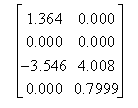
data_element modify matrix full & | |
|---|---|
matrix_name = | matrix_1 & |
comments = | "matrix example in full format" & |
row_count = | 4 & |
column_count = | 2 & |
values = | 1.364,0.000,0.000,1.200,-3.546,4.008,0.000,0.7999 & |
input_order = | by_column |
Description:
Parameter | Value Type | Description |
|---|---|---|
matrix_name | Matrix name | Specifies the name of the existing matrix. |
New_matrix_name | New name for the matrix | Specifies the name of the new matrix. You may use this name later to refer to this matrix. |
adams_id | Integer | Specifies an integer used to identify this element in the Adams data file. |
comments | String | Specifies comments for the object being created or modified. |
row_count | Integer | Specifies the number of rows (M) in the matrix used in the definition of a full matrix. |
column_count | Integer | Specifies the number of columns (N) in the matrix used in the definition of a full matrix. |
value | Real | Specifies the real number values that you enter to populate a FULL MATRIX. |
result_set_component_names | Existing component | You can only use a result set component as matrix values using full format and entering all the values stored in the result set component. |
input_order | By_column,by_row | Specifies the order the values that you input will appear in for a FULL MATRIX format (all of the M by N entries will be specific numeric values |
units | String | Allows you to specify the type of units to be used for this object. |
Extended Definition:
1. A data element matrix is a general M x N array that can be a rectangular or square two-dimensional matrix or a row or column matrix. You can enter the data in:
■Full format - You list all the M x N values or specify the results of a simulation (result set components).
■Sparse format - You list the row position, column position, and value for only nonzero entry values.
■External file - Enter a file containing a matrix.
If one-third or more of the entries in a matrix are nonzero, we recommend that you use full format since it takes less time to create. If the matrix is mostly empty and entering each nonzero entry's row position, column position, and value takes less time than entering all of the values, you should use the sparse format.
2. Adams View will not allow you to have two matrices with the same full name, so you must provide a unique name.
Normally, entity names are composed of alphabetic, numeric, or '_' (underscore) characters, and start with an alphabetic or '_' character. They may be any length. For more information, see Using Extended Names.
By enclosing the name in double quotes, you may use other printable characters, or start the name with a numeral. If a name contains characters, or starts with a numeral, you must always quote the name when entering it.
Note that you can specify the parentage of an entity (e.g. what part "owns" a marker or a geometry element) when you CREATE it by changing the name. If you enter just the entity name, then the default parent will be assigned by Adams View. If you type in the full name, then you may over ride the default parent. In most cases, when creating an entity, Adams View will provide a default name. The default name that Adams View provides will specify the parentage that it has assumed.
You may, or course, delete this name and use your own. The form of a full name is:
"...._NAME.GRAND_PARENT_NAME.PARENT_NAME.ENTITY_NAME"
The number of levels used varies from case to case and the parentage must exist before an entity can be assigned to it.
3. The MATRIX to be defined is FULL therefore, the VALUES parameter specifies all of the M times N entries in the matrix. The sequence of the values depends on the value of the INPUT_ORDER parameter. If BY_ROW is specified, you enter the values row-by-row.
If BY_COLUMN is specified, you enter the values column-by-column.
4. A result set is a basic set of state variable data that Adams Solver calculates during a simulation. Adams Solver outputs the data at each simulation output step. A component of a result set is a time series of a particular quantity (for example, the x displacement of a part or the y torque in a joint).
5. The input_order parameter can take two values:
a. BY_ROW indicates the values are listed by row in the VALUES parameter (that is, starting with the first row and proceeding to the second, and so on until the entire matrix is completely defined).
b. BY_COLUMN indicates the values are listed by column (that is, starting with the first column and proceeding to the second, and so on).
Default value is BY_COLUMN
6. Since this object can be used in a variety of contexts, Adams View can not determine what type of units it should have. By telling Adams View what the unit type for this object is Adams View can perform the proper conversions on the values you specify.