geometry modify shape spring_damper
Allows you to modify the graphics spring damper object.
A spring-damper is a graphic representation of a spring and damper drawn between two markers. The spring damper stretches along the axis created by its I and J markers.
The equation below illustrates the display options you can set.

The figure below illustrates the display options you can set.
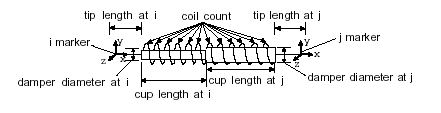
The diameter_of_spring parameter defines the diameter of the spring, while damper_diameter_at_ij defines the diameters of the dampers at the I and J markers.
The number of coils drawn in the spring is defined using coil_count. The distances between the ends of the dampers and the I and J markers is defined using tip_length_at_ij. The lengths of the damper caps at the I and J markers is defined using cup_length_at_ij.
Format:
geometry modify shape spring_damper | |
|---|---|
spring_damper_name = | existing spring damper |
new_spring_damper_name = | new name for damper |
adams_id = | integer |
comments = | string |
i_marker_name = | existing marker |
j_marker_name = | existing marker |
coil_count = | integer |
diameter_of_spring = | length |
damper_diameter_at_ij = | length |
tip_length_at_ij = | length |
cup_length_at_ij = | length |
Description:
Parameter | Value Type | Description |
|---|---|---|
spring_damper_name | Existing spring damper | Specifies the name of the spring-damper graphic to be modified |
New_spring_damper_name | New spring damper | Specifies the new name of the spring-damper graphic. |
adams_id | Integer | Assigns a unique ID number to the geometry. |
comments | String | Adds any comments about the graphic that you want to enter to help you manage and identify it. |
i_marker_name | Existing marker | Specifies a marker on the first of two parts connected by this spring-damper graphic. |
j_marker_name | Existing marker | Specifies a marker on the second of two parts connected by this spring-damper graphic. |
coil_count | Integer | Enter the number of coils drawn in the spring. |
diameter_of_spring | Length | Specifies the diameter of the spring.  |
damper_diameter_at_ij | Length | Specifies the diameters of the damper cups in a spring-damper graphic. |
tip_length_at_ij | Length | Specifies the distances between the ends of the dampers and the I and J markers. |
cup_length_at_ij | Length | Specifies the length of the damper cups in a spring-damper graphic. |
Extended Definition:
1. When using the Adams View command language and naming entities, you can use the name later to refer to this entity. Adams View does not allow you to have two entities with the same full name, so you must provide a unique name. Normally, entity names are composed of alphabetic, numeric, or '_' (underscore) characters, and start with an alphabetic or '_' character. They may be of any length. For more information, see Using Extended Names.
By enclosing the name in double quotes, you can use other printable characters, or start the name with a numeral. If a name contains characters, or starts with a numeral, you must always quote the name when entering it.
Note that you can specify the parentage of an entity (for example, what part "owns" a marker or a geometry element) when you create it by changing the name. If you enter just the entity name, then Adams View assigns the default parent. If you type in the full name, then you can override the default parent. In most cases, when creating an entity, Adams View provides a default name. The default name that Adams View provides specifies the parentage that it has assumed. You can, of course, delete this name and use your own. The form of a full name is:
"...._NAME.GRAND_PARENT_NAME.PARENT_NAME.ENTITY_NAME"
The number of levels used varies from case to case and the parentage must exist before an entity can be assigned to it.
2. An Adams Solver ID is an integer used to identify the element in the Adams Solver dataset (.adm) file. You only need to specify an ID number if you have user-written subroutines.
Enter a 0 to have Adams Solver assign the ID for you.
3. Adams View draws this graphic between one part at the I marker and the other at the J marker.
4. For the damper_diameter_at_ij, the first value defines the diameter of the cup at the I marker. The second value defines the diameter of the cup at the J marker.
5. For the cup_length_at_ij parameter, the first value defines the length of the cup at I marker. Adams View measures the length from the bottom of the cup to its top along the line that I and J define.
The second value defines the length of the cup at J. Adams View measures the length from the bottom of the cup to the top along the line that I and J define.