IF
Allows you to conditionally define a function expression.
Note: | Using the IF function will likely cause discontinuities in the derivatives of the function evaluation, which can cause the integrator to decrease the time step size or fail. We recommend that you use the STEP function instead of the IF. |
Format
IF(Expression1: Expression2, Expression3, Expression4)
Arguments
Expression1 | The expression Adams evaluates. |
Expression2 | If the value of Expression1 is less than 0, IF returns Expression2. |
Expression3 | If the value of Expression1 is 0, IF returns Expression3. |
Expression4 | If the value of Expression1 is greater than 0, IF returns Expression4. |
Example
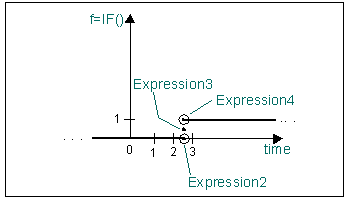
In the following illustration, the expression returns different values depending on the value of the variable called time:
Function | IF(time-2.5:0,0.5,1) |
Result | 0.0 if time < 2.5 0.5 if time = 2.5 1.0 if time > 2.5 |