DELAY
The DELAY function returns the value of an expression at a delayed time.
The DELAY function is useful to define Delay Differential Equations (DDE) or Delay Differential-Algebraic Equations (DDAE) of the retarded type (when delays are positive). Neither DDE nor DDAE of the advance type (negative delays) are supported. The DELAY function can be used in MOTION and GCON definitions (possibly involving neutral type of DDE or DDAE).
During linearization the DELAY function is approximated by a first order polynomial equivalent to an order 1 Padé approximant.
The user does not require to specify a buffer size. Adams Solver (C++) will manage a variable-size buffer automatically.
Format
DELAY (Delayed_Expression, Delay_Magnitude, Initial_Expression_Value, Delay_Logic_Array)
Arguments
Delayed_Expression | Adams expression to be delayed. |
Delay_Magnitude | Adams expression defining the magnitude of the delay. The delay can be constant or state dependent. The magnitude of the delay must be positive. Negative values will be taken as zero. |
Initial_Expression_Value | Initial history of the expression; the history must provide for the values of 'e_delayed' for the values of time less than zero (t<0). The history must be a function of TIME or a constant. |
Delay_Logic_Array | ADAMS-ID of the Delay_Logic_Array or default 0 should be passed as the parameter |
The equations:
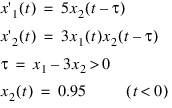
could be modeled in Adams as follows:
DIF/1, FU=5*DELAY(DIF(2), DIF(1)-3*DIF(2), 0.95))
DIF/2, FU=3*DIF(1)*DELAY(DIF(2), DIF(1)-3*DIF(2), 0.95)
or
VARIABLE/1, FU=DELAY(DIF(2), DIF(1)-3*DIF(2), 0.95)
DIF/1, FU=5*VARVAL(1)
DIF/2, FU=3*DIF(1)*VARVAL(1)
Notice that the integrator will take care of using zero for the delay when the expression for the delay is negative.
Example:
part create equation differential_equation differential_equation_name = DIFF1 initial_condition = 1 function = (DELAY(DIFF1, 1,1,777)
Learn more about Constants & Variables.