One-sided Impact (IMPACT)
Returns a real number for a force magnitude corresponding to a one-sided collision, using a compression-only nonlinear spring-damper formulation.
Format
IMPACT (Displacement Variable, Velocity Variable, Trigger for Displacement Variable, Stiffness Coefficient, Stiffness Force Exponent, Damping Coefficient, Damping Ramp-up Distance)
Arguments
Displacement Variable | A measure of the distance between colliding bodies; defined by a run-time displacement function. |
Velocity Variable | A measure of the time derivative of the distance between colliding bodies; defined by a run-time velocity function. |
Trigger for Displacement Variable | Independent variable value at which to turn the one-sided impact on and off; defined by a real number, a run-time function, a design-time function, a design variable or an expression. |
Stiffness Coefficient or K | Stiffness coefficient for spring force; defined by a real number, a run-time function, a design-time function, a design variable or an expression. |
Stiffness Force Exponent | Exponent for nonlinear spring force; defined by a real number, a run-time function, a design-time function, a design variable or an expression. |
Damping Coefficient or C | Damping coefficient for damper force; defined by a real number, a run-time function, a design-time function, a design variable or an expression. |
Damping Ramp-up Distance | Distance over which to gradually turn on damping once impact is triggered; defined by a real number, a run-time function, a design-time function, a design variable or an expression. |
Equation
The IMPACT function turns a force on and off depending on the value of the independent variable, as follows:
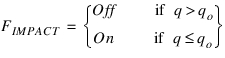
Mathematically, IMPACT is calculated as follows:

where:
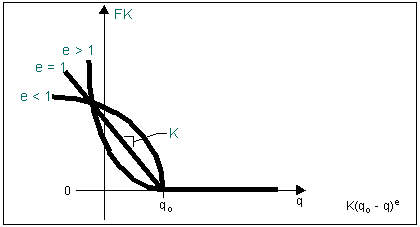
■q is the displacement variable
■ is the velocity variable
is the velocity variable ■qo is the trigger for displacement variable
■K is the stiffness coefficient
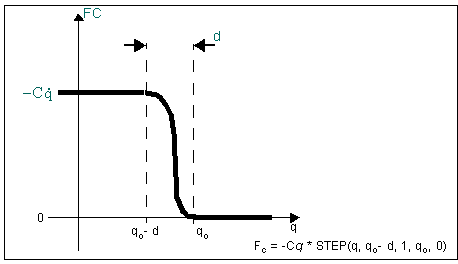
■C is the damping coefficient
■d is the damping ramp-up distance
Compression-only Spring Force from IMPACT Function
Compression-only Damping Force from IMPACT Function
Examples
You can use the IMPACT function to create a user-defined collision force (such as a single-component force), for example, when a sphere hits a flat surface:
Sphere Hitting Flat Surface
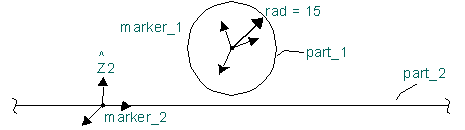
Note: | Assume that the flat surface being contacted by the sphere is an infinite plane. |
IMPACT(DZ(marker_1, marker_2, marker_2), VZ(marker_1, marker_2, marker_2, marker_2),15, 100, 1.2, 2.5, 0.01)
where:
■DZ(marker_1, marker_2, marker_2) defines the instantaneous displacement of marker_1 with respect to marker_2 along the z-axis of marker_2.
■VZ(marker_1, marker_2, marker_2, marker_2) defines the velocity of marker_1 with respect to part_2 minus the velocity of marker_2 with respect to part_2 along the z-axis of marker_2.
■The displacement trigger is the radius of the sphere, in this case 15 length units.
■The stiffness coefficient is 100.
■The stiffness force exponent is 1.2.
■The damping coefficient is 2.5.
■The penetration at which full damping is applied is 0.01 length unit.