Entering Set-up and Global Parameters
The top of the Event Builder window, as shown next, has three fields and two tabs that provide global parameters and set initial conditions.
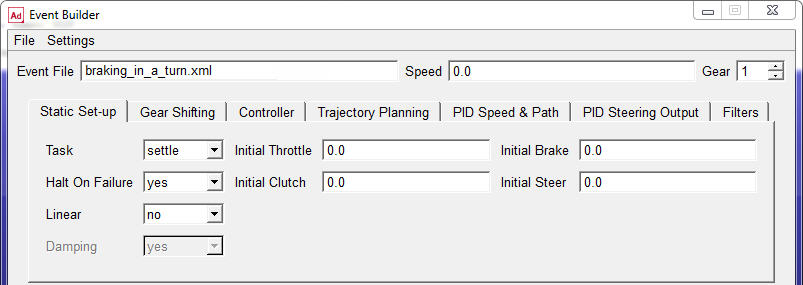
The Event File text box shows the file name you specified when you created or opened the file, and the path, for new files, is the working directory. You can’t change the file name or path in the Event Builder. You can use the Speed and Gear text boxes to enter an initial speed and gear, respectively, for the vehicle prior to starting the first mini-maneuver.
The Static Set-up tab lets you complete the definition of the vehicle state prior to beginning of the first mini-maneuver. The Gear Shifting Parameters tab lets you define global parameters related to gear shifting. The Event Builder outputs this information so that the Driving Machine uses these parameters for any shifting required by any mini-maneuver.
For this exercise, the default Gear Shifting Parameters should be adequate, so you won’t change them. Because the first mini-maneuver that you specify is going to be a straight line, you will use the straight static setup. For a description of the static setup methods available in the Driving Machine, see Structure of Event Files in the Adams Car online help.
1. In the Static Set-up tab, change set Task to straight. Note that the rest of the parameters are not used because they will be overwritten by the initial values computed during the quasi-static setup.
You must set the initial velocity of the vehicle. The value of the initial velocity depends on the units in which you are using the Event Builder.
2. To check the units or make a change, from the Settings menu, select Units.
By default, the length unit is set to meters and the time unit is set to seconds. Therefore, the velocity must be set in meters/second.
3. To verify that velocity units are in meters/second, click in the Speed text box at the top of the Event Builder, and then read what is displayed in the Current Field Unit text box at the bottom of the Event Builder.
4. To set the target vehicle velocity, in the Speed text box, enter 27.7 (as previously explained, units are meters/second), which corresponds to approximately 100 km/h.
5. To set the initial gear, in the Gear text box, enter 5.