Creating a Suspension Subsystem
In this section, you create an Adams Car suspension subsystem that is based on the template you just built. You also modify some hardpoints and translate the subsystem to ensure that Adams Car correctly positions the subsystem within the assembly.
To create a subsystem:
1. From the File menu, point to New, and then select Subsystem.
2. Fill in the dialog box as shown next, and then select OK.
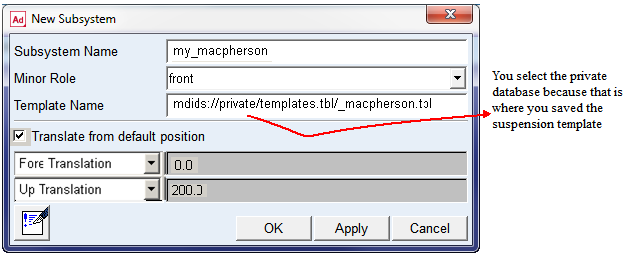
Adams Car displays the following message:
The template _macpherson exists in memory. Do you want to use it?
3. Select Yes.
Adams Car displays the subsystem.
To modify hardpoints:
1. From the Adjust menu, point to Hardpoint, and then select Table.
2. Modify the hardpoint values to match those listed in Table 2:
Name: | loc_x: | loc_y: | loc_z: |
|---|---|---|---|
hpl_arm_front | -200 | -400 | 225 |
hpl_arm_rear | 200 | -390 | 240 |
hpl_tierod_inner | 200 | -400 | 300 |
hpl_tierod_outer | 150 | -690 | 300 |
3. Select Apply.
4. Select Cancel.
To save the subsystem:
■From the File menu, select Save.