Run the Suspension Analyses
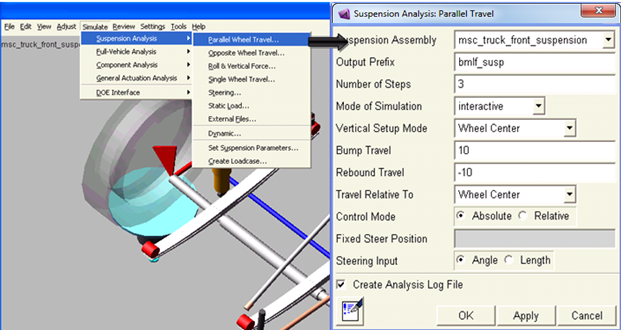
Select the kind of analysis you want to perform using the available standard analyses or create loadcase file of your own and submit the analysis. You can view the results in the postprocessor. An example of wheel-travel analysis is given below.
Parallel Wheel-Travel Analysis
A wheel-travel analysis allows you to look at how the characteristics of a suspension change throughout the vertical range of motion of the suspension. You can perform three types of wheel-travel analyses. As a minimum, all wheel-travel analyses require a suspension subsystem. These analyses can also include a steering subsystem.
A parallel wheel-travel analysis keeps the left wheel and right wheel heights equal, while moving the wheels through the specified bump and rebound travel.
To set up a parallel wheel-travel analysis:
1. From the Simulate menu, point to Suspension Analysis, and select Parallel Wheel Travel.
2. Enter the necessary parameters in the dialog box as shown in the figure below.
3. Click OK.