Step Five – Create Simulink Model
To create the Simulink template for the control system:
1. Enter setio at the MATLAB prompt.
MATLAB creates a template model with the inport(s) and outport(s) defined, as shown in Figure 16.
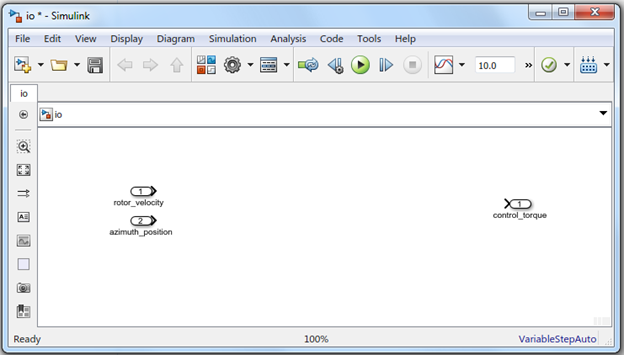
Figure 16 Simulink Template
Based on this template, you can design continuous, discrete, or hybrid control systems. For this tutorial, this step is information only. Since you already have these files copied into the local directory, you can delete this "io" model and use one of the examples.
2. To open hybrid.mdl, from the File menu, select Open. Or, double-click the file in the file browser. Optionally, you may also open discrete.mdl and/or continuous.mdl and run the rest of the tutorial with those for comparison.
In the following context, the hybrid control system will be used as the example to illustrate the process. The Figure 17 shows the hybrid system and Table 1 shows the topology.
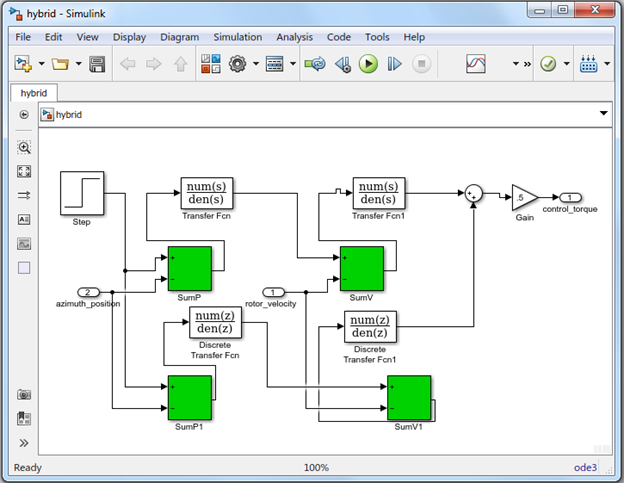
Figure 17 Hybrid Control System
Table 1 Hybrid Control System Topology
Quantity | Library | Block Type | ||
1 | Sources | Step | ||
2 | Continuous | Transfer Function | ||
2 | Discrete | Transfer Function | ||
5 | Math Ops | Sum | ||
1 | Math Ops | Gain | ||
2 | Ports | Import | ||
1 | Ports | Outport | ||
Step Parameters | Continuous Transfer Function Parameters | |||
Step Time: 0.001 | 1 | Numerator: [1040] | ||
Initial Value: 0 | Denominator: [0.001 1] | |||
Final value: 0.3 | Absolute tolerance: auto | |||
Sample time: 0.01 | 2 | Numerator: [950] | ||
[X] Interpret vector parameters as 1-D | Denominator: [0.001 1] | |||
[X] Enable zero crossing detection (greyed out) | Absolute tolerance: auto | |||
Discrete Transfer Function Parameters | Sum Parameters | |||
1 | Numerator: [657.4] | 1 | SumP | |
Denominator: [1 -.3679] | Icon shape: rectangular | |||
Sample time: 0.001 | List of signs: +- | |||
2 | Numerator: [600 5] | [ ] Show additional parameters | ||
Denominator: [1 -.3679] | 2 | SumV | ||
Sample time: 0.001 | Icon shape: rectangular | |||
Gain | List of signs: +- | |||
Gain: 0.5 | [ ] Show additional parameters | |||
Multiplication: Element-wise(K, *u) | 3 | SumP1 | ||
[ ] Show additional parameters | Icon shape: rectangular | |||
Import | List of signs: +- | |||
Name: | rotor_velocity | [ ] Show additional parameters | ||
Port number: | 1 | 4 | SumV1 | |
Name: | azimuth_position | Icon shape: rectangular | ||
Port number: | 2 | List of signs: +- | ||
Outport | [ ] Show additional parameters | |||
Name: | control_torque | 5 | Icon shape: Round | |
Port number: | 1 | List of signs: ++ | ||
[ ] Show additional parameters | ||||