Step Five - Run a Simulation
In this section, you will run a simulation of the antenna model containing the Easy5 controller.
To run the simulation:
1. From the Settings menu, point to Solver, and then select Dynamics.
The Solver Settings dialog box appears.
2. Change the Formulation setting to SI2.
This change is necessary because the SI2 formulation is better able to deal with the rapid value change. In this model, the rapid change is associated with the STEP function in the Easy5 model.
3. Select Close.
4. Run a simulation with step size of 0.001 seconds and duration of 0.25 seconds.
During the simulation, the antenna moves the same as it did during the co-simulation in the preceding chapter.
5. Switch to Adams PostProcessor and examine the results.
6. From the list of analysis results plot the azimuth_position versus time.
Adams PostProcessor displays the plot of azimuth position versus time, as shown in Figure 57.
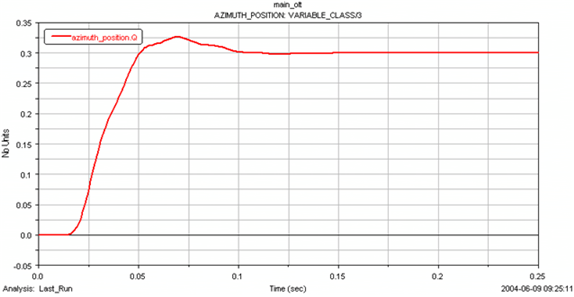
Figure 57 Simulation Result: Azimuth Position versus Time