Adams Real Time Animation requirements
For a good performance the Real Time Animation component should run on platforms that fulfil the following requirements:
Operating system
■RedHat 7.6-7.9 and 8.0 - 8.4
Ethernet Device
If the ethernet device on Linux is different from 'eth0', the ethernet device needs to be defined with the environment variable:
ADAMS_VIS_ETHERNET_DEVICE
For example:
■ADAMS_VIS_ETHERNET_DEVICE=enp0s10
You can get information about the ethernet device with the Linux 'ifconfig' command, for example:
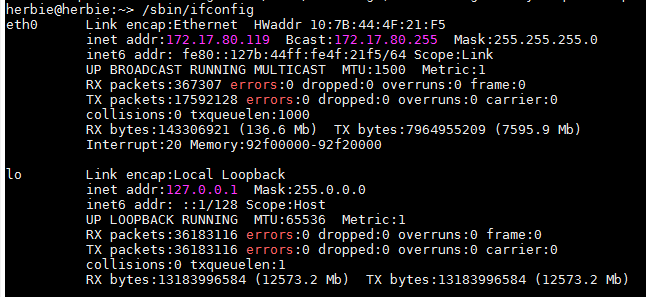
In this example 'eth0' is the device used to connect to the Ethernet so there's no need to set ADAMS_VIS_ETHERNET_DEVICE.
Display
By default the display settings for the real time animation component assume 0 (echo $DISPLAY). If the display is different one can adjust that setting in the file by changing the ‘displayNum’ in the file: <topdir>/VTD/Data/Setups/Current/Config/ImageGenerator/AutoCfgDisplay.xml.
Note: | Your system may need a definition in the etc/hosts file, such as: 120.130.99.104 mycompu mycompu.thiscompany.com |
UDP Ports
The animation components sends data via a UDP Port, and port 48191 needs to be opened and not blocked by a firewall.
The minimum hardware requirements are:
■64bit system
■quad core CPU
■8 GB RAM
■nVIDIA GeForce 600 series (Kepler, for example, 680 GTX)
The recommended hardware requirements are:
■64bit system
■quad core CPU
■16 GB RAM
■nVIDIA GeForce 10 series (Pascal, for example, 1080 GTX or quadro P5000 / P6000)