Welcome to Adams View Start Screen
Adams View is a powerful modeling and simulating environment. You can use Adams View to build and simulate a model of any mechanical system that has moving parts. You can test your model in the same environments your actual product will experience. You can also validate your model against test data, and refine your model with flexible parts, realistic geometry, and controls. Finally, you can find the important parameters that affect your product design and find the right combination of design values to arrive at the best product design. Best of all, you can do all this over and over again, saving time and money.
With the Adams 2012 release, the updated Graphical User Interface (GUI) introduced. This includes changes to the Start Screen where you are provided with the option to create new model or import an existing model.
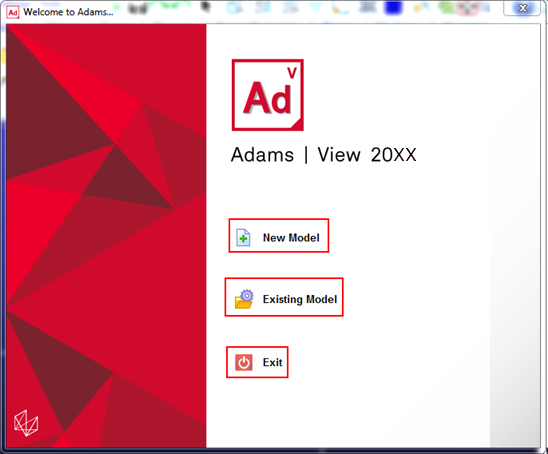
New Model
To create a new model, select the New Model icon  from the start screen. You will be presented a panel which consist of options needed to create a new model.
from the start screen. You will be presented a panel which consist of options needed to create a new model.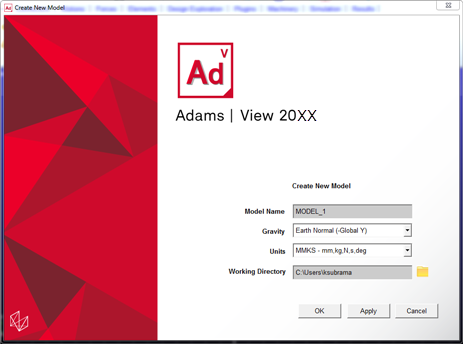
You can change the working directory by clicking the Browse For Folder  button.
button.Existing Model
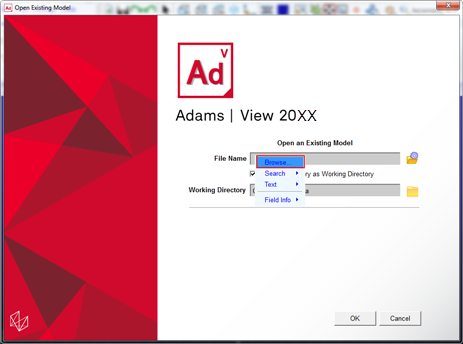
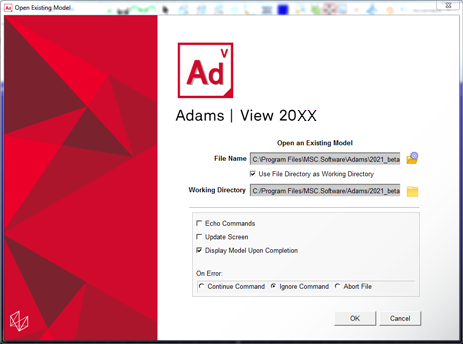
To start your Adams session from an existing model, select the Existing Model icon  from the start screen.
from the start screen. You can browse for the model by clicking the Existing Model  button in the opened dialog box or you can right click inside the File Name field and locate the existing model through the Browse option.
button in the opened dialog box or you can right click inside the File Name field and locate the existing model through the Browse option.