Modifying Design Variables
Use the design of experiments results shown in Table 1 of Iterating Your Design(those with the largest variable sensitivities) to determine which variables to use in optimization. Set up the optimization on design variables DV_4, DV_6, and DV_8, since they seem to have the most effect on the clamping force. Run the optimization with the set of parameters that would maximize spring force.
To make sure that the model stays within a given work envelope, set the following limits on the design variables:
Design variable name: | Design point location: | Minimum value: | Maximum value: |
|---|---|---|---|
DV_4 | POINT_2 y | 1 | 6 |
DV_6 | POINT_3 y | 6.5 | 10 |
DV_8 | POINT_8 y | 9 | 11 |
To modify design variables:
1. From the Model Browser window, click Design Variables and expand.
2. Select the first design variable you need to modify, in this case, DV_4 from the list. Right click and select Modify.
The Modify Design Variable dialog box appears:
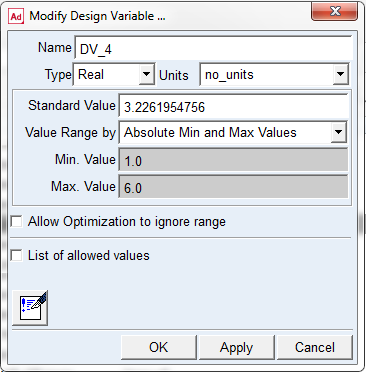
3. Set the Min. Value and Max. Value, which are the minimum and maximum values for your first design variable, DV_4, as shown in Table 1.
4. Select Apply.
5. Right-click the Name text box, point to Variable, and Browse for DV_6.
6. Double-click on DV_6.
7. Type in the minimum and maximum values for DV_6. Make sure the Absolute Min and Max Values option is selected.
8. Select Apply.
9. Repeat the above three steps for DV_8.
10. After you have modified the last design variable, DV_8, select OK.