Running with Extended Parallelization
Preamble
A complete set of instructions to run an Adams FMU in real time environments can be found in Getting Started with Adams Real Time where instructions on how to create, export and run and FMU are presented. Adams FMUs can be further customized using Adams FMU parameters or environment variables before running an actual real time simulation. See section Adams Solver Advanced Settings for details about environment variables; see section Default fixed parameters in an Adams FMU for details of the supported Adams FMU parameters. The Adams FMU parameters (or environment variables) can be used to customize affinity settings, number of parallel threads, integrator parameters, messages generation, results generation, and so on.
Among all Adams FMU parameters used to configure a real time simulation, four parameters are especially important.
For real time simulations using the default option, you need to define:
■msc_adams_realtime to the value ON.
■thread_affinity_set0 to the set of CPUs where the Adams FMU model will run on (SET0).
■solver_thread_count to a value equal to the size of the set of CPUs defined in SET0.
For real time simulations using the Extended Parallelization option (available starting Adams 2024.1), you need to define:
■msc_adams_realtime to the value ON
■thread_affinity_set0 to the set of CPUs where the Adams FMU model will run on (SET0).
■thread_affinity_set1 to the set of CPUs where a helper process will run on (SET1).
■solver_thread_count to a value equal to the size of the set of CPUs defined in SET0.
Use of the Extended Parallelization option is triggered by the thread_affinity_set1 parameter. Extended Parallelization uses a proprietary algorithm that launches a concurrent process to help in the required computations.
Notice the number CPUs defined in SET0 must match the number of parallel threads defined in parameter solver_thread_count; however, the number of CPUs defined in SET1 can be different than the number of CPUs defined in SET0. Moreover, SET0 and SET1 must not have common CPUs, and SET1 must define at least two CPUs.
Extended Parallelization
When using the Extended Parallelization option, Adams Solver launches a concurrent process to help in the Adams FMU numerical computations. The concurrent process runs on the set of CPUs defined in the Adams FMU parameter thread_affinity_set1.
Typically, users will notice a 2X speed up or more when using this option. However, users may notice that some models do not benefit from this new option because they may require additional iterations defined by the FIXIT option in the INTEGRATOR settings.
Figure below shows a real time simulation using the default option (no Extended Parallelization). Notice SET0 = {2, 3, 4, 5}. Notice also the Adams FMU does not run in real time.
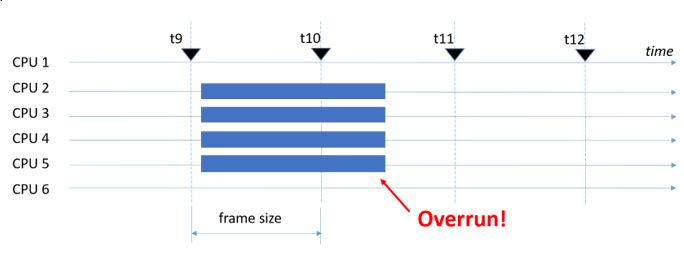
Figure 1 Adams FMU running with default option.
Figure below shows a real time simulation using the Extended Parallelization option. Notice SET0 = {2, 3, 4, 5} and SET1 = {6, 7, 8, 9}. In this case, the Adams FMU runs in real time.
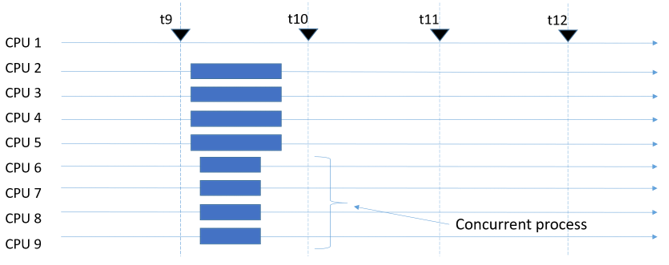
Figure 2 Adams FMU running with the Extended Parallelization option.
Using the Extended Parallelization option requires no extra MSC licenses. However, if the Adams FMU uses licensed 3rd party libraries, you may need to request additional licenses for the 3rd party product. This and other limitations are summarized below.
Option Extended Parallelization is supported by the SIMulation Workbench® environment, and by tools like the FMU Compliance Checker only.
Limitations
The Extended Parallelization has the following limitations:
■No additional MSC licenses are required to run with the Extended Parallelization option. However, if the Adams FMU uses licensed 3rd party libraries, you may need additional licenses for the 3rd party tools.
■The Extended Parallelization implements a proprietary numerical algorithm; hence it should be regarded as another simulation tool. Simulation results are not binary identical (default vs Extended Parallelization).
■Some models do not behave well with the Extended Parallelization option. Such models may require increasing the value of the FIXIT in the INTEGRATOR statement or change the INTEGRATOR type. The msc_adams_realtime parameter can be used to modify those settings without the need to regenerate the Adams FMU.
■Extended Parallelization is supported only in the SIMulation Workbench® environment or when using a FMU Compliance Checker.
Environment variables issue
As mentioned above, the Extended Parallelization algorithm uses a concurrent process to help speed up the simulation computations. By default, the concurrent process inherits the environment settings defined in real time environment or in the shell (when using the FMU Compliance Checker.) However, the launching of the concurrent process may overwrite some of the settings; for example, the environment variables that could be modified are:
LD_LIBRARY_PATH
MDI_ACAR_SITE
MDI_SOLVER_USER_LIB
In that regard, additional code was written to preserve the definitions of those three variables so the concurrent process will receive the same values set by the user. However, in case you experience that some other environment variables are modified by the launching of the concurrent process, you may proceed as follows:
1. Create a text file in a public directory.
2. Edit the file and write down the NAME=VALUE definitions of the environment variables. Use one definition per line.
3. In the shell or real time environment, define the environment variable MSC_SIMWB_ENV with a value equal to the path to the text file.
Recommendations
When defining SET0 (thread_affinity_set0), aim for a set of CPUs that belong to the same NUMA node. When multithreading spans more than one NUMA node, performance deteriorates. The same idea applies when defining SET1 (thread_affinity_set1). See section Thread Affinity Settings in Adams for more information on selecting CPUs and NUMA nodes.
Most of the time, the Extended Parallelization algorithm provides a 2X speed up for models running with double the number of CPUs reserved for the real time simulation. For example, let's first assume that running a model using the standard approach (no Extended Parallelization) with 10 CPUs (10 threads) results in 700 microseconds required to complete a frame. Then, running the same model with Extended Parallelization using 10 CPUs for SET0 and 10 CPUs for SET1, the model will take 350 microseconds to complete a frame.
Running the same model (in previous paragraph) with Extended Parallelization with say 5 CPUs for SET0 and 5 CPUs for SET1 will provide a speedup less than 2X.
The size of SET1 and SET0 need not be the same. Some models will benefit more when SET1 is bigger than SET0, and vice versa.