XML File Format
The XML file format is an established industry standard data format used in many Web applications. You can open .xml files using an appropriate Web browser and view their contents in a tree-like structure.
A note regarding units
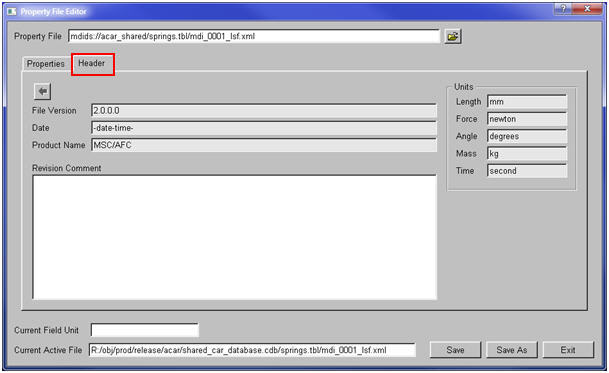
In xml files, units are usually defined in a block at the beginning of the file. The units are displayed in Header tab if the .xml file is opened in Property File Editor as illustrated below. Adams Car considers the units block and does the necessary conversions when it writes the .adm file.
<afc:Units>
<afc:UnitSetting name="angle" current="deg" />
<afc:UnitSetting name="current" current="ampere" />
<afc:UnitSetting name="force" current="newton" />
<afc:UnitSetting name="length" current="mm" />
<afc:UnitSetting name="luminosity" current="candela" />
<afc:UnitSetting name="mass" current="kilogram" />
<afc:UnitSetting name="quantity" current="mole" />
<afc:UnitSetting name="solidAngle" current="steradian" />
<afc:UnitSetting name="temperature" current="kelvin" />
<afc:UnitSetting name="time" current="second" />
</afc:Units>
Note in some of .xml files such as bushing property files each individual spline curve may also have a unit tag such as "xUnit" and "yUnit". These tags are used for the labels in the Curve Editor, but are not used for any conversion in Adams Car.
<ConnectorBushingProperties active="true" shape="cylindrical" radius="30" height="80">
<ConnectorDirectionComponent name="x" active="true">
<ConnectorStiffness name="stiffness" active="true" type="spline">
<ConnectorLinearData name="linear_data" active="true" rate="0" />
<ConnectorSplineData name="spline_data" id="0" active="true"
interpolation_method="akima" xUnit="mm" yUnit="N">
interpolation_method="akima" xUnit="mm" yUnit="N">
<![CDATA[
-10 -45000
-8 -36000
-6 -27000...