Adams 2024.1 Online Help
Welcome to the Adams® 2024.1 Online Help System.
The Help system provides:
■Release Notes for each product
■Configuration information
■Getting Started guides for each product
■Online Help for all products
Note: | It is recommended that you use Microsoft Edge 15, Chrome 57 or Firefox 75 above for best performance of the help system. Some features are not working in Internet Explorer. |
Navigating the Help System
The navigation panel on the left side of the Help window displays the help topics for each Adams product. If you do not see the navigation panel on the left side, click the Show Navigation icon ( ). Click the closed book icon (
 ) to expand, or the open book icon (
 ) to collapse the entries beneath. Topics with no icon contain no subordinate topics.
). Click the closed book icon () to expand, or the open book icon () to collapse the entries beneath. Topics with no icon contain no subordinate topics.Use the left ( ) and right (
 ) arrows to page forward and backwards through the help topics.
) and right () arrows to page forward and backwards through the help topics. Left Pane Adjustment
To adjust the left pane size, drag the ( ) icon in the separator as shown below.
) icon in the separator as shown below. 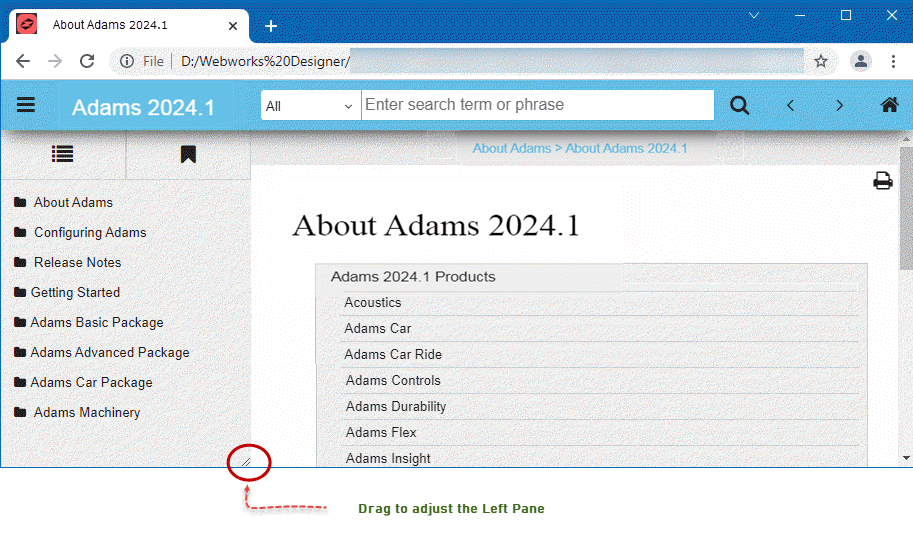
Note: | The adjustment of the Left Pane is not available in Internet Explorer. |
Searching the Help System
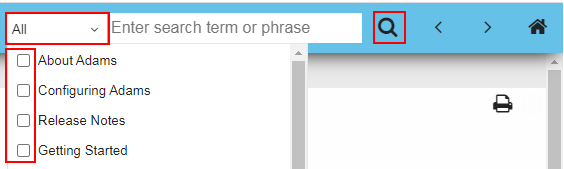
You can search all the help files in HTML format for a particular product or all Adams products.
1. Select your product from the list.
2. Enter the search term or phrase, and then press enter.
Printing a Help Topic
You can use the print button ( ) provided with the Help system to print the contents in the current help window.
) provided with the Help system to print the contents in the current help window.