Setting up and running Marc models
The steps to setup the model and run Marc are the following:
a. You must place a node (the node must have 6 degrees of freedom) at each interaction point. The node may be glued to a RIGID BODY or to an adjacent mesh of elements by means of RBE2 elements. The interaction node must be position controlled and the option Co-Sim Int. Node must be checked ON (See Figure 9 below).
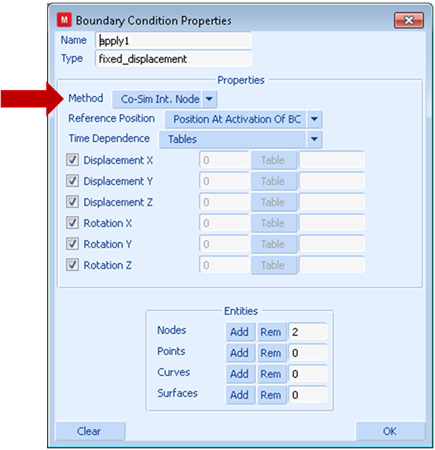
Figure 9 Selecting option Co-Sim Int. Node.
Moreover, you need to check the option Adams-Marc Co-Simulation in the Structural Analysis Options (See Figure 10 below) corresponding to the job for which the co-simulation will run.
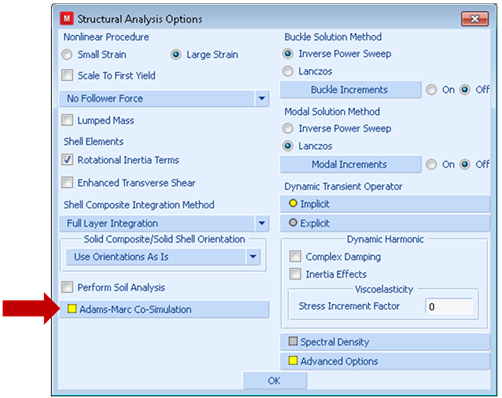
Figure 10 Selecting Adams-Marc Co-Simulation.
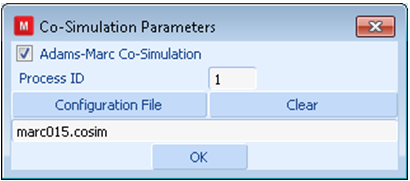
Figure 11 Setting Process ID and configuration script file name.
The process ID and the name of the configuration file must be set as shown in Figure 11 above.
The location of the interaction node must be coincident with the location of an interaction MARKER in Adams.
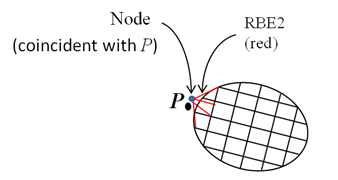
Figure 12 Setting up a node at an interaction point P in Marc. (Coincident locations are drawn separately for clarity.)
Adams will drive each NODE kinematically. Marc will provide to Adams the reacting forces and stiffness matrix.
b. The configuration script must include a process group for each Marc model. For example:
process {
code = marc
name = Box
id = 1
interaction {
name = Box
connection = gforce1
node_id = 1333
}
}
Make sure the code option is marc. You may need to add more options depending on the location of the model and your choice of units. For each interaction point create an interaction group and select a name for it. The connection option must the name of the corresponding interaction point found in the process corresponding to the Adams model. The node_id is the node to be controlled by Adams. The process id is arbitrary and it must be set in the Marc dataset along with the name of the configuration script.
c. You must launch Marc using a command similar to this one:
run_marc.bat -mo i8 -j springdamper
Optionally, users can launch the Marc job from within Mentat. Marc version 2014.2 and later require no compiler/linkers be installed in the user's computer to run Marc in co-simulation mode with Adams. Alternatively, you may use options execution_command and working_directory to launch the Marc process automatically. See section Automatic local launch.
d. We recommend relaxing the condition of computed non-singular matrices by selecting Job Properties → Run → Parallelization/GPU → Matrix Solver Options → Non-Positive Definite in Mentat. In some cases, the computed tangent matrix passed to Adams may be singular. Singular tangent stiffness matrices are correct in some situations.