Directory Structure for Template-Based Products
To create libraries and binaries for template-based products, you need to have the proper directory structure. An example of the structure of a site location for Adams Car with two different platform libraries (Linux and HP) is shown next.
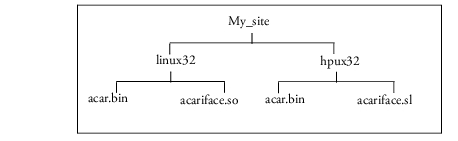
The process for creating the directory structure varies by platform.
Linux
To help you create binaries and libraries for the template-based products, Adams Car, Adams Driveline, the Adams Toolbar creates a directory structure for you as you create libraries and binaries. For each platform for which you create a library or binary, the Toolbar creates a different subdirectory in which to store the library or binary.
■For the private location, by default, Adams Toolbar uses the directory that it creates when you first run a template-based product. You can also specify its location as explained in Template-Based Product Preferences. You must have permission to write to the directories. If you do not have write permission, the product returns an error.
■For a site location, you must create the base site directory and specify its location as explained in Template-Based Product Preferences.
Windows
Before creating a site library, you need to create a site directory and specify its location, as explained in the online help for your template-based product. If you are creating a private library, Adams Car, and Adams Driveline, uses the private directory that it creates when you first run the product. You must have permission to write to the directories. If you do not have write permission, the product returns an error.
The product stores the binaries and libraries in the directory at the same level.