Bearings
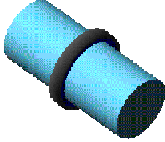
A bearing component describes a force-based connection between two parts. Adams Driveline models a bearing with a six-component force and allows the two parts to rotate around the z-axis. Adams Driveline also models all contact forces and drag. You can specify both radial and axial backlash for the bearing.
Learn about bearings:
Creating or Modifying Bearings
To create or modify a bearing:
■From the Driveline Components menu, point to Bearing, and then select New/Modify.
■Select OK.
About Bearings
In Adams Driveline you can create two types of bearings:
■Axial
■Tapered
The driveline bearing formulation is based on values obtained from the Timken Company manual (for free online resources register at http://www.timken.com/timken_ols/bearings/). The running torque equations are for bearings whose torque has stabilized after a period of running under operating conditions, so called a "running" bearing. The equations apply to bearings lubricated with circulating oil or oil level systems. You can use the equations to model all single-row bearing loading conditions.
The component consists of the following objects:
■A general force component featuring the actions and reactions between the inner and outer ring of the bearing.
■A request to output force and torque values.
■Two revolution geometries to visualize the rings. The component creates these geometries on the parts to be connected by the bearing (that is, shaft and housing).
Adams Driveline calculates the forces and torques between the rings using a user-defined general force, which acts properly depending on the bearing type.
Displacement Request (disp_request)
Component: | Component name: | Component units: | Definition: |
|---|---|---|---|
F2 | dx | length | The displacement between the i marker and the reference marker in the x direction. |
F3 | dy | length | The displacement between the i marker and the reference marker in the y direction. |
F4 | dz | length | The displacement between the i marker and the reference marker in the z direction. |
F6 | ax | angle | The angular displacement between the i marker and the reference marker around the x-axis. |
F7 | ay | angle | The angular displacement between the i marker and the reference marker around the y-axis. |
F8 | az | angle | The angular displacement between the i marker and the reference marker around the z-axis. |
Velocity Request (velo_request)
Component: | Component name: | Component units: | Definition: |
|---|---|---|---|
F2 | vx | velocity | The velocity between the i marker and the reference marker in the x direction. |
F3 | vy | velocity | The velocity between the i marker and the reference marker in the y direction. |
F4 | vz | velocity | The velocity between the i marker and the reference marker in the z direction. |
F6 | wx | angular velocity | The angular velocity between the i marker and the reference marker around the x-axis. |
F7 | wy | angular velocity | The angular velocity between the i marker and the reference marker around the y-axis. |
F8 | wz | angular velocity | The angular velocity between the i marker and the reference marker around the z-axis. |
Force Request (force_request)
Component: | Component name: | Component units: | Definition: |
|---|---|---|---|
F2 | fx | force | The force between the i marker and the reference marker in the x direction. |
F3 | fy | force | The force between the i marker and the reference marker in the y direction. |
F4 | fz | force | The force between the i marker and the reference marker in the z direction. |
F6 | tx | torque | The torque between the i marker and the reference marker around the x-axis. |
F7 | ty | torque | The torque between the i marker and the reference marker around the y-axis. |
F8 | tz | torque | The torque between the i marker and the reference marker around the z-axis. |
Adams Driveline calculates the force and torque for the bearing using backlash expressions. The force or torque is almost zero until the relative translational or angular displacement is lower than the specified lash, then the force or torque follows an elastic law.
For tapered roller bearings, the thrust force acts only along one direction (z-positive), being zero along the other.
The reaction forces in the three translational directions are defined with a linear stiffness + backlash. The two cardanic reaction torques are calculated based on the translational forces and the geometric properties (bearing diameter). Learn about the rotational backlash formulation.
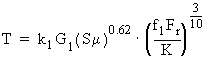
To calculate the running torque of the bearing, depending on several factors (bearing geometry, applied loads, load zone, speed of rotation, and so on) the following expressions have been used:
Radial load or combined radial thrust load:
Pure thrust load:

where:
■T = Running torque
■k1 = Constant being 2.56e-5 for T in N*m, 3.54e-5 for T in lbf*in
■G1 = Bearing geometry factor
■S = Running speed (rpm)
■Mu = Lubricant viscosity (Cp)
■K = Bearing K-factor. The K-factor is the ratio of basic dynamic radial load rating to basic dynamic thrust load rating of a single row bearing.
■f1 = Combined load factor. The combined load factor can be read from Timken tables as a function of (K*Fa)/(Fr).
■Fr = Radial load
■Fa = Thrust road
Request Definition
Component: | Component name: | Component units: | Definition: |
|---|---|---|---|
F2 | angle | angle | The angle between the two parts (gear and shaft). |
F3 | angular_velocity | angular velocity | The relative velocity between the two parts connected with the synchronizing force component. |
F4 | torque | torque | Rotational force exerted by the synchronizer component. |
Modeling Bearings
In Adams Car and Adams Driveline you can model bearings in different ways, according to the effects you want to observe in your models.
If, for example, you want to model a shaft with two bearings, the simplest solution is to connect the shaft to the case with a revolute joint. The revolute joint is an ideal constraint that removes five degrees of freedom. With this solution, compliance and drag effects are ignored. In addition, reaction forces on the revolute joint are not comparable with the reaction forces you experience in a physical model.
A second solution is provided with a combination of kinematic joints: an inline primitive joint and a spherical joint. The inline acts as a pure radial bearing (ideal) and the spherical joint as a combined radial and axial bearing. This solution still does not take into account compliance and drag effects but provides meaningful reaction forces.
When you want to model the connection between shaft and case, taking into account the compliance effects, you can use the standard Adams Car bushing element. You can define the radial and axial stiffnesses using force versus displacement characteristics, and approximate the drag effects with a constant rotational damping.
The Adams Driveline bearing component allows you to specify, in the three translational directions, a linear stiffness with backlash effects. It also allows you to specify the same for the torques in the x and y direction, while the torque along the z (spin) direction is computed based on values obtained from the Timken Company manual (for free online resources register at http://www.timken.com/timken_ols/bearings/). You can use the current implementation to model all single-row bearing loading conditions, except for the pure thrust load (that means radial or combined radial and thrust load bearing).
Example Bearing Property File
$--------------------------------------------------MDI_HEADER
[MDI_HEADER]
FILE_TYPE = 'bea'
FILE_VERSION = 4.0
FILE_FORMAT = 'ASCII'
$--------------------------------------------------UNITS
[UNITS]
LENGTH = 'mm'
ANGLE = 'degrees'
FORCE = 'newton'
MASS = 'kg'
TIME = 'second'
$----------------------------------------------BEARING_PARAMETERS
[BEARING_PARAMETERS]
G1 = 1000
MU = 10
K_FACTOR = 1
$--------------------------------------------------BEARING_SPLINE
[BEARING_SPLINE]
{ x y}
-100.0 6.0E-02
-50.0 6.0E-02
0.0 6.0E-02
50.0 6.0E-02
100.0 6.0E-02