Belt
The belt wizard could be launched anytime after a Pulley Set has been defined in the current model. Once the user enters the Pulley Set name (that is, the existing set of pulleys defined via the pulley set wizard around which the belt will be wrapped), then the Belt System name and type will be loaded automatically and is not editable.
In Adams Machinery, you can work with Poly-V Grooved, Trapezoidal Toothed and Smooth. A belt can be:
■elastic (model type = 2D Links, 3D Links, 3D Links Nonplaner, 3D Simplified) - Contains belt segment parts and their connections. The parts are connected with fields. The belt also contains the contact forces between belt segment parts and pulleys.
■rigid (model type = Constrained) - Contains parts, couplers, and simple geometry. Each coupler constrains the rotational displacement of two pulleys.
You wrap the belt around pulleys. There are no predefined results for the belt properties component or the belt component.
Poly-V Grooved
You wrap the belt around poly-v pulleys and deviation pulleys. The belt always references an Poly-V Grooved component.
Poly-V Grooved Properties
An accessory Belt property is an array referenced by pulleys. It contains all belt parameters. All Poly-V Pulley that will be in contact with a specific belt must reference the same instance associated with the belt
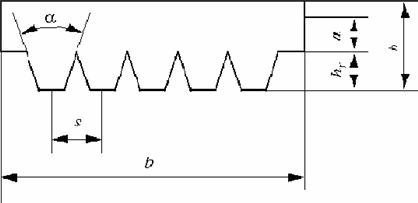
Belt Profile According to ISO 5296
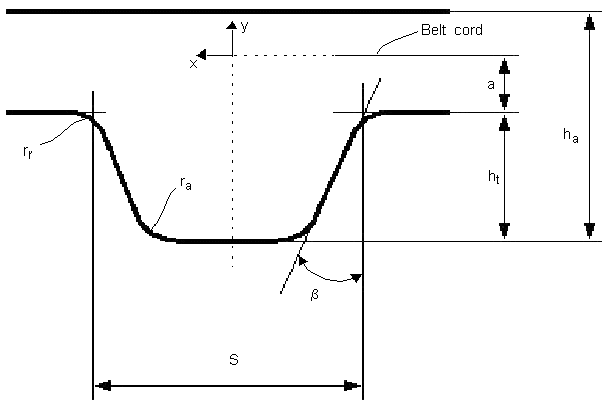
Belt Schematic Representation
Notes: | To access a listing of the belt properties: ■From the belt object within the model browser or graphics window right-click and select "Info". ■From the Information window click the "properties" object and Apply. 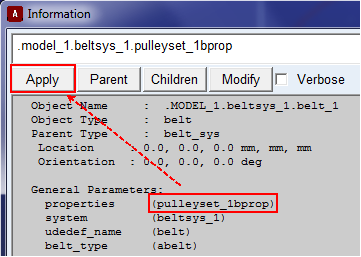 |
Stiffness Parameters
Adams Machinery calculates the following stiffness parameters based on the parameters specified for the section connection:
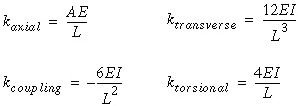
where:
■A - Area
■E - Young's Modulus
■L - Segment Length
■I - Area Inertia
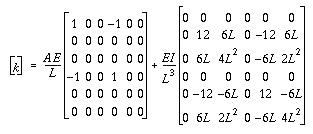
This results in the following stiffness matrix:
The damping values are based on damping ratio and the stiffness values:
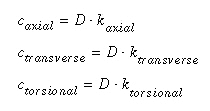
where D is damping ratio.
Tension warning while Belt wrapping
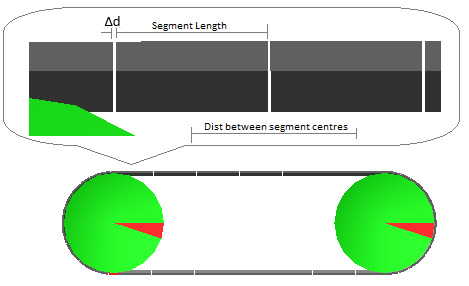
Total length of belt perimeter over all pulleys may not be exactly equally to (number of segments x length of segment). The perimeter is calculated at pitch circle diameter based on center location and diameter of pulleys specified by user. Segment length is specified by user. If belt perimeter is not exact multiple of segment length then it will result in overlap/slackness between two adjoining segments of belt resulting in negative/positive tension as below:
Tension = Δd × Axial Stiffness of the belt (KX)
where:
■Δd = (Distance between adjoining segment centers - Segment Length)
Using user subroutines for contact and friction in Adams Machinery belt
User subroutine structure:
1. Installation has a default 'amachinery_user.dll' with a few placeholder subroutines (CFFSUB, CNFSUB and so on.)
2. Corresponding default subroutine FORTRAN file (amach_usersub.f) is provided in standard installation (topdir/amachinery/examples/usersubs/amach_usersub.f)
3. The 'amachienry_user.dll' will be a part of standard Adams Machinery installation (topdir/win64/amachinery_user.dll)
How to use one's own user-subroutine:
4. If one chooses 'user_subroutine' in Belt wizard, it will refer to default 'amachienry_user.dll' to get those subroutines
5. To use a user-written subroutine,
a. Copy 'topdir/amachinery/examples/usersubs/amach_usersub.f' to current working directory and edit as per needs and compile it using ADAMS-command prompt and create private 'amachinery_user.dll'
b. Make sure newly created 'amachinery_user.dll' is in the working directory
6. If users do not provide their own 'amachinery_user.dll' in the working directory then the corresponding subroutine will refer to 'amachinery_user.dll' in 'topdir/win64/amachinery_user.dll'
7. Reminder: Any user/solver .dll once loaded is not automatically unloaded with the Adams View-launched internal solver.
a. Once a model is simulated, the solver_dll is invoked with its given parameters (for example, static_coeff_friction = 0.2).
b. After the simulation if the parameter values are edited (for example, static_coeff_friction = 0.3) subsequent simulations will still assume the coeff to be 0.2 until the current Adams View session is closed, Adams View is restarted, the model reopened and a new simulation is run.
Generating user's private subroutine DLL
1. Copy ‘topdir/amachinery/examples/usersubs/amach_usersub.f’ to current working directory.
2. Edit the copied ‘amach_usersub.f’ to use a specific algorithm.
3. From the Start Menu → Adams folder, open Command Prompt.

4. Choose 'Create Adams Solver with Adams User-DLL'

5. Specify modified amach_usersub.f and enter NONE for other file

6. Strictly specify name of Adams Solver User-DLL as 'amachinery_user.dll'

7. The ‘amachinery_user.dll’ will be created in current working directory.
8. Complete procedure of creating user-dll is shown in snapshot below:
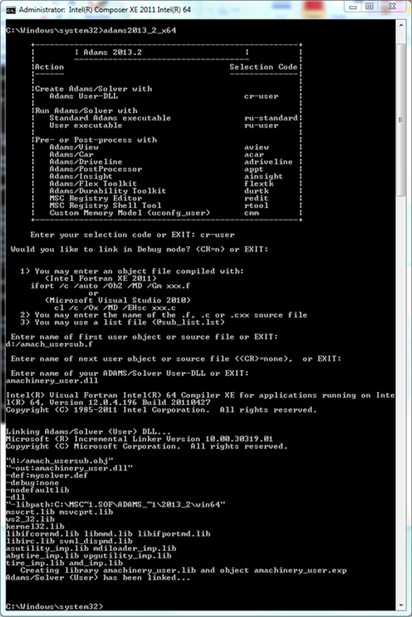
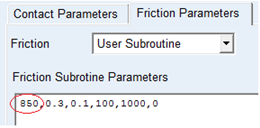
9. From within Adams View, create a belt model and specify the required cffsub or cnfsub in the Belt wizard as shown below:
Editing amach_usersub.f
Have a look at ‘amach_usersub.f’, it has two subroutines CFFSUB and CNFSUB.
Edit the executable code section ( ) in the file to use any specific algorithm.
) in the file to use any specific algorithm.CNFSUB has single executable code
CFFSUB has two separate executable codes CFFSUB850() and CFFSUB860(), which demonstrates how a branching can be done to use two different subroutines in same sessions for two different belts. Same can be adopted for CNFSUB.
Branching in user-subroutines:
If user wants to use separate user-subroutines in same model for different belts, he can use branching. 'amach_usersub.f' demonstrates this in cffsub(). Note that, cffsub() redirects controls to two other subroutines as below:
IF ( INT(PAR(1)).EQ.850 ) THEN
CALL cff850 ( ID, TIME, PAR, NPAR, LOCI, LOCJ, X, XDOT, NFORCE, AREA, DFLAG, IFLAG, RESULT )
ELSEIF ( INT(PAR(1)).EQ.860 ) THEN
CALL cff860 ( ID, TIME, PAR, NPAR, LOCI, LOCJ, X, XDOT, NFORCE, AREA, DFLAG, IFLAG, RESULT )
One can edit these IF/ELSE condition to add multiple subroutines as per requirement and mention the ID of the subroutine to be called for specific belt as below
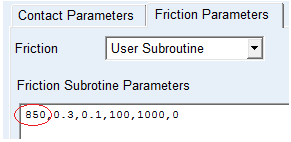
If one wants to use a single subroutine in the model then follow the method specified in CNFSUB where ID does not have any significance.
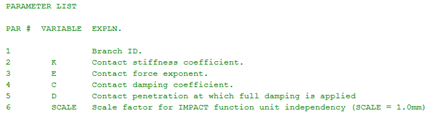
Parameters list for subroutines:
For CONTACT:
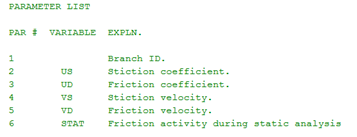
For FRICTION: