REXS Import
REXS Import allows you to translate data from your CAE driveline calculation software into Adams, thus helping you to quickly set up an MBS model for detailed dynamic analysis with use the of Gear AT and Bearing AT products.
The REXS (Reusable Engineering Exchange Standard) defines an industry-wide uniform modeling and nomenclature for the gear unit and its components based on the detailed terminology. For more information, please visit www.rexs.info
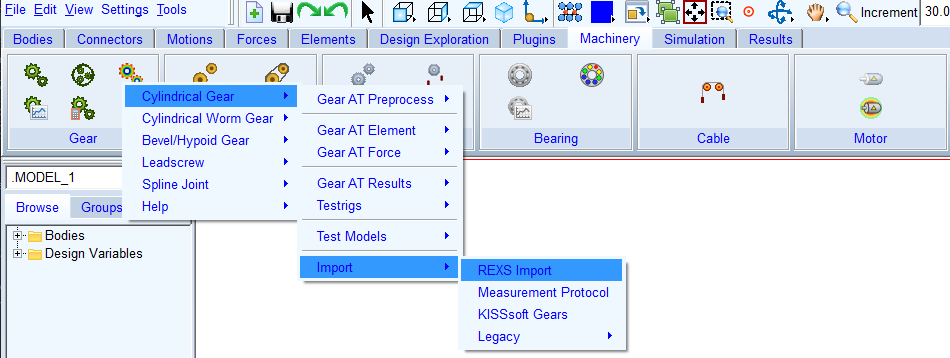
Figure 139 Access to REXS Import
In this Gear AT there are following machine elements and respective attributes supported by the REXS Import:
■cylindrical stages and gears
■cutting tools definition for gears manufacturing
■tooth flank modifications
■gears materials
■rolling bearings (deep grooved balls bearings, radial cylindrical roller bearings, tapered roller bearings, needle roller bearings)
The Figure 140 shows a dialog box where the required rexs file is searched for in the property file field. Subsequently a table will appear in the gears and bearings tabs, which is filled with the corresponding number of cylindrical gears and roller bearings.
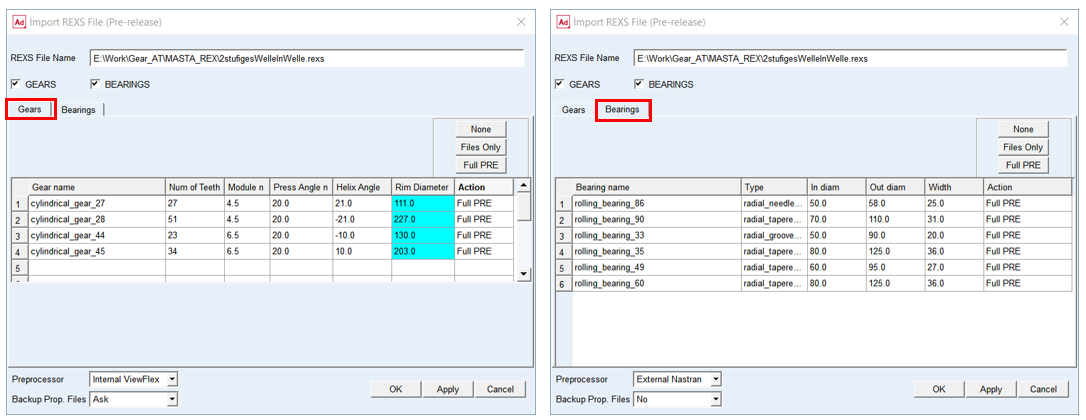
Figure 140 REXS Import dialog box - gears tab, bearings tab
For each component of the table (Gears / Bearings) it is possible to select the desired preprocessing option by selection of particular row or number of rows and clicking on one of the buttons in the Action field (see Figure 142). With that you can translate either complete list of items (gear and bearings) from the table or update one or several items in your database. Files with translated data will be stored in gears and bearings folders in your current working directory (see Figure 141)
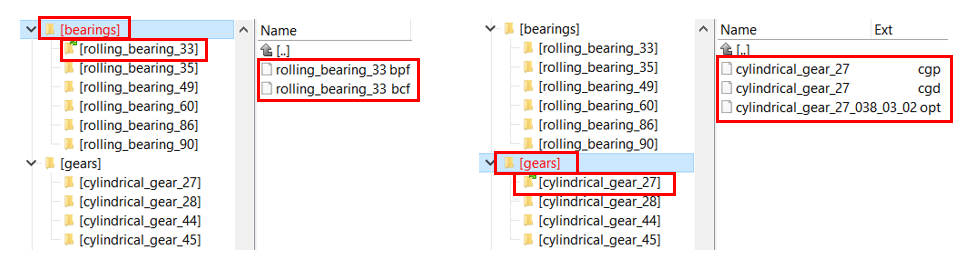
Figure 141 REXS Import - Structure of created folders
Action selection Figure 142 shows an example where we do not want to perform any action for gear 27 and 28, we want to generate only property files for gear 44 and we want to run a complete preprocessing for gear 45.
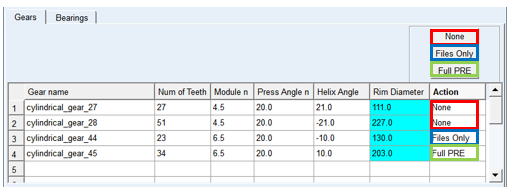
Figure 142 REXS Import - Action selection
For the options | Do the following |
|---|---|
REXS File Name (rexs) | This file stores all cylindrical gears and bearings unit data. Right click to browse for existing rexs file. All relevant cells of the data tables below (for gears and bearings) will be filled up by the content of rexs file |
Gears toggle | In case you do not want to translate and preprocess any gear of imported model, switch this toggle to off and the data table with gears then disappears |
Bearings toggle | In case you do not want to translate and preprocess any bearing of imported model, switch this toggle to off and the data table with bearings then disappears |
Data Table of Gears | |
Gear Name | In this column you can find all gears names as they are defined in the imported rexs file, it is not editable. |
Number of Teeth | The value shows the number of teeth for particular gear, it is not editable |
Module n | The value of module in normal plane of a tooth; it is not editable |
Press Angle n | The value of angle at the pitch diameter between the line of pressure and the line tangent to the pitch circle; it is not editable |
Helix Angle | The value defines the slope of the tooth in lead direction against the rotational axis at the pitch diameter. A positive sign corresponding with the right-hand rule. A spur gear has helix angle of zero; it is not editable |
Rim Diameter | The Rim Diameter defines the boundary of the gear rim to the finite element model of the wheel body, it is not editable. For more information see definition of Rim diameter |
Action | Select the desired preprocessing option by clicking on one of the push buttons: ■None - neither property file is created, nor preprocessing action is executed ■Files Only - only CGD, CGP, OPT files will be created ■Full PRE - all files will be created, and all preprocessing steps will be performed Default action = Full PRE |
Data Table of Bearings | |
Bearing Name | In this column one can find all bearings names as they are defined in the imported rexs file |
Type | It shows the type of bearing, it is not editable |
Inside Diam | The value shows inside diameter of particular bearing, it is not editable |
Outside Diam | The value shows outside diameter of particular bearing, it is not editable |
Width | The value shows width of particular bearing, it is not editable |
Action | Select the desired preprocessing option by clicking on one of the push buttons: ■None - neither property file is created, nor preprocessing action is executed ■Files Only - only XPF, XCF files will be created; ■Full PRE - all files will be created, and all preprocessing steps will be performed Default action = Full PRE |
Preprocessor | Choose one of following options: ■Internal ViewFlex: use this option when there is no Nastran installation available, and you don’t wont to draw additional Adams View license to execute the ViewFlex. Please note that additional ViewFlex license is required ■External ViewFlex: use this option when there is no Nastran installation available. On background there is SOL101 running by Adams embedded Nastran Solver. This option allows you to continue working since ViewFlex is executed in external shell window hence the main window remains active. Please note that additional Adams View and ViewFlex license is required. This option is not available on linux ■Internal Nastran: use this option when you have Nastran installation available. It makes use of Nastran SMP license if available ■External Nastran: use this option when you have Nastran installation available. It makes use of Nastran SMP license if available. This option allows you to continue working since standalone Nastran is executed in external shell window hence the main window remains active. Please note that additional Nastran license is required. This option is not available on linux ■Mesher Only: use this option to verify that FE Mesh is valid before running SOL101 or when you need to run Nastran on a different computer |
Backup Prof. Files | Choose one of following options to apply in the case there are gears / bearings folders with property files already in the working directory: ■No the files will be overwritten and backups will not be created ■Ask you will be prompt whether you want to create a backup for each gear and bearing file ■Yes each file is backed up without prompting |
Note: All of the parameters in both data tables like names and geometrical parameters are not editable in this place. One can change the preprocessing option in the Action column.
Extended definition:
Select the cell in Action column of the table and click on one of the buttons to perform requested level of preprocessing. You can also select entire Action column by clicking directly on Action cell on the top of the table (see Figure 143). In that case the option will be applied to all items of the table.
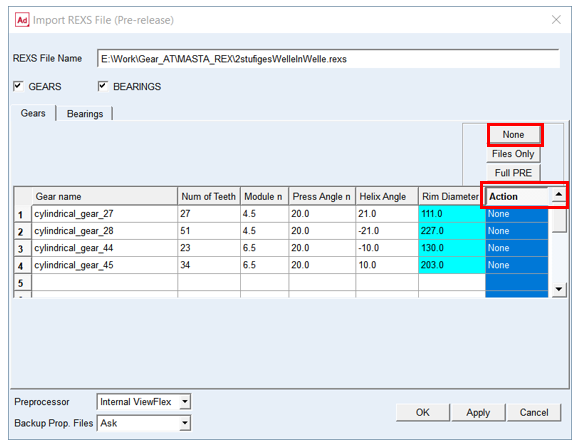
Figure 143 REXS Import - selecting entire column
None: No preprocessing action for particular item is executed. There are no new property files created and if folder for gears / bearings already exists, the property files in it will be preserved and not updated.
Files Only: A folder for gears / bearings and dedicated subfolder for each cylindrical gear and bearing is created and pertinent property files with extracted data are generated.
For gears:
■CGD, CGP, OPT
and for bearings:
■XPF, XCF (“X” stands for various types of bearing types, see Bearing AT reference manual)
Full PRE: A folder for gears / bearings is created, in which subfolders for individual cylindrical gear / roller bearings are created. Subsequently the meshing process and Nastran SOL101 is executed followed by OP2 reading for a gear and contact preprocessing for a bearing element. All preprocessing steps will be performed which are necessary to create gear and bearing elements in your Adams model.