Gear AT Mesh Export
Additional option to preprocessing gear element is to export FE mesh of gear tooth to BDF file for further usage. You start with prepared property file *.CGP, where all parameters are defined. The Figure 92 shows how to access Gear AT Mesher interface to export your gear FE Model.
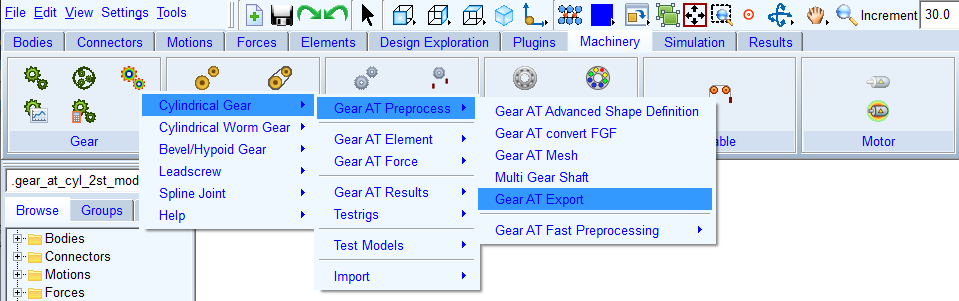
Figure 92 Launch of Gear AT Mesh Export
The FE Model can be exported with applied parametric flanks topology or if defined with applied measurement data described in CGM file referenced in the CGP file. The exported model is a segment of gear rim, the number of teeth exported is selected in Number of Contact Teeth to Export menu, the available options are 1, 3, 5, 7. Hitting Generate writes the BDF file (see Figure 93).
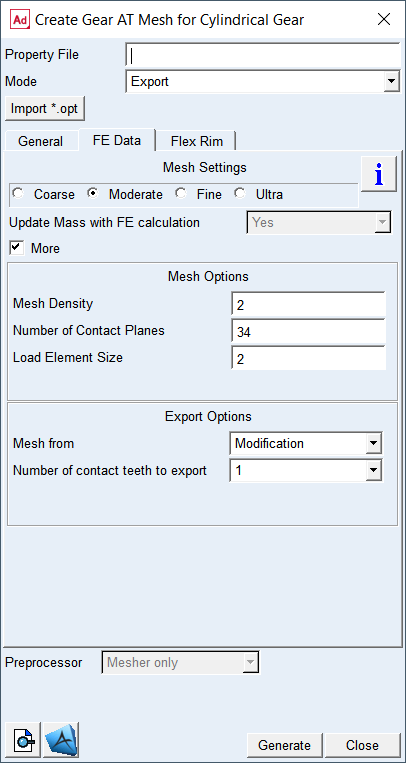
Figure 93 Gear AT Mesh Export dialog box