Output Settings
In the dialog box depicted on Figure 434, you can specify the simulation time range, tooth flank of interest and sampling of records to be stored to *.cga (Flex Gear Results) file for later Flex Tooth Animation post-processing phase. For Time Skip Step equal zero, all relevant quantities are stored at each simulation output time step.You need to set up time range before running actual simulation and the time range has to be contiguous, i.e. the step size does not have to change. Say, if your simulation script consists of two subsequent analyses :
SIMULATE/TRANSIENT, END=0.10, steps=10
SIMULATE/TRANSIENT, END=0.20, DTOUT=2.5E-005
you might want to set the output to *.cga file for the last analysis as shown on Figure 434.
Important: | The time range settings described above applies to the Flex Tooth Animation postprocessing only (*.cga file), it does not affect time range stored in the *.xgr file dedicated for Advance Results postprocessing ( formerly known as Contact Pattern) , which comprises the full simulation range. |
The file is stored in the working directory, the name is composed as:
File_Prefix__Gear AT Force.cga
You can activate or deactivate the output of *.xgr (Gear Results) file (Figure 434), which stores results of contact pressure, Oil Film Thickness, and Friction power for further postprocessing as described in Advanced Results. The file is stored in the working directory, the name is composed as:
File_Prefix__Gear AT Force __M_mode.xgr
for MINUS contact side (Right Flank) and
File_Prefix__Gear AT Force __P_mode.xgr
for PLUS contact side (Left Flank).
where
the File_Prefix is taken from the Solver output settings (Figure 435),
the Gear_AT_Force is the name of the Gear Force element you defined for the gear pair,
the XGR extension is specific for each type of gear:
■CGR - Cylindrical Gear
■WGR - Worm Gear
■HGR - Hypoid Gear
■ISR - Involute Spline joint
Important: | Please note that both, the *.cga and *.xgr file gets overwritten without notice so one has to edit the File Prefix in the Solver Settings dialog box before submitting new simulation! |
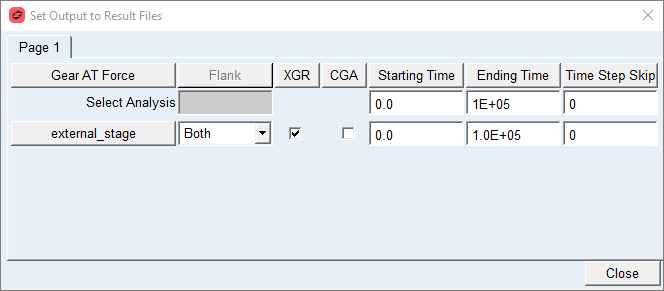
Figure 434 Output Settings
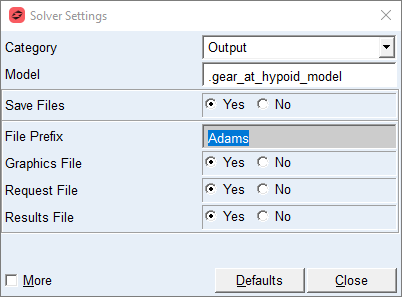
Figure 435 File prefix for *.cga and *.xgr file