Gear AT Shape Definition
Gear AT Shape Definition allows you to create a property file (WGP) that defines the topology of a worm and gear (both macro and micro geometry). In current release you can define a tooth profile only by KISSsoft data. Figure 171 shows how to access the tools you need to define your worm and gear geometry.
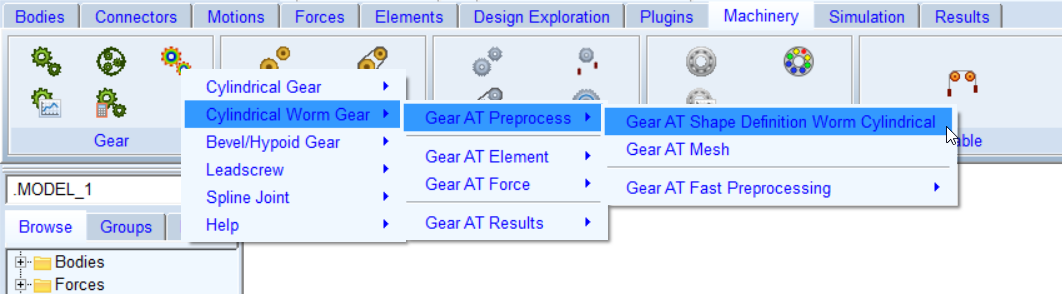
Figure 171 access to the Gear AT Shape Definition
The Gear AT Shape Definition has following tabs to help you design a gear
■Mass
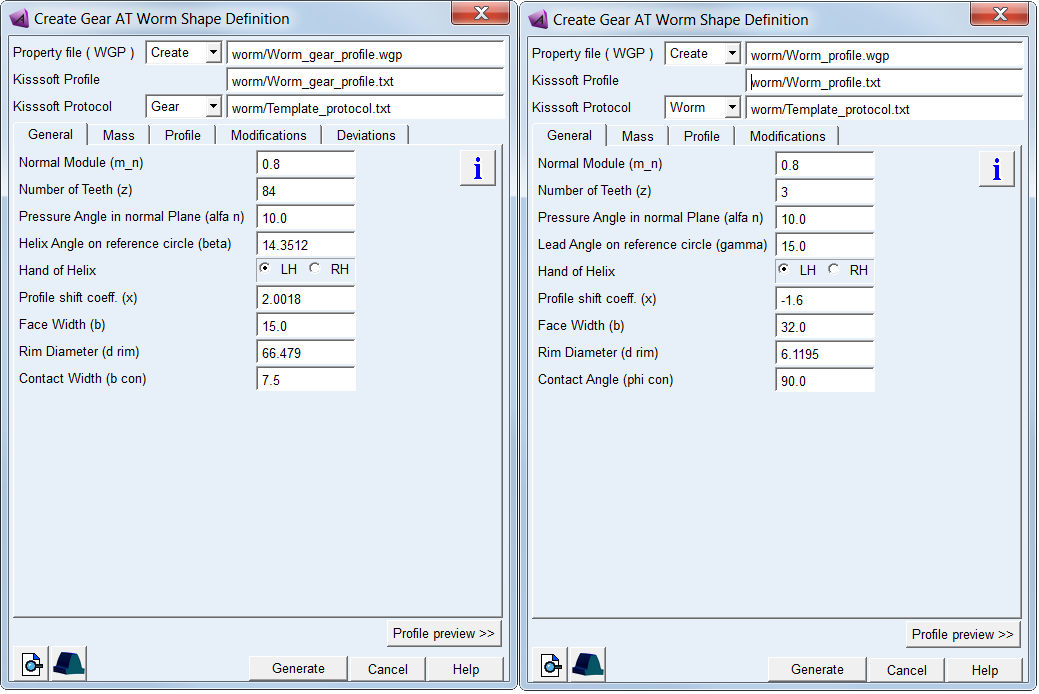
Figure 172 Worm and Worm gear Shape Definition dialog box
Main
For the options | Do the following |
|---|---|
Property file ( WGP ) | In Create mode: ■Enter name of new gear or worm property file. In Edit mode: ■Enter name of existing gear or worm property file to edit parameters. |
KISSsoft Profile | Browse for profile file (*.txt) exported from KISSsoft. In Worm mode: ■Browse for worm tooth profile data file. In Gear mode: ■Browse for gear tooth profile data file. |
KISSsoft Protocol | Browse for protocol file (*.txt) exported from KISSsoft. This file defines worm gear pair geometrical data. |
Worm / Gear option menu | Select to define a worm or a gear wheel. Based on the option selected a relevant parameter values from KISSsoft Protocol file are loaded in all fields of General and Profile tab. Since the tooth profile is defined already the values in the fields are not editable. Note: Before switching from Worm to Gear or vice versa make sure you have browsed for appropriate KISSsoft Profile (*.txt) otherwise limits of fields in Profile tab will be mismatched. |
View Property File | Displays content of worm or worm gear property file (*.wgp) in information window. |
Create Mesh | Opens the mesh dialog box to proceed with Gear AT Mesh pre-processing for the current worm or worm gear property file (*.wgp). |
Profile preview >> | Opens the Profile plot window for the current property file. |
General
Review basic geometrical parameters in the General tab (Figure 172). Since the tooth profile is defined already some of values in the fields are not editable.
For the options | Do the following |
|---|---|
Normal Module ( m_n ) | Value of module in normal plane of a worm or gear. |
Number of Teeth (z) | Number of teeth of a gear or number of threads (starts) of a worm. |
Pressure Angle in normal Plane (alfa n) | Angle at the pitch diameter between the line of pressure and the line tangent to the pitch circle |
If selected Gear option: | |
Helix Angle on reference circle (beta) | The gear helix angle defines the slope of the tooth in lead direction against the rotational axis at the pitch diameter. |
If selected Worm option: | |
Lead Angle on reference circle (gamma) | The lead angle of a worm is thread angle and is the complement of the gear helix angle. |
Hand of Helix | Defines whether the helix is left handed (negative) or right handed (positive). Both, worm and gear have the same hand of helix. |
Profile shift coeff. (x) | This factor is positive, when the reference profile is moved away from a gear by the amount of module * factor. Positive factor increases tooth thickness at pitch circle while negative factor decreases. |
Face Width (b) | The length of tooth flank in lead direction. For Worm it represents the worm length, while for Gear it is the gear width. |
Rim diameter (d rim) | The rim diameter defines the boundary of the gear rim to the finite element model of the wheel body. |
If selected Gear option: | |
Contact Width (b_con) | The gear contact width defines effective width of a face carrying load transmitted by the gear. |
If selected Worm option: | |
Contact Angle (phi con) | The worm contact angle is the effective angle of a thread carrying load transmitted by the gear. |
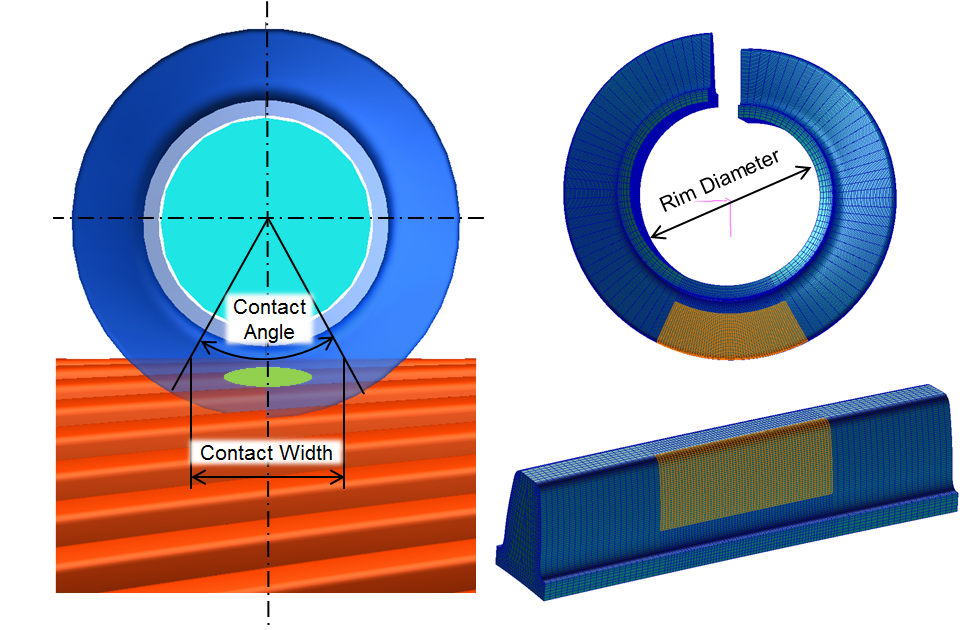
Figure 173 Worm contact angle and gear contact width
Mass
The Mass card of the Shape Definition process allows you to define the mass of the gear based either on the Geometry and Material Type or by specific User Input (Figure 174). In the former case the mass, center of mass and inertia tensor is computed later on by the mesher based on FE mesh volume. In the latter case enter all required data in current model units. In either case, inertia data are written to the *.wgp file.
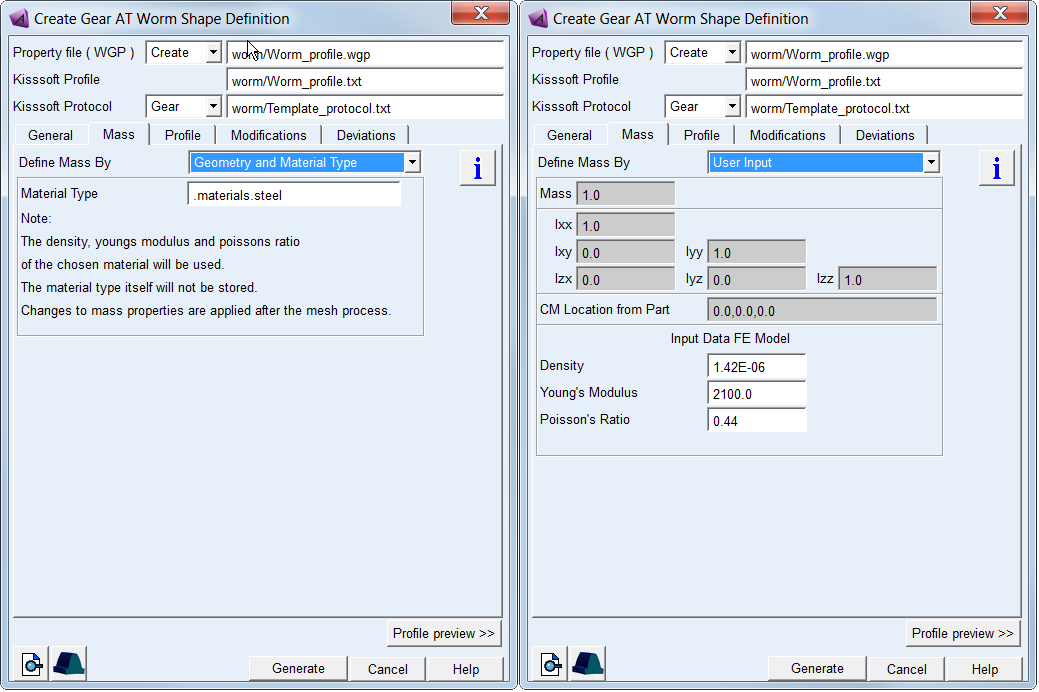
Figure 174 Worm and gear mass and material properties
For the options | Do the following | |
|---|---|---|
Define Mass By | Set to: ■Geometry and Material Type ■User Input | |
For the option Define Mass By the Geometry and Material Type : | ||
Material Type | Choose material type either from predefined material library - right click the field and go to Material - Browse, or create a new one. Note that material of steel is set by default. | |
For the option Define Mass By the User Input : enter value of Mass, the principal mass moments of inertia (Ixx, Iyy, Izz) and cross-products of inertia (Ixy, Izx and Iyz). Note that you still need to define material parameters to define FE model of flexible tooth properly | ||
Mass | Enter the mass of the part. | |
Moments of inertia | Enter the mass moments of inertia. | |
CM Location from Part | Enter location vector of center of mass expressed in local part reference frame. | |
Density | Enter Material density to define Nastran MAT1 card of the flexible tooth for SOL101 and SOL103. The value is also used for calculation of the gear wheel inertia properties. | |
Young’s Modulus | The Young's modulus E is used to define Nastran MAT1 card of the flexible tooth for SOL101 and SOL103. It defines the relation between tensile strain ε and tensile stress σ by Hooke's law (Equation (6)), thus defining flexible tooth stiffness. For detailed information: see literature about theory of elasticity. | |
Poisson’s Ratio | The Poisson’s Ratio is used to define Nastran MAT1 card of the flexible tooth for SOL101 and SOL103. An extension εx of a linear elastic and isotropic material is accompanied by lateral strains εy and εz. Poisson's ratio ν defines this relation by Equation (7) and Equation (8) | |
Profile
Preview tooth profile and adjust start and end of contact. Since the tooth profile is defined already some of values in the fields are not editable.
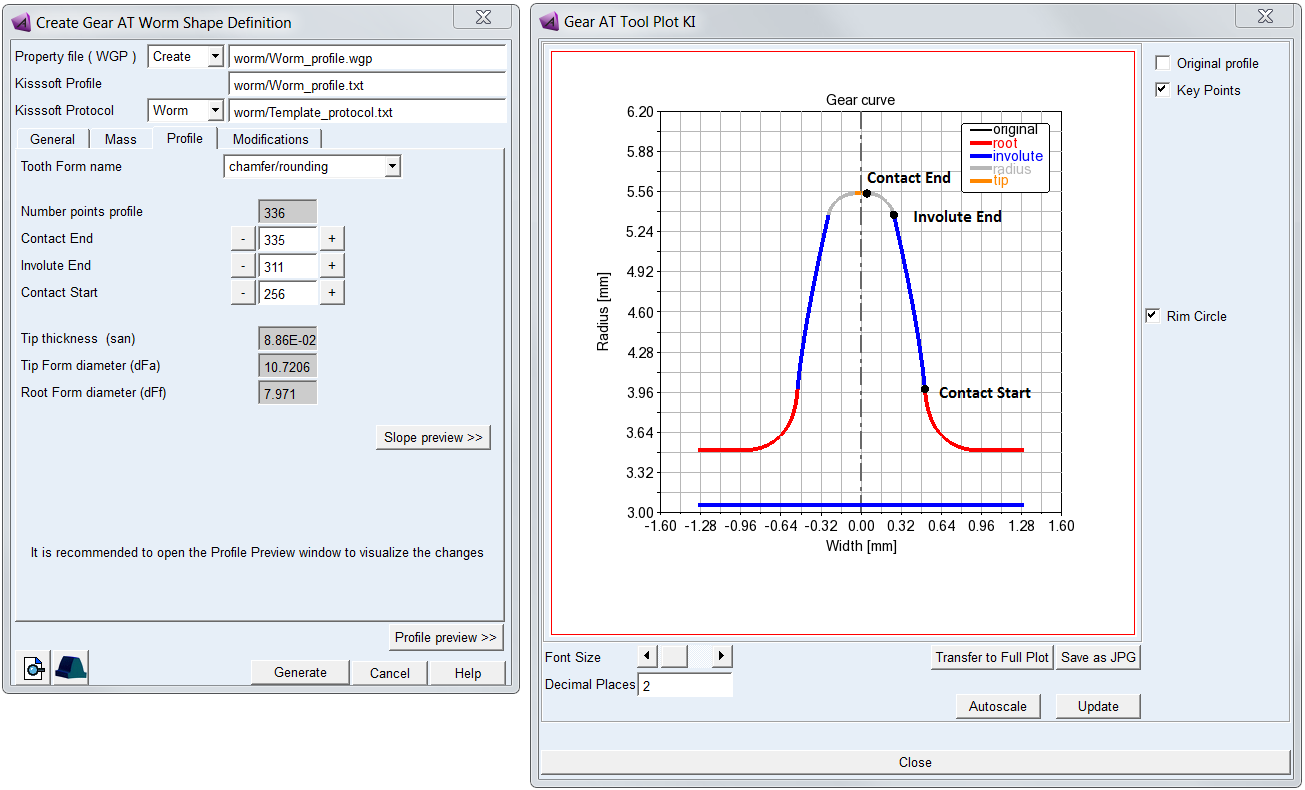
Figure 175 Profile tab and profile preview of worm tooth
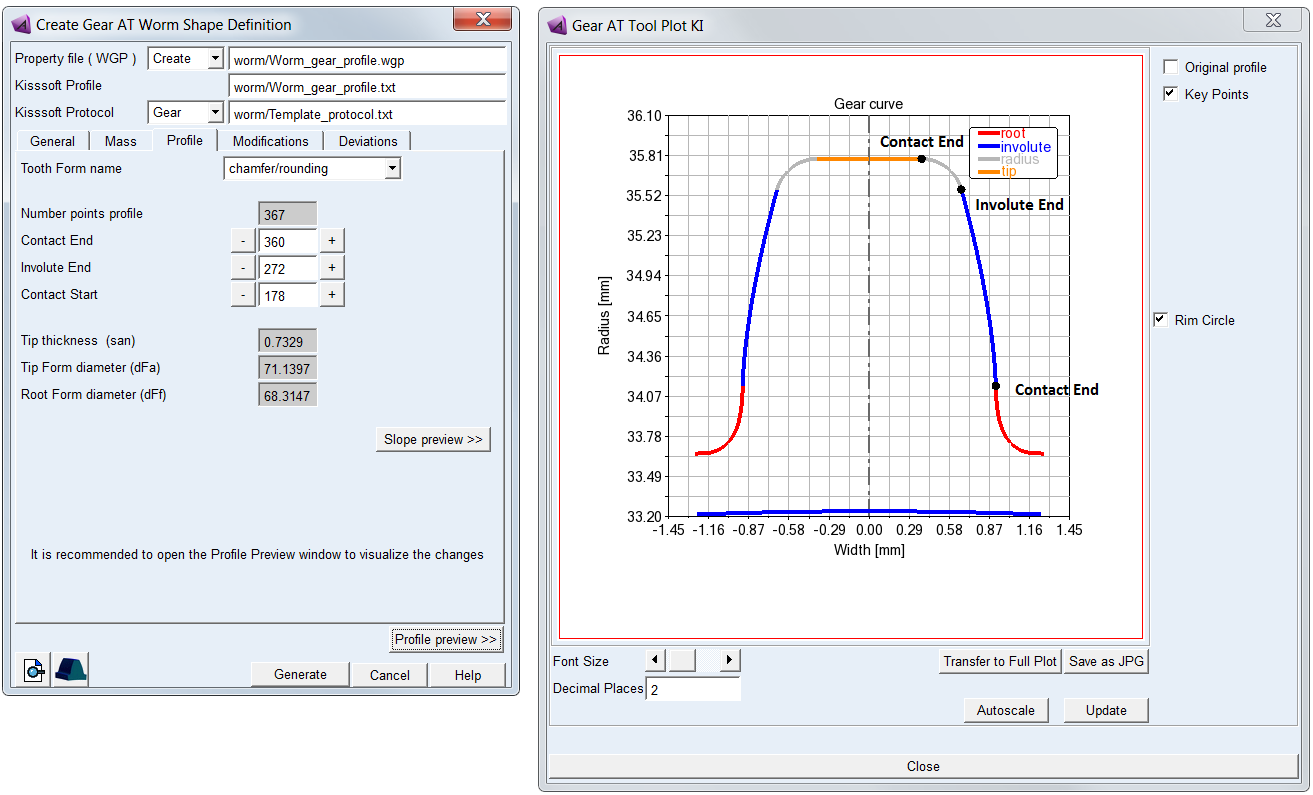
Figure 176 Profile tab and profile preview of gear tooth
For the options | Do the following |
|---|---|
Tooth Form name | Select manufacturing step. Make sure it corresponds to the one you used for the profile export from KISSsoft. It affects the keypoint location along profile but you can adjust each manually by + or – buttons adjacent to the corresponding field. |
Number points profile | Shows the number of profile points stored in the KISSsoft Profile file. The value is not editable. |
Contact End | Adjust the value to set the point of profile where the contact ends. It has to be less or equal to the value of the Number points profile. |
Involute End | Adjust the value to set the point of profile where the involute ends. It has to be less or equal to the value of the Contact End. |
Contact Start | Adjust the value to set the point of profile where the contact starts. It has to be less than the value of the Involute End. |
Tip thickness (san) | Shows the tip thickness of profile stored in the KISSsoft Profile file. The value is not editable. |
Tip Form diameter (dFa) | Shows the tip form diameter of profile stored in the KISSsoft Profile file. The value is not editable. |
Root Form diameter (dFf) | Shows the root form diameter of profile stored in the KISSsoft Profile file. The value is not editable. |
Modifications
Gear tooth flank modifications are applied to compensate for manufacturing errors, deformation of the teeth due to load and also for shafts and gear housing deformation thus ensure a proper meshing to achieve more favorable load distribution and reduced transmission error. The ultimate goal is to reduce gear wear and vibrations induced by the gear pair operation, thus help to design durable gearbox fulfilling specified NVH parameters.
All types of tooth flank modification can be defined separately for left and right flank or symmetrically on both flanks. The convention for tooth flank side used throughout the Gear AT is based on ISO standards.
Important: | Values of gear modifications are usually defined in units of micrometers in gear specification sheets or drawings. However, values of all parameters have be entered in model units! |
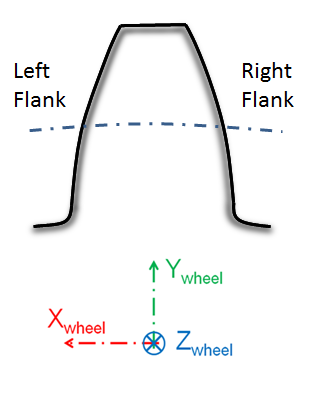
Figure 177 Definition of left and right flank
Gear AT supports following worm and worm gear profile modifications which are all superimposed over the tooth flank:
Profile Modifications
Profile Modifications
Profile modifications are mostly used to decrease the engagement shock and the involved strain and noise. Types of profile modifications for worm gear supported by Gear AT include tip and root relief, barreling (vertical crowning) and involute slope correction. The modifications can be set individually for left and right tooth flank or symmetrically on both flanks. The layout for profile modification parameters is depicted in Figure 178.
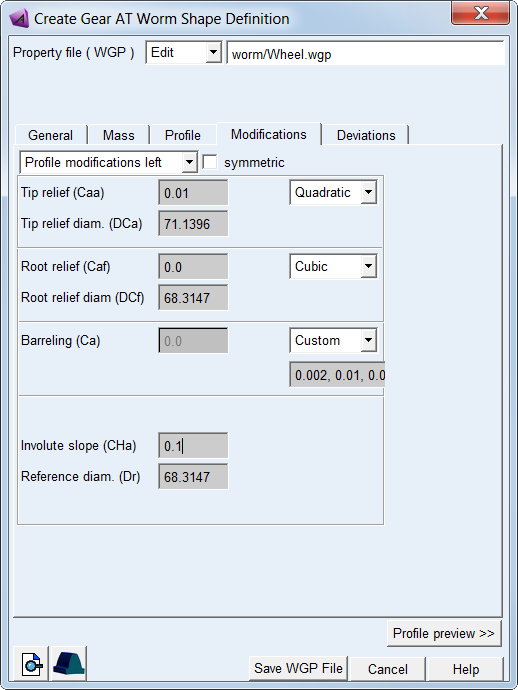
Figure 178 Worm profile modification tab
For the options | Do the following |
|---|---|
Profile modifications option menu | Select tooth flank side to apply profile modifications: ■Profile modifications left ■Profile modifications right |
symmetric | Toggle ON to apply the same profile modifications on both flanks. |
Order of modification (Tip and Root relief, Barreling) | Select order of polynomial of modification: ■None – no modification is applied ■Linear ■Quadratic ■Cubic ■Custom - select to enter all 3 polynomial coefficients to define total value of modification |
Tip relief (Caa) | Enter value of tip relief at end of involute - see Figure 179 |
Tip relief diam. (DCa) | Enter value of diameter where the tip relief starts - see Figure 179 |
Root relief (Caf) | Enter value of root relief at start of involute - see Figure 179 |
Root relief diam. (DCf) | Enter value of diameter where the root relief ends - see Figure 179 |
Barreling (Ca) | Enter value of barreling at start and end of involute - see Figure 180 |
Involute slope (CHa) | Enter value of involute slope modification. The positive correction removes material on tip while negative correction removes material on root - see Figure 181 |
Reference diam. (Dr) | Enter value of reference diameter at which no involute slope modification is applied - see Figure 181 |
Tip and Root Relief
The use of tip relief will cause less noise during gear meshing. Tip relief is the most economical and most common method. If there are both, tip and root relief applied on one gear, the other gear needs not to be modified. In case the root relief is not applied, the tip relief is applied on both gears of a gear pair.
Both reliefs,  and
and  , are defined by a polynomial function of dimensionless involute curve parameters utip and uroot .
and , are defined by a polynomial function of dimensionless involute curve parameters utip and uroot .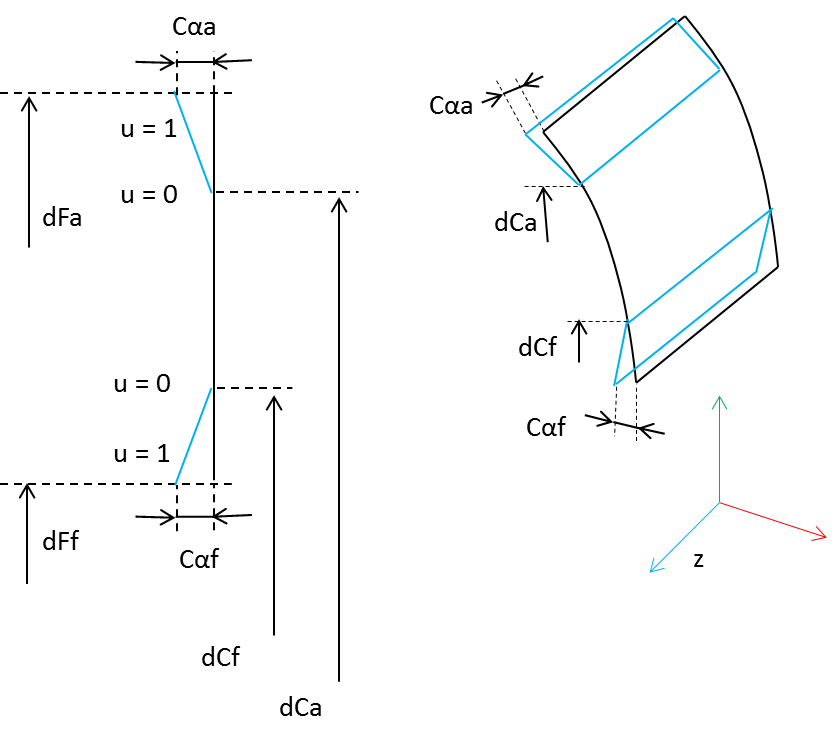
Figure 179 Worm tip and root relief modification
Barreling
Profile barreling is a convex shape added to the involute curve to prevent hard contact near the tip and root. Barreling  is defined as a polynomial function of the dimensionless involute curve parameter u.
is defined as a polynomial function of the dimensionless involute curve parameter u.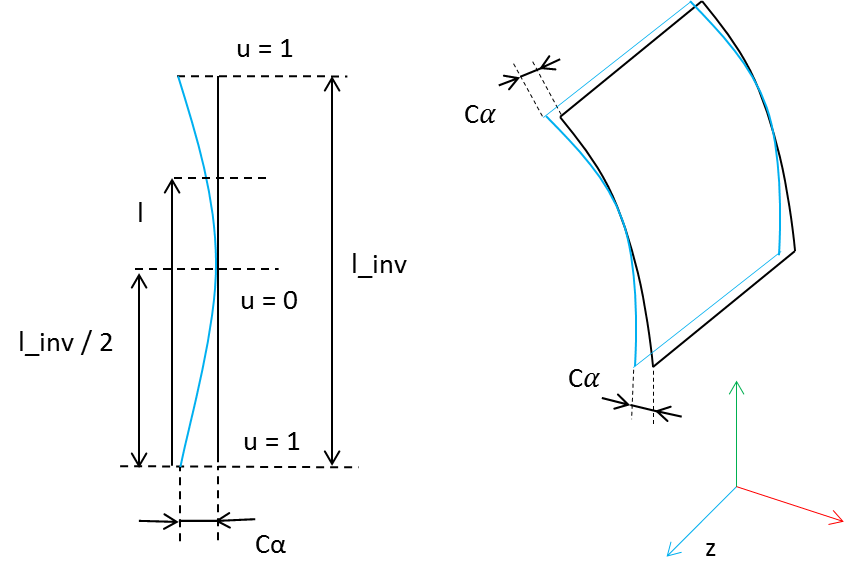
Figure 180 Worm barreling modification
Involute Slope
Involute slope is used to compensate for tooth deflection differences between the two meshing gears and to compensate for system deflections that would otherwise result in hard contact near the root or the tip of one of the gears. It defines correction in pressure angle relative to lead line, defined by reference length along the line of contact. The positive correction removes material on tip as shown by Figure 181 for the left flank, while negative correction removes material on root.
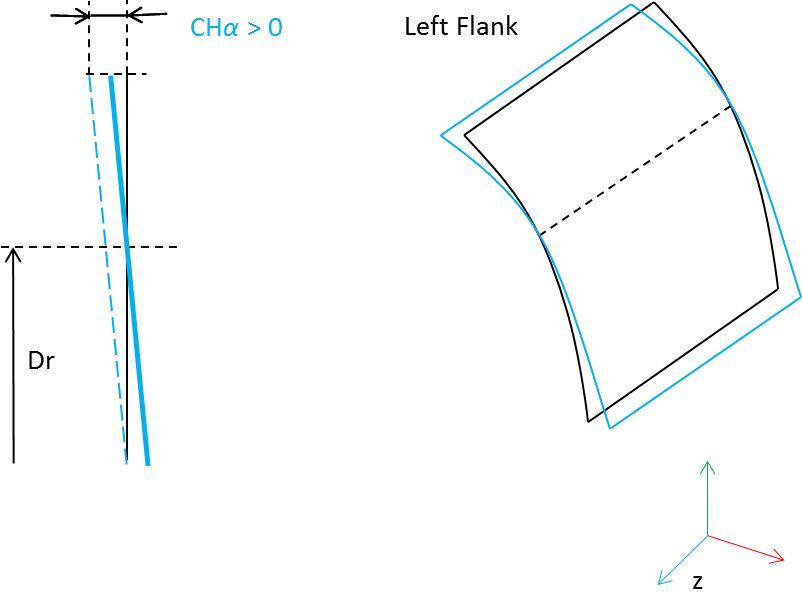
Figure 181 Worm involute slope
Deviations
You can define worm gear manufacturing errors to be taken into account in the contact simulation. Enter Radius Error for every tooth to describe deviations from ideal pitch circle and enter Pitch Error for every tooth to describe deviations from angular pitch, see Figure 182.You can also enter amplitude and phase shift to generate harmonic distribution of error by cosine function or apply generator of random numbers to get random distribution from interval of <-amplitude , + amplitude>. Positive value of Radius Error results in larger tooth radius and positive Pitch Error rotates tooth in counter clock-wise direction according to the right hand rule.
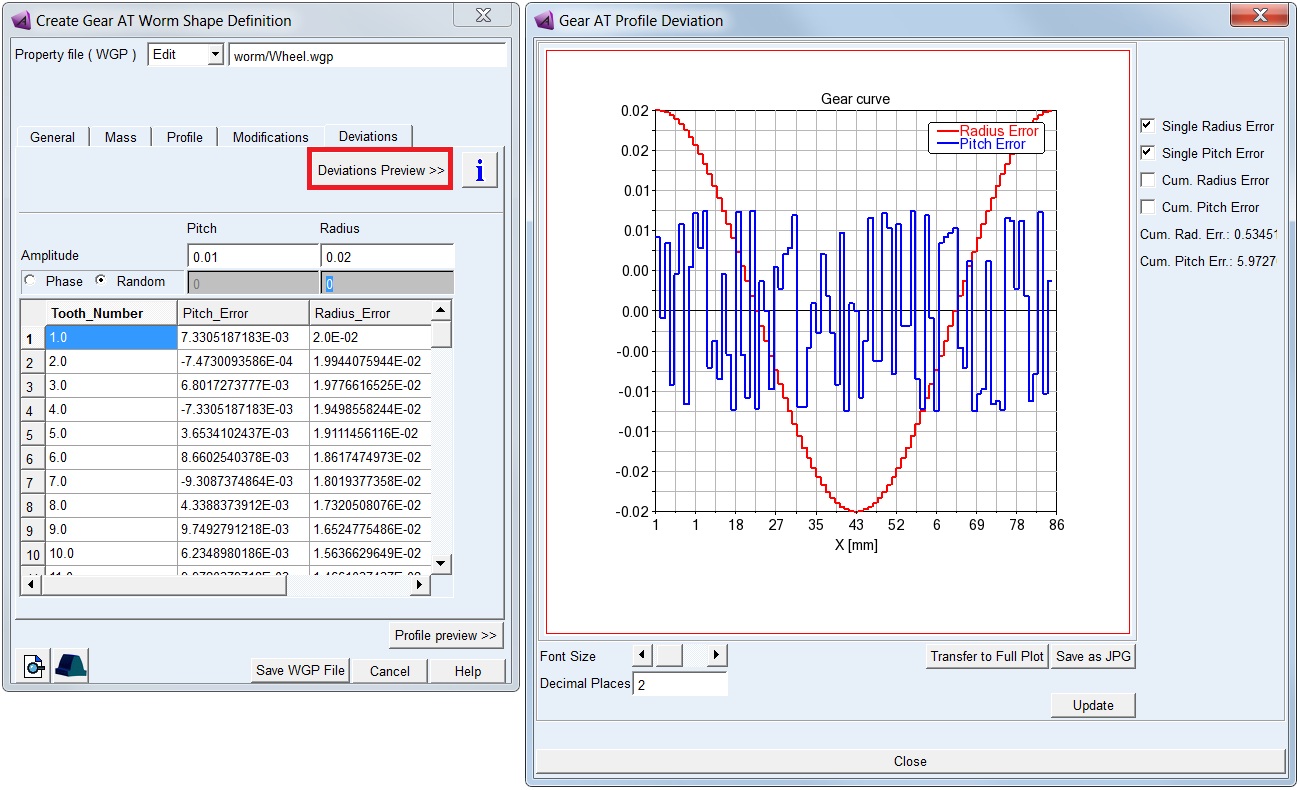
Figure 182 Worm gear deviations tab
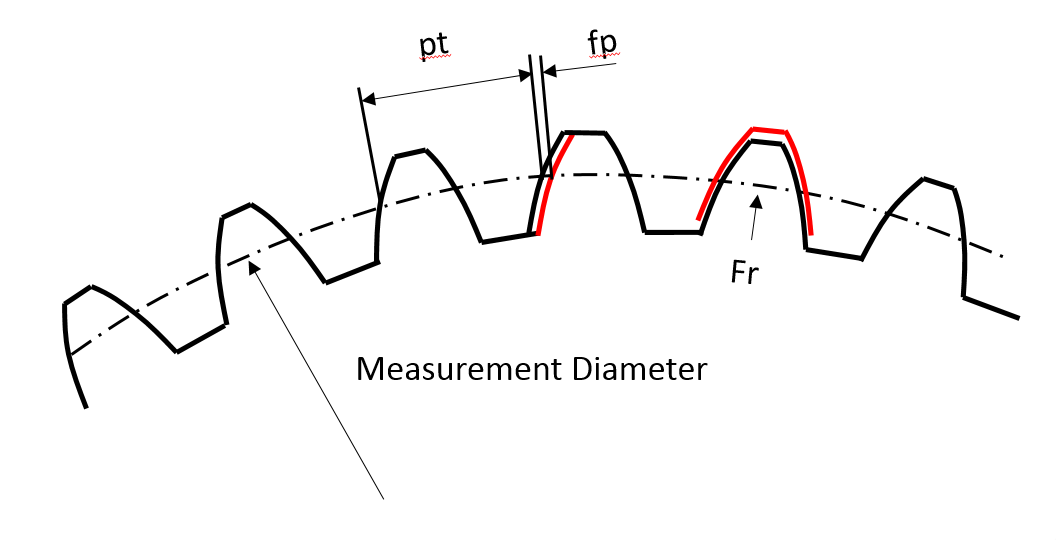
Figure 183 Radial and pitch deviations of worm gear tooth