Gear AT Advanced Shape Definition
Gear AT Shape Definition allows you to create a file that defines the topology of a gear (both macro and micro geometry). You can define a gear tooth profile either by defining tooth proportions or by simulating manufacturing process using hobbing cutter or pinion cutter tool. Figure 360 shows how to access the tools you need to define your gear geometry.
One cannot import a profile from other gear design software in the current release.
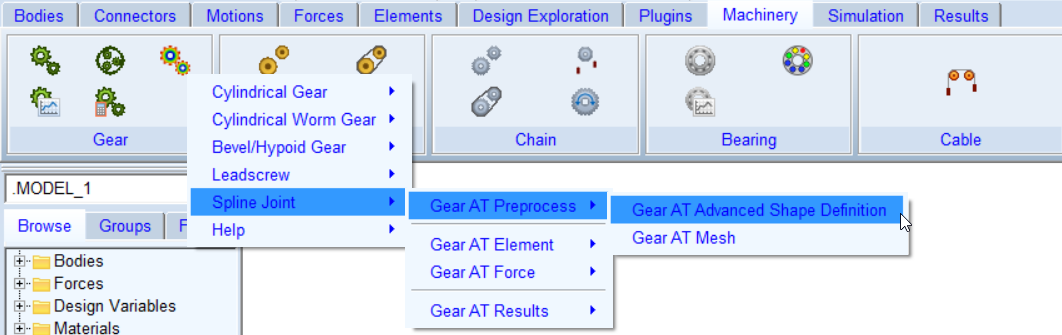
Figure 360 Access to the Gear AT Shape Definition
The Gear AT Shape Definition has following tabs to help you design a gear
■Mass
Main
For the options | Do the following |
|---|---|
Property file (ISP) | This file stores all essential gear element parameters, profile curve, micro geometry and deviations data required for gear element preprocessing and building the gear element in Adams model. In Create mode: ■Enter name of new gear property file ■name of definition file will be derived from property file name automatically when definition file field is left blank In Edit mode: ■right click to browse for existing gear property file ■all relevant fields in various tabs of the dialog box will be filled up by content of gear property file. |
Definition file (ISD) | This file stores all basic gear and tool parameters and settings for a gear profile generation one can usually find in a gear data sheet. In Create mode: ■enter name of new gear definition file or left blank so the name of definition file will be derived from property file name automatically ■or right click to browse for existing gear definition file to edit parameters In Edit mode: ■not editable. It shows the definition file name used for gear shape definition which is stored in CGP file parameter called DEFINITION_FILE |
View Property and Definition file |  Displays content of gear property file and definition file (*.ISP and *.ISD) in new information window. |
Measure file (ISM) | In this field the cylindrical measure file can be selected and imported. Parameters for measurement are set and data is loaded into memory, measurement data can be visualized from the Measure card. |
Profile Preview >> | Opens the Profile plot window for the current property file. |
View ISP Content >> | You can view existing 2D profile of a tooth, which is stored in property file already. This button is available in Edit mode only. |
Create Mesh | Opens the mesh dialog box to proceed with Gear AT Mesh pre-processing for current property file. |
General
To define a spline enter basic geometrical parameters in the General tab (Figure 361).
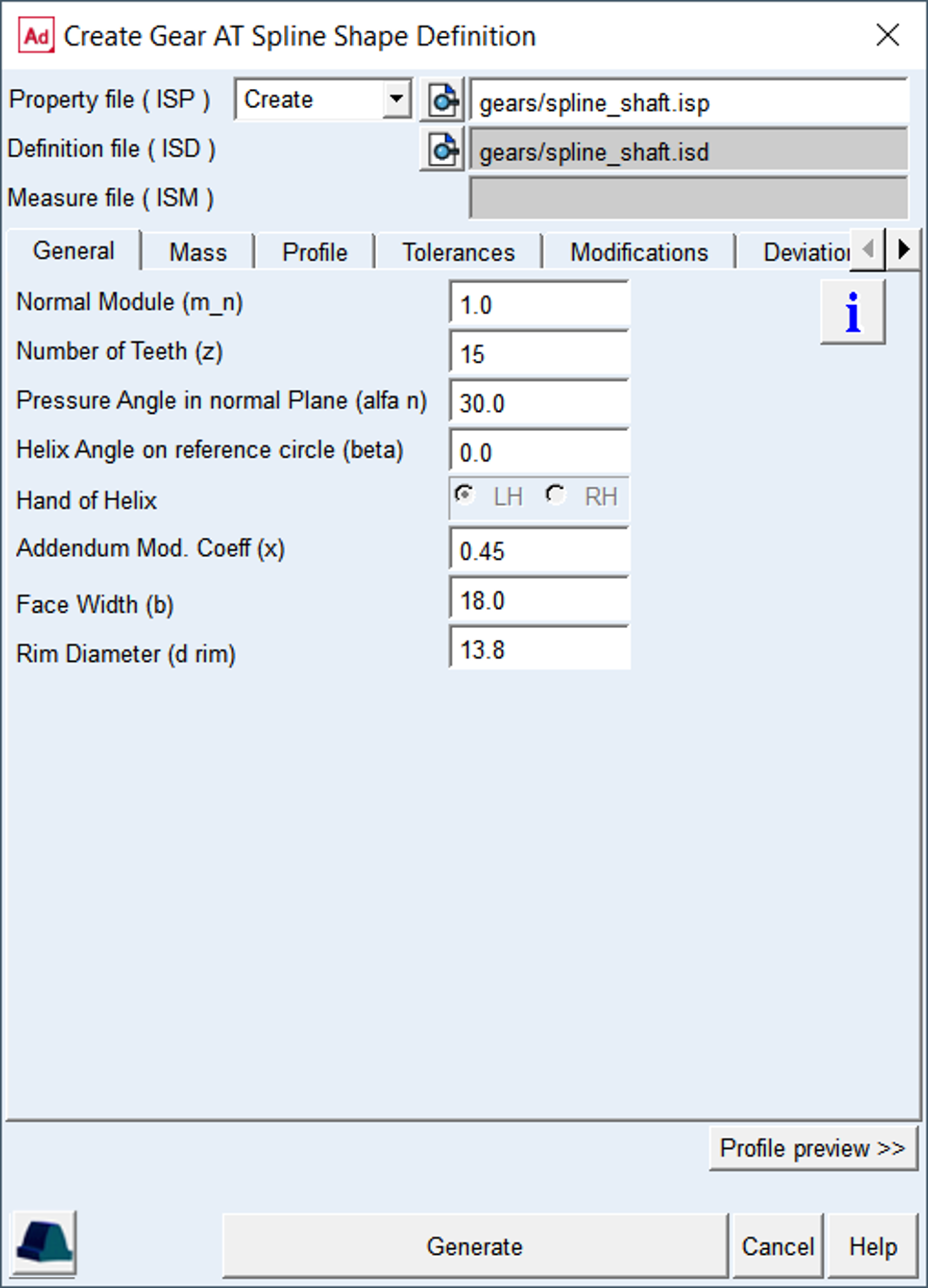
Figure 361 Shape Definition - General tab
For the options | Do the following |
|---|---|
Normal Module (m_n) | Enter value of module in normal plane of a tooth |
Number of Teeth (z) | Enter number of teeth of a gear |
Pressure Angle in normal Plane (alfa n) | Enter value of angle at the pitch diameter between the line of pressure and the line tangent to the pitch circle |
Helix Angle on reference circle (beta) | The helix angle defines the slope of the tooth in lead direction against the rotational axis at the pitch diameter. A positive sign corresponding with the right hand rule. A spur gear has helix angle of zero |
Hand of Helix | Defines whether the helix is left handed (negative) or right handed (positive) |
Profile shift coefficient (x) | This factor is positive, when the reference profile is moved away from a gear by the amount of module * factor. Positive factor increases tooth thickness at pitch circle while negative factor decreases |
Face Width (b) | The length of tooth flank in lead direction |
Rim Diameter | The Rim Diameter defines the boundary of the gear rim to the finite element model of the wheel body |
Normal Module
The Normal Module and the Number of teeth are the fundamental variables in defining a gear wheel; the module is often standardized. Following variables and basic equations explain the relation between the module, pitch diameter and the number of teeth in absence of profile modifications.
m ... normal module
n ... number of teeth
p ... pitch
P ... diametral pitch
d ... pitch diameter
 ... helix_angle
 | (1) |
 | (2) |
The theoretical distance between two wheel centers without modification is given by
 | (3) |
Number of Teeth
A positive integer defines number of teeth of an external gear while a negative integer a number of teeth of an internal gear.
Pressure Angle in normal Plane
The normal pressure angle is the angle at the pitch diameter between the line of pressure and the line tangent to the pitch circle; see Figure 362.
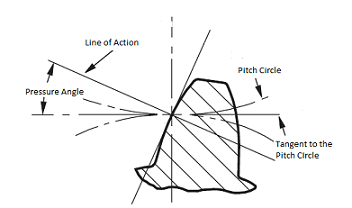
Figure 362 Normal Pressure Angle
Helix angle
The helix angle defines the slope of the tooth in lead direction against the rotational axis at the pitch diameter (Figure 363). A positive sign corresponds with the right hand rule. A straight spur gear has helix angle of zero.
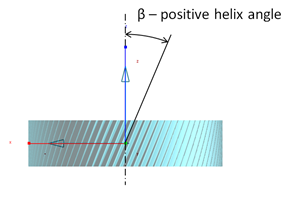
Figure 363 Helix Angle
Hand of Helix
Defines whether the helix is left handed (negative) or right handed (positive)
Profile Shift coefficient
This factor is positive, when the reference profile is moved away from a gear by the amount of module * factor. Positive factor increases tooth thickness at pitch circle while negative factor decreases.
Face Width
The length of tooth flank in lead direction
If this value is set to zero, following default (see Equation (4)) will be set
 | (4) |
Each gear wheel has a reference marker in the middle of the gear rim of width W; the marker can be placed on any rigid or flexible body. The Z-axis of this reference marker represents the rotation axis of the gear wheel as shown on Figure 364.
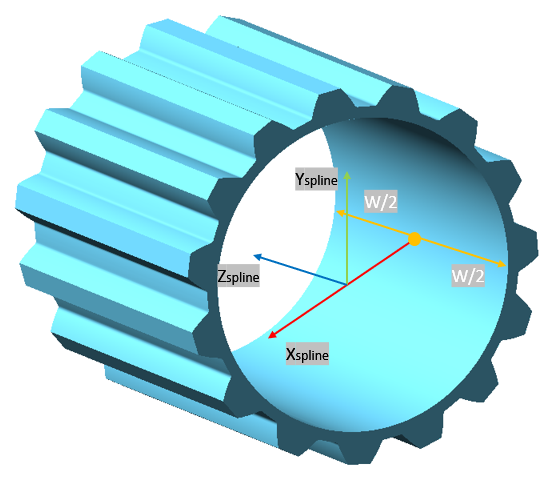
Figure 364 Face Width
Rim diameter
The rim diameter for an external gear and the bore diameter for an internal gear define the boundary of the gear rim (as solid and as finite element model) with the wheel body (Figure 365).
If bore or rim diameter are left to zero, the default is defined by Equation (5). Negative sign holds for external gear and positive sign holds for internal gear. However, the rim thickness should be in the range of  . If user input is out of the range it is automatically adjusted and warning message is issued to the log file.
. If user input is out of the range it is automatically adjusted and warning message is issued to the log file. | (5) |
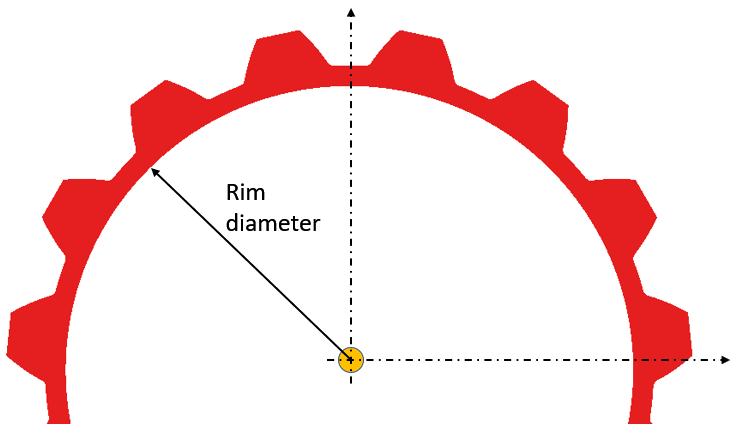
Figure 365 Rim diameter
Hit the button  to open info window with the content of current *.isp property file.
to open info window with the content of current *.isp property file.Hit the button  to open the mesh dialog box for the current *.isp property file
to open the mesh dialog box for the current *.isp property fileThe Profile preview >> button opens the Profile plot window for the current property file as shown in Figure 366.
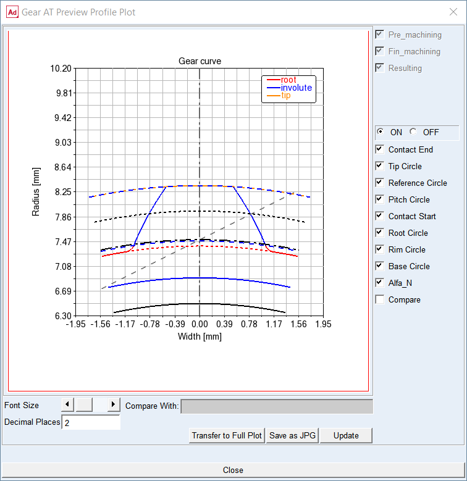
Figure 366 Preview Profile Plot
Mass
The Mass card of the Shape Definition process allows you to define the mass of the gear based either on the Geometry and Material Type or by specific User Input (Figure 367). In the former case the mass, center of mass and inertia tensor is computed later on by the mesher based on FE mesh volume. In the latter case enter all required data in current model units. In either case, inertia data are written to the *.isp file.
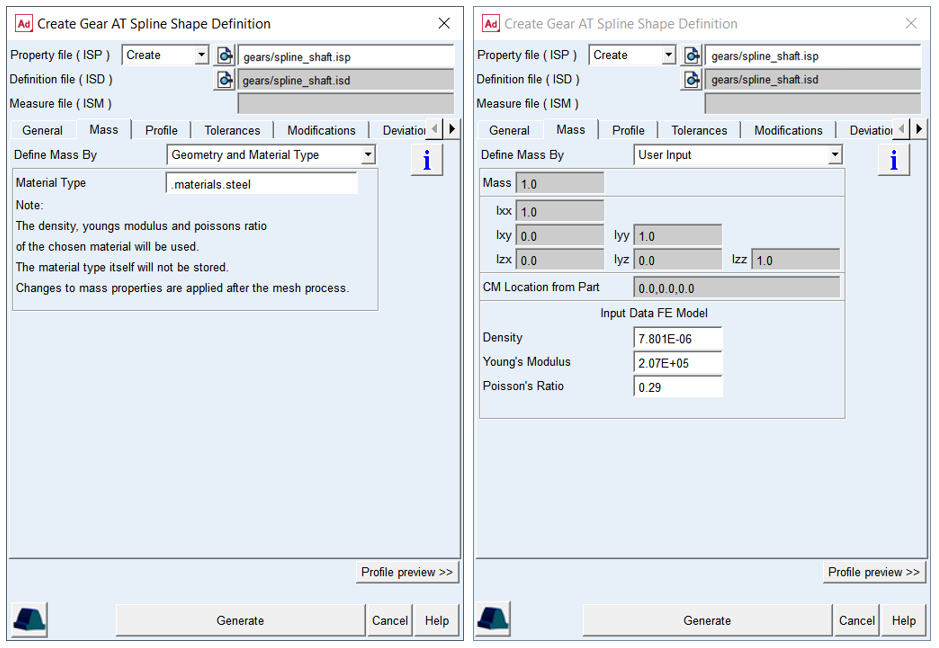
Figure 367 Shape Definition - Mass tab
For the options | Do the following |
|---|---|
Define Mass by | Set to: ■Geometry and Material Type ■User input |
For the option Define Mass by the Geometry and Material Type: | |
Material Type | Choose material type either from predefined material library - right click the field and go to Material - Browse, or create a new one. Note that material of steel is set by default |
For the option Define Mass by the User Input: enter value of Mass, the principal mass moments of inertia (lxx, lyy, lzz) and cross-products of inertia (lxy, lzx, lyz). Note that you still need to define material parameters to define FE model of flexible tooth properly | |
Mass | Enter the mass of the part |
Moments of inertia | Enter the mass moments of inertia |
CM Location from Part | Enter location vector of center of mass expressed in local part reference frame |
Density | Enter Material density to define Nastran MAT1 card of the flexible tooth for SOL101. The value is also used for calculation of the gear wheel inertia properties |
Young‘s Modulus | The Young‘s modulus E is used to define Nastran MAT1 card of the flexible tooth for SOL101. It defines the relation between tensile strain ε and tensile stress σ by Hooke‘s law (Equation (6)), thus defining flexible tooth stiffness. For detailed information: see literature about theory of elasticity |
Poisson‘s Ratio | The Poisson‘s Ratio is used to define Nastran MAT1 card of the flexible tooth for SOL101. An extension εx of a linear elastic and isotropic material is accompanied by lateral strains εy and εz. Poisson‘s ratio defines this relation by Equation (7) and Equation (8) |
Young’s modulus
The Young's modulus E is used to define Nastran MAT1 card of the flexible tooth for SOL101 and SOL103. It defines the relation between tensile strain ε and tensile stress σ by Hooke's law (Equation (6)), thus defining flexible tooth stiffness. For detailed information: see literature about theory of elasticity.
 | (6) |
Poisson’s Ratio
The Poisson’s Ratio is used to define Nastran MAT1 card of the flexible tooth for SOL101 and SOL103. An extension εx of a linear elastic and isotropic material is accompanied by lateral strains εy and εz. Poisson's ratio ν defines this relation by Equation (7) and Equation (8)
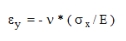 | (7) |
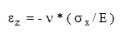 | (8) |
Poisson's ratio can also be derived from the shear modulus G. see Equation (9)
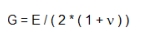 | (9) |
Profile
The Profile tab defines the proportions of tooth profile which can be specified by different method of profile definition. The fields and labels change according to selected definition method and input format. For two step generating process additionally the finishing stock is entered here. The one resp. two informative fields show the resulting generating profile shift upon selected method and entered input data.
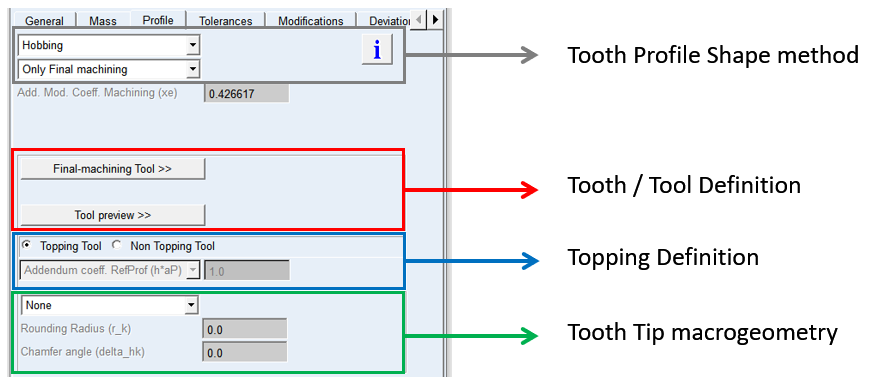
Figure 368 Profile definition tab
Tooth profile shape method menu
The tooth profile can be defined by:
■Explicitly defined tooth reference profile
♦Only Final Machining
■Cutting tool selection thus simulating cutting process
♦Only Final Machining
♦Only Final Machining
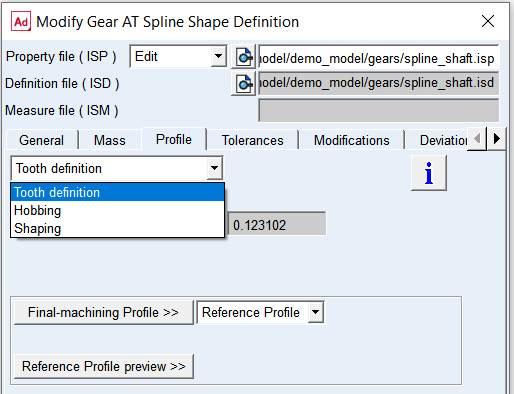
Figure 369 Tooth profile shape method menu
Tooth definition
The Tooth Definition enables user to specify virtual cutting tool for resulting tooth proportions. Internal gears are generated with virtual shaping cutter and external gears with virtual hobbing cutter. Tooth proportions can be defined in form of diameters or coefficients of Normal Module.
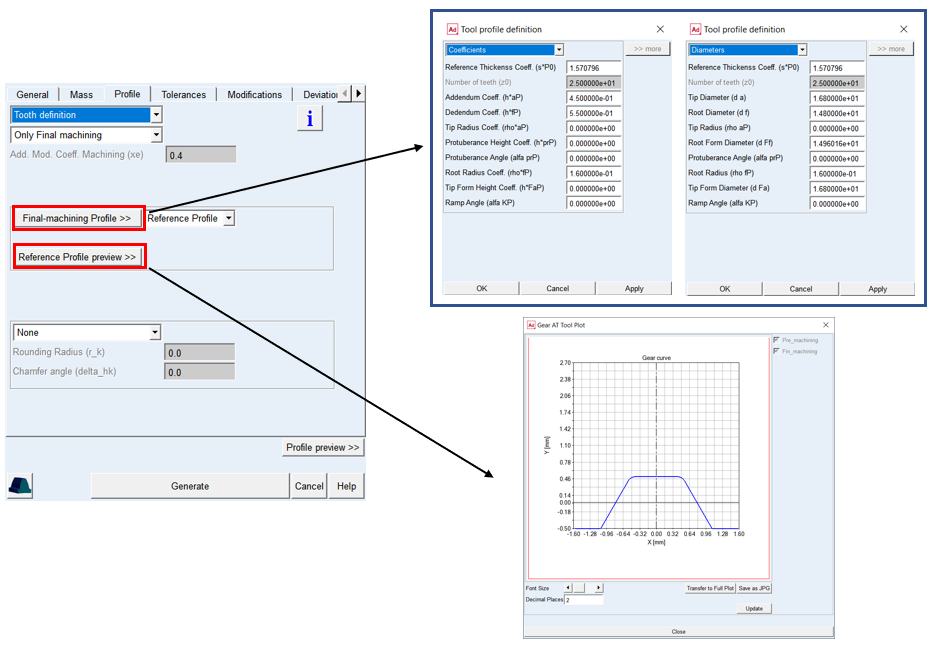
Figure 370 Tooth definition method
Only Final Machining
This method generates the tooth profile in one step, without additional grinding process, so the thickness and the diameters are defines with one tool. The tooth proportions can be entered in form of diameters or coefficients of Normal Module. The Profile shift machining is displayed on the card as informative value, the value differs from Profile shift in General card as it is corrected due to specified thickness allowance.
For the options | Do the following |
|---|---|
Profile shift machining (xe) | The value has informative purpose to see resulting value of generating profile shift: xe = x + Δxjn x = nominal profile shift Δxjn = profilshift due to backlash |
Profile shift (x0) | Applies for internal gears. The reference profile is formed by shaping cutter, so the profile shift can alter the sharper profile due to wear and subsequent tool sharpening |
Number teeth (z0) | Applies for internal gears. Specifies number of teeth for shaping cutter tool. In case the number of teeth is too small to cut the requested gear wheel, the profile generator calculates minimum required number of teeth for cutter |
Addendum Coeff. (h*aP) Tip Diameter (d a) | The value defines addendum height of the gear tooth. This entry can be specified either in form of coefficient h*aP or diameter d a. Typical value is: h*aP = 1.0 d a = pitch diameter + 2.0*profile shift + 2.0* normal module |
Dedendum Coeff. (h*fP) Root Diameter (d f) | The value defines the dedendum height of the gear tooth. This entry can be specified either in form of coefficient h*fP or diameter d f. Dedendum values usually includes tip clearance of 0.25 * normal module. Typical value is: h*fP = 1.25 d f = pitch diameter + 2.0*profile shift − 2.5* normal module |
Tip Radius Coeff. (rho*aP) Tip Radius (rho aP) | The value defines rounding section on a tip of gear tooth |
Protuberance Height Coeff. (h*prP) Root Form diameter (d Ft) | The value defines the height of undercut section on the root of gear tooth. This entry can be specified either in form of coefficient h*prP or diameter d Ft. When set to zero, the undercut section is not created |
Protuberance Angle (alfa prP) | The value defines the inclination of the undercut section. When set to zero, the undercut section is not created. The value should be lower than normal pressure angle |
Root Radius Coeff. (rho*fP) Root Radius (rho fP) | The value defines the root fillet section on gear tooth. This entry can be specified either in form of coefficient rho*fP or radius rho fP. The radius must be always greater then zero, typical value is: |
Tip Form Height Coeff. (h*FaP) Tip Form Diameter (d Fa) | The value defines the starting point of a tip chamfer. This entry can be specified either in form of coefficient h*Fap or diameter d Fa. When set to zero, the chamfer section is not created |
Ramp Angle (alfa KP) | The value defines the inclination of the chamfer section on gear tooth tip. When set to zero, the chamfer section is not created. The value should be greater then normal pressure angle |
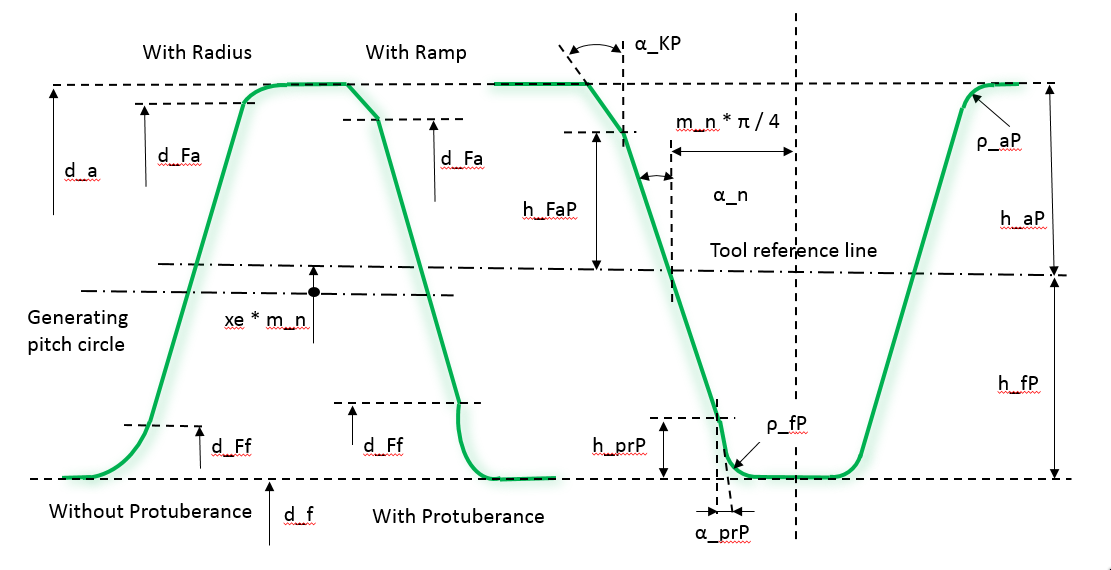
Figure 371 Tooth definition parameters
Hobbing
To define a tooth manufactured by hobbing cutter, enter all dimensions of a tool in the dialog box as shown on Figure 372 according to drawing in Figure 373. Please note that unlike the Tooth definition, it expects to define cutter proportions. Here, it is important to realize the fact that addendum portion of a cutter tooth is shaping dedendum portion of a gear tooth. For hobbing one can additionally select in how many steps the profile is generated.
For the options | Do the following |
|---|---|
Profile shift machining (xe) | The value has informative purpose to see resulting value of generating profile shift: xe = x + Δxjn x = nominal profile shift Δxjn = profilshift due to backlash |
■Only Final Machining - one step cutting, without final grinding, the tooth shape is created only with one tool
Only Final Machining
This method generates the tooth profile in one step, without additional grinding process, so the thickness and the diameters are defines with one tool. The tooth proportions can be entered in form of diameters or coefficients of Normal Module. The Profile shift machining is displayed on the card as informative value, the value differs from Profile shift in General card as it is corrected due to specified thickness allowance.
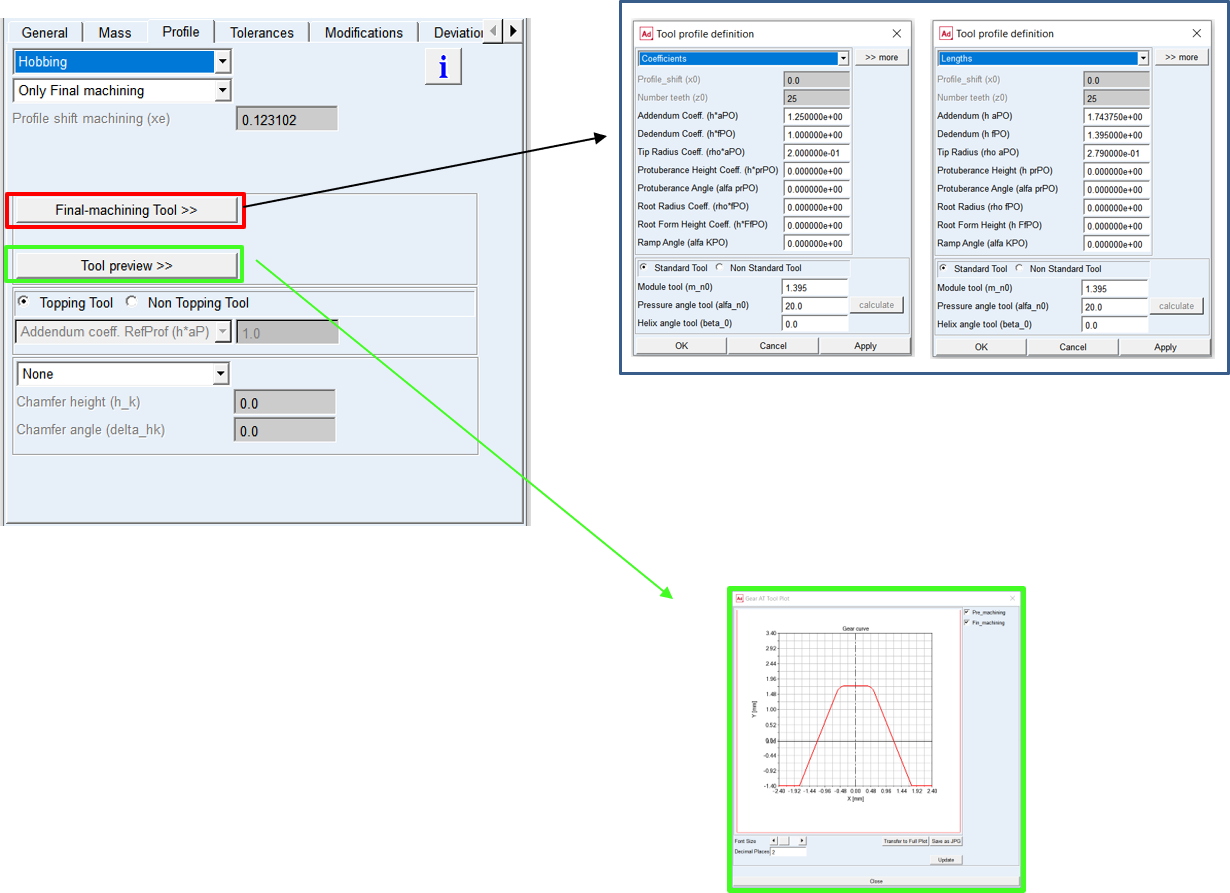
Figure 372 Hobbing cutter method - Only Final Machining
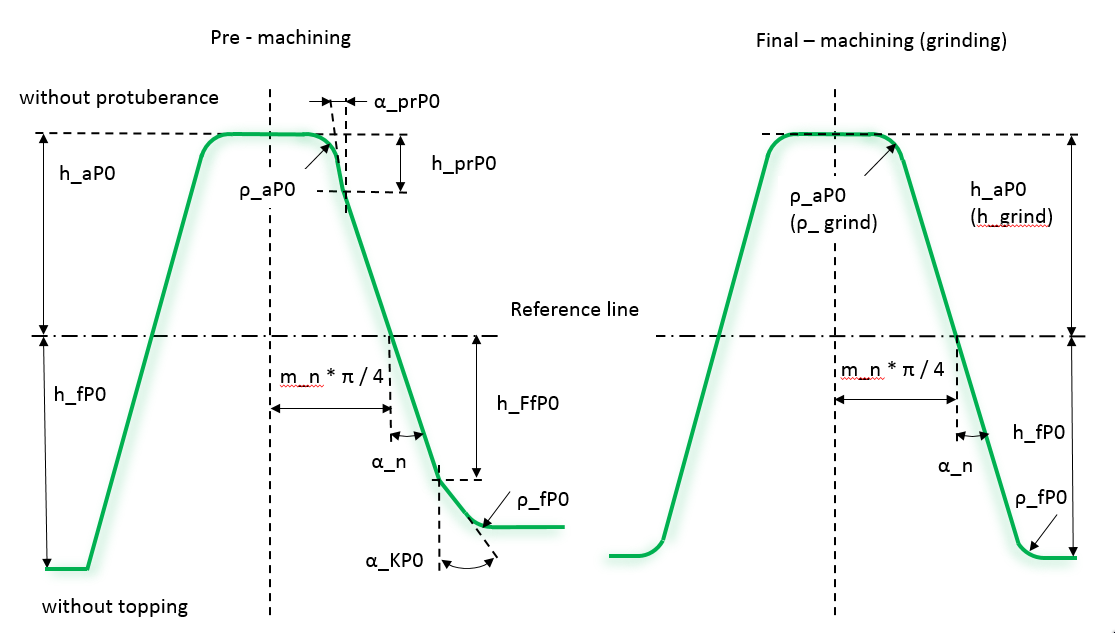
Figure 373 Hobbing cutter parameters
Shaping
To define a tooth manufactured by pinion cutter, enter all parameters as shown in the dialog box on the Figure 374 according to drawing in Figure 375. Please note that unlike the Tooth definition, it expects to define cutter proportions. Here, it is important to realize the fact that addendum portion of a cutter tooth is shaping dedendum portion of a gear tooth.
For the options | Do the following |
|---|---|
Profile shift machining (xe) | The value has informative purpose to see resulting value of generating profile shift: xe = x + Δxjn x = nominal profile shift Δxjn = profilshift due to backlash |
The shaping tool can not be defined as Nonstandard tool in this release.
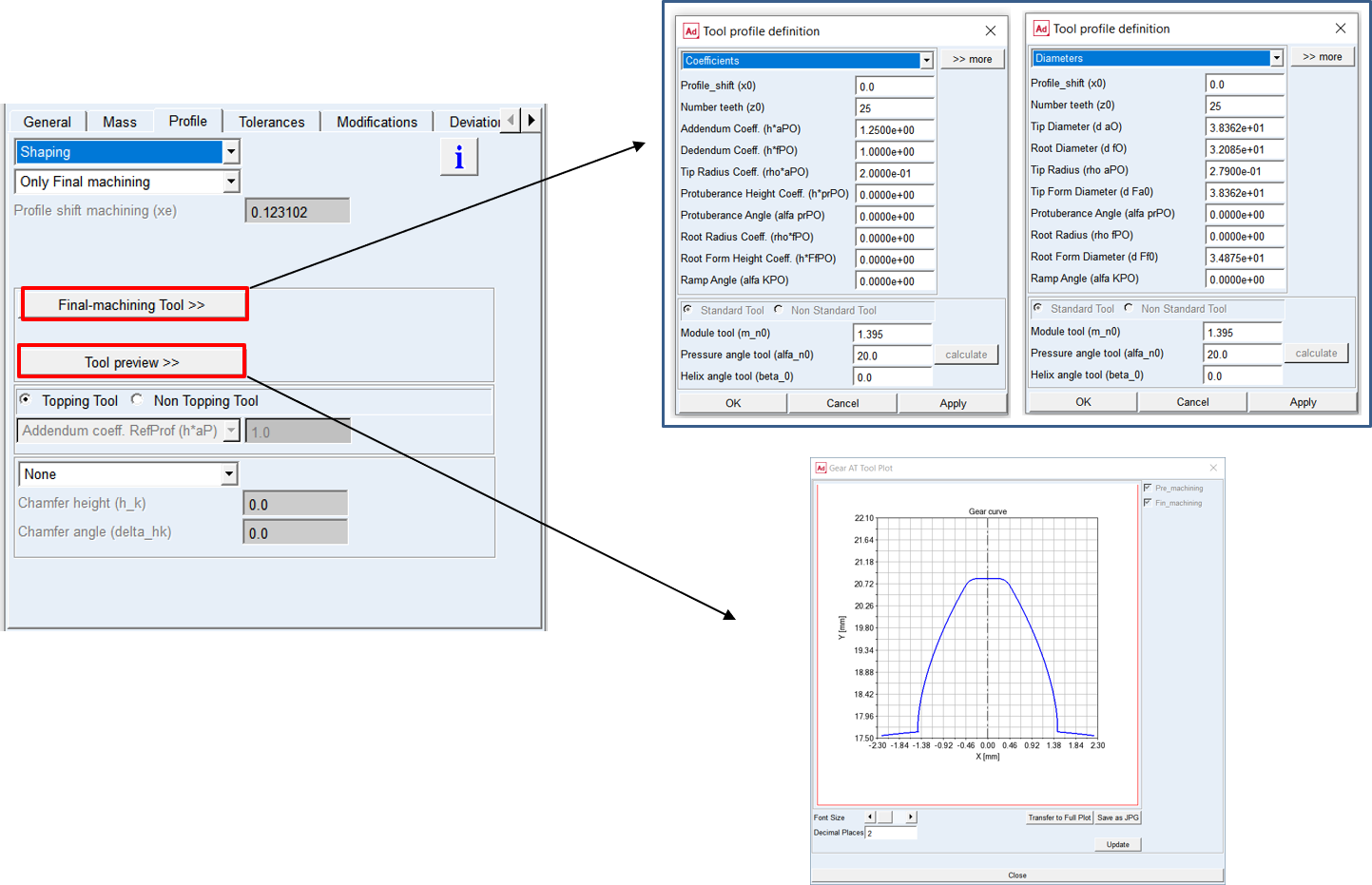
Figure 374 Shaping cutter method
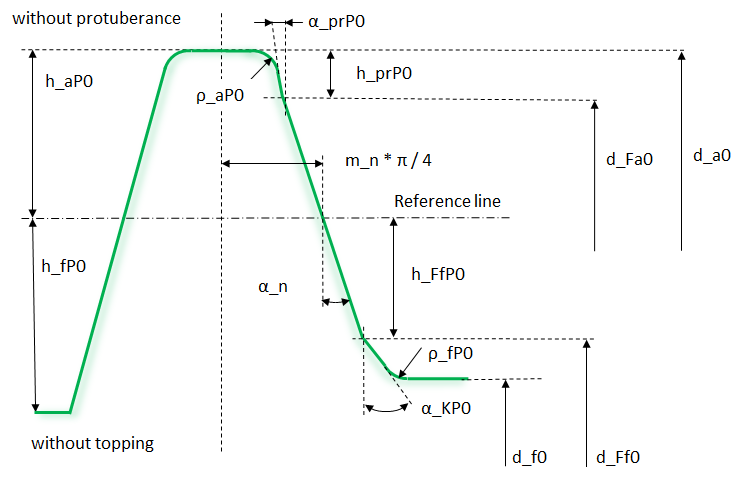
Figure 375 Shaping cutter parameters
Only Final Machining
This method generates the tooth profile in one step, without additional grinding process, so the thickness and the diameters are defines with one tool. The tooth proportions can be entered in form of diameters or coefficients of Normal Module. The Profile shift machining is displayed on the card as informative value, the value differs from Profile shift in General card as it is corrected due to specified thickness allowance.
Tolerances
The Tolerances card includes definition of tooth thickness, tip and root diameter allowances. The tooth thickness allowance can be defined either direct or via normal or circular backlash, the allowance can be also defined from Dimension Over Balls and Base Tangent Length measurement.
In case either from the measurement is not known, one can initialize the measurements with Init Measurement buttons, this sets either optimal value of the Measurement ball diameter or the value of Number teeth spanned, and it derives the measurement for given thickness allowance input.
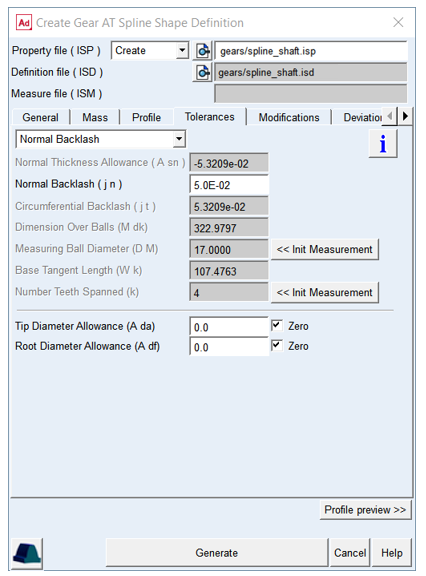
Figure 376 Shape Definition - Tolerance tab
For the options | Do the following |
|---|---|
Normal Thickness Allowance (A sn) | The value represents alternation of tooth thickness at the reference circle in the normal plane |
Normal Backlash (j n) | The entered value represents the portion of the total backlash in normal plane along line of action, applied on the respective gear wheel. |
Circumferential Backlash (j t) | The entered value represents the portion of the total backlash in form of arc length on reference circle in transversal plane, applied on the respective gear wheel. |
Dimension Over Balls (M dk) | The Dimension over balls can be used to define the thickness allowance from measurement together with Measuring ball diameter |
Measuring Ball Diameter (D M) | The diameter of measuring ball can be used to indirectly define the tooth thickness allowance together with Dimension Over Balls M dK. Diameter of measuring ball is also used for gear generator to calculate dimensions over balls for the generated profile |
Base Tangent Length ( W k eff) | The Effective Base tangent length can be used to indirectly define the tooth thickness allowance together with Number of teeth spanned. |
Number Teeth Spanned (k) | Number of teeth spanned can be used to indirectly define the tooth thickness allowance together with Effective Base tangent length. The number of teeth the instrument is placed over, depends on the total number of teeth, the pressure angle and helix angle of a gear. |
Tip Diameter Allowance (A da) | The value represents the alternation of Tip Diameter on respective gear wheel. |
Root Diameter Allowance (A df) | The value represents the alternation of Root Diameter on respective gear wheel. |
Zero toggles | If the tip resp. root diameter allowance is not of interest, one can check this toggle, then the selected diameter allowance is hold zero and not influenced by thickness allowance settings. |
Extended definition:
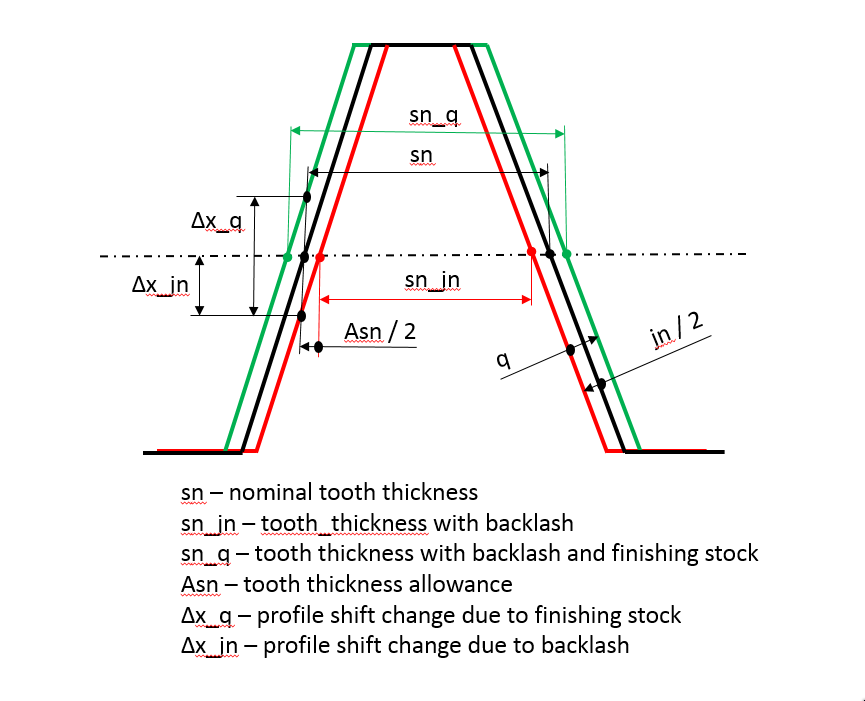
Figure 377 Thickness relation to backlash and finishing stock
Normal Thickness Allowance (A sn)
The value defines the alternation of tooth thickness. Usually, the nominal tooth thickness is adjusted to ensure smooth operation of the gear pair allowing for pitch and radial deviations, gear misalignments due to assembly or system deflections to not cause unintended contact between the gear teeth, like tooth interference and/or backside contact. The relation to backlash is depicted on Figure 377.
Normal Backlash (j_n)
The value represents just another way to define Thickness Allowance. The entered value represents the portion of the total backlash applied on the respective gear wheel in normal plane along line of action. It is the shortest distance between the non-working flanks of a gear pair when their working flanks are in contact.
Circumferential Backlash (j t)
The value represents just another way to define Thickness Allowance. The entered value represents the portion of the total backlash applied on the respective gear wheel as an arc length in radians on the reference circle in the transversal plane.
Dimensions Over Balls (M dk) / Measuring Ball Diameter (D M)
Measurement over the balls or pins enables indirect determination of the tooth Thickness Allowance. A measuring ball or pin is placed in two tooth spacing which are opposite to each other (see Figure 379). The Dimension Over Balls and Measuring Ball Diameter are the values to be entered accordingly to measurement process. The Measuring Ball Diameter is also input for gear generator which calculates Dimension Over Balls for comparison with real measurement (Figure 380).
Base tangent length (W k eff) / Number of teeth spanned (k)
Effective Base tangent length enables indirect determination of the tooth thickness allowance.
The tooth thickness is evaluated from the effective base tangent length W k eff (Figure 378), which is measured over a specific number of teeth. The number of teeth the instrument is placed over, depends on the total number of teeth, the pressure angle, the helix angle and width of a gear.
The number teeth spanned is also used for the computation of the effective base tangent length W k eff and the base tangent length W k (without backlash) by the profile generator and outputs resulting value for comparison with real measurement (Figure 380).
Number Teeth Spanned (k)
It is used for the computation of the effective base tangent length Wk and the base tangent length (without backlash) by the profile generator and outputs resulting value for comparison with real measurement (Figure 380). The tooth thickness is evaluated from the effective base tangent length Wk (Figure 378), which is measured over a specific number of teeth. The number of teeth the instrument is placed over, depends on the total number of teeth, the pressure angle and helix angle of a gear.
Tip Diameter Allowance (A da)
The value represents the alternation of Tip Diameter on respective gear wheel. The allowance is not available if tool with topping ( shaping or hobbing) generates the profile, in this case the tool adjustment due to thickness allowance defines the allowance.
Root Diameter Allowance (A df)
The value represents the alternation of Tip Diameter on respective gear wheel. The allowance is not available if tool ( shaping or hobbing) generates the profile, in this case the tool adjustment due to thickness allowance defines the allowance.
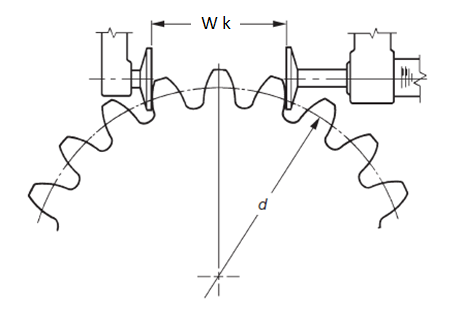
Figure 378 Teeth Span Measurement
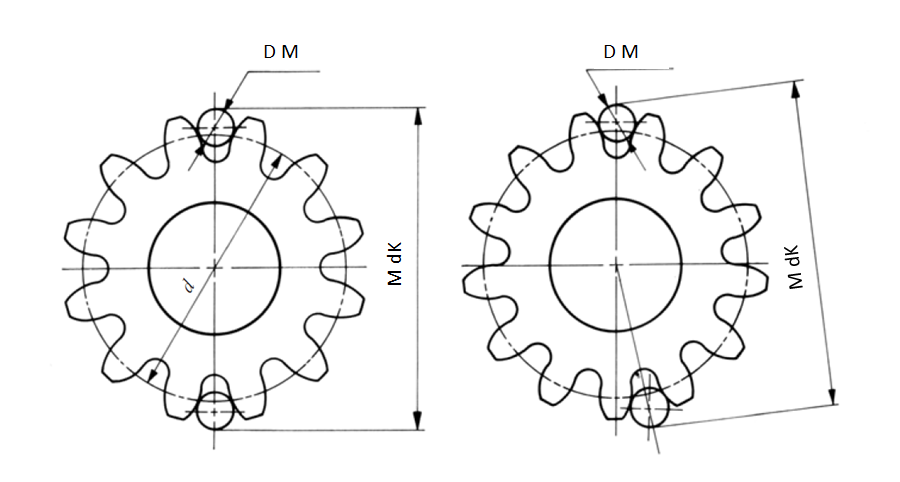
Figure 379 Measurement over pins/balls
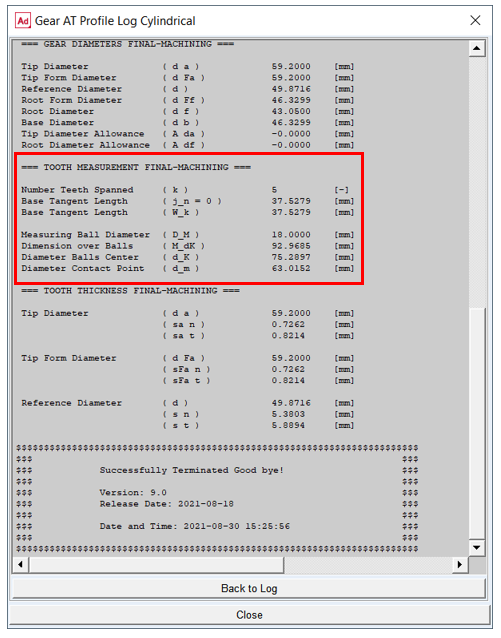
Figure 380 Tooth measurements output from profile generator
Modifications
Spline tooth flank modifications are applied to compensate for manufacturing errors, deformation of the teeth due to load and also for shafts and housing deformation thus ensure a proper meshing to achieve more favorable load distribution. The ultimate goal is to reduce spline wear and vibrations induced by the spline pair operation, thus help to design durable gearbox fulfilling specified NVH parameters.
The convention for tooth flank side used throughout the Gear AT is based on ISO standards (Figure 381). The modification amount is defined in transversal plane and perpendicular to profile curve. The principal definition is based on ISO DIN 21771 and ISO DIN 1328-1 2018.
Important: | Values of gear modifications are usually defined in units of micrometers in gear specification sheets or drawings. However, values of all parameters have be entered in model units! |
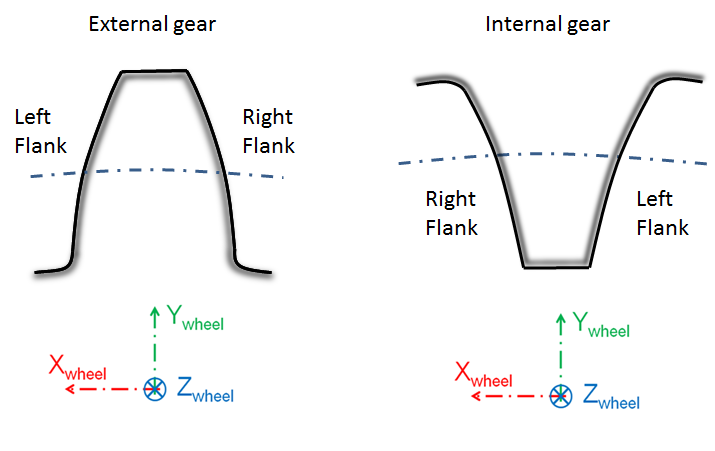
Figure 381 Definition of left and right flank
The topology modifications are divided in Gear AT into 3 main groups:
User can enter values individually for each group on left or right flank, after opening dedicated dialog box with group button under Topology setting section. The input can be identical for both flanks after checking Symmetric Left Right Flank toggle before opening the group dialog box. See Figure 382.
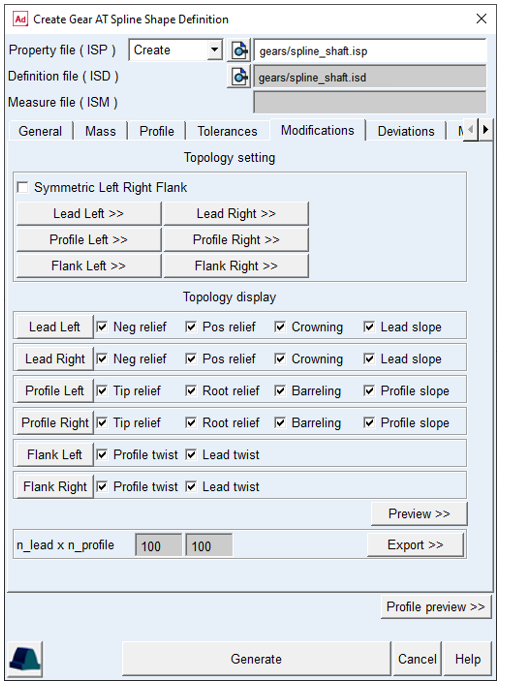
Figure 382 Shape Definition - Modifications tab
Lead Modification
Lead modifications are used to attain a low displacement sensitivity and to avoid strain peaks occurring due to displaced positions of the gear axis or helix deviations of the flank. Types of lead modifications for spline supported by Gear AT include longitudinal end relief, crowning and lead slope changes. The Figure 383 shows the lead modifications tab layout for the left flank.
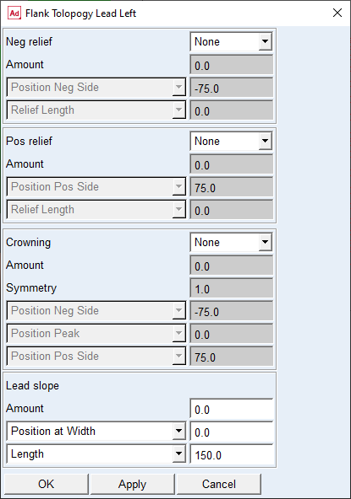
Figure 383 Lead Modification dialog box
End Relief (Pos relief, Neg relief)
End relief is used to avoid stress concentrations at the edges due to angular misalignment of a spline pair. This type of tooth modification is preferably used on wider gears.
For the options | Do the following |
|---|---|
End Relief Neg / Pos | The relief can have Linear, Quadratic or Cubic shape. The Quadratic shape is in most cases equivalent with circular and parabolic shape. Selecting None deactivates the relief. Default option = None |
Amount (C_b_I / C_b_II) | This parameter defines how much material is added or removed by the relied. Positive value means material is removed. Default value = 0.0 |
End Relief Neg / Pos Position | The amount of relief is applied at the position defined by this parameter. It has the meaning of gear width starting in the middle of gear width, spanning from middle to pos. resp. neg. gear side. In addition to the user input, the Position Neg Side / Position Pos Side option, there is predefined value of position at the negative and positive half width, the Position Neg Gear Side / Position Pos Gear Side Neg relief: Default value = Position Neg Gear Side Pos relief: Default value = Position Pos Gear Side |
End Relief Neg / Pos Length (L_CI_2 / L_CII_2) | This parameter defines the start position of the end relief along lead direction which is measured from the end relief position. Default value = 0.0 |
The End Relief modifications with the principal parameters are depicted on figure Figure 384.
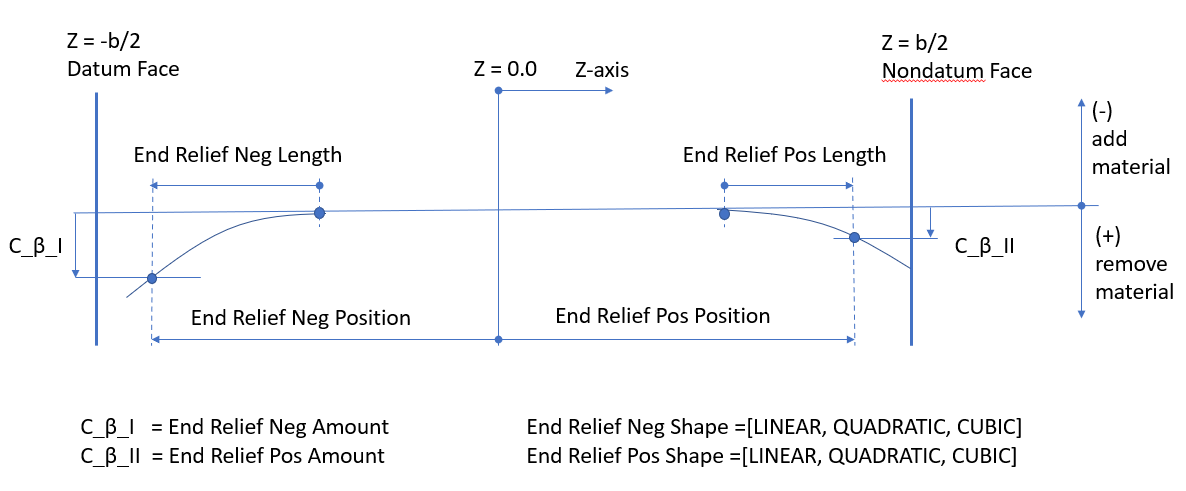
Figure 384 Positive and Negative end relief
Crowning
Crowning is convex shape along the width of a tooth. It is used to maintain contact in the central region of the tooth flank width allowing for spline angular and axial misalignment. This type of tooth modification is preferably used on narrow gears. The amount of crowning should not be larger than necessary as otherwise it would reduce area of contact, thus lowering load capacity of a spline pair.
For the options | Do the following |
|---|---|
Crowning | The crowning can have Linear, Quadratic or Cubic shape. The Quadratic shape is in most cases equivalent to circular and parabolic shape. Selecting None option deactivates the crowning. Default option = None |
Amount (C_b_I / C_b_II) | It defines how much material is added/removed by the crowning at the Negative and Positive Position, respectively. Positive value means material is removed. Default value = 0.0 |
Symmetry | This parameter defines the distribution of crowning amount between positive and negative tooth side. The amount applied on positive side is multiplied by this value. Using value of 1.0 defines symmetrical crowning. Default value = 0.0 |
Crowning Position Neg: Position Neg Side Position Neg Gear Side | The amount of crowning is applied at position on the negative side of a tooth defined by this parameter. It has the meaning of gear width starting in the middle of a gear, spanning to negative gear side. In addition to the user input, the Position Neg Side option, there is predefined value of position at the negative half width, the Position Neg Gear Side. Default value = Position Neg Gear Side |
Crowning Position Peak: Position Peak Position Middle | This parameter defines position of the crowning peak, that is, the point where no material is removed of the flank surface. It has meaning of gear width starting in the middle of a tooth width, spanning from Crowning Position Neg to Crowning Position Pos. In addition to the user input, the Position Peak, there is predefined position in the middle of a tooth width, the Position Middle. Default value = Position Middle |
Crowning Position Pos: Position Pos Side Position Pos Gear Side | The amount of crowning is applied at reference position on the negative side of a tooth defined by this parameter. It has the meaning of gear width starting in the middle of a gear, spanning to positive gear side. In addition to the user input, the Position Pos Side option, there is predefined value of position at the positive half width, the Position Pos Gear Side. Default value = Position Pos Gear Side |
The Crowning modification with the principal parameters is depicted on figure Figure 385.
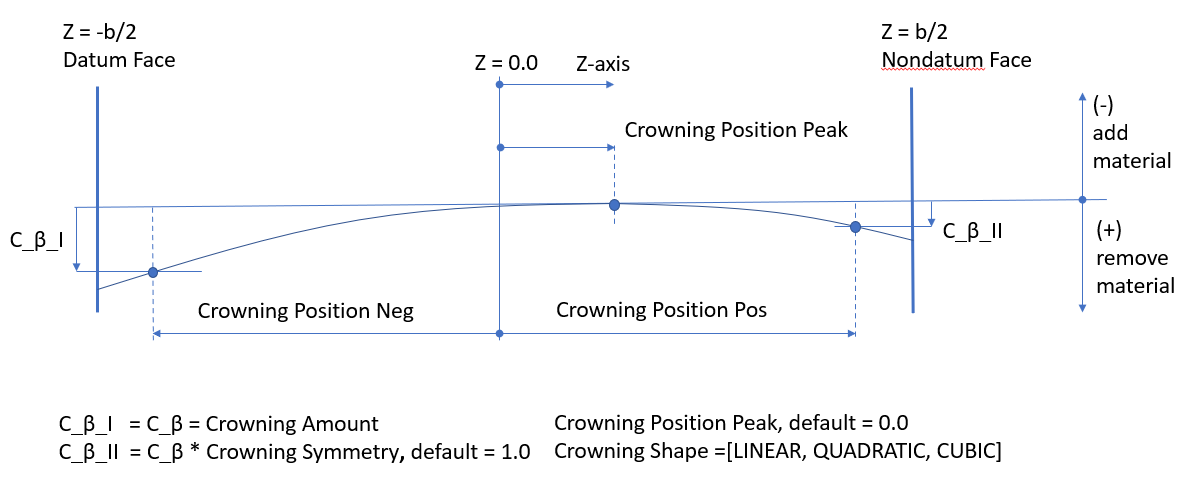
Figure 385 Crowning definition
Lead Slope
Lead Slope defines correction of the helix angle (Figure 386), which is used to improve contact with mating gear teeth when system deflections would otherwise cause edge loading.
For the options | Do the following |
|---|---|
Amount (C_Hb) | Along with Slope Length it defines the slope by which the flank deviated from the original helix. Positive value increases the absolute value of the helix angle, while negative decreases the absolute value. For straight teeth, a positive value creates right-hand helix, while negative value creates left-hand helix. Default value = 0.0 |
Slope Reference Position: Position at Width Position Neg Gear Side Position Pos Gear Side Auto Width | The parameter defines the position of zero flank change. It has the meaning of gear width starting in the middle of a gear width, spanning from negative to positive gear side. In addition to the user input, the Position at Width option, there are predefined values of position at the gear negative or positive side, the Position Neg Gear Side and Position Pos Gear Side. The Auto Width option adjusts the value in the way the sum of all lead modifications is tangent to the original flank surface at certain point. Default value = 0.0 |
Slope Length (L_b): Length Full Length | The parameter defines the tooth width where the lead slope is applied. Beside the user input, the Length option, a full tooth width is a predefined length value. Default value = Full Length |
The Lead slope modification with the principal parameters is depicted on figure Figure 386.
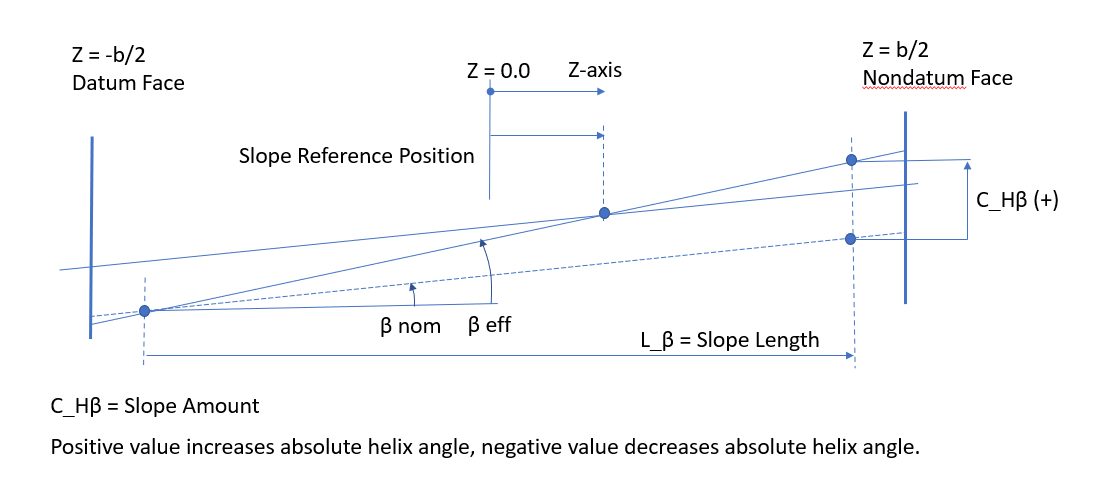
Figure 386 Lead Slope definition
Profile Modifications
Profile modifications are mostly used to decrease the engagement shock and the involved strain and noise. Types of profile modifications supported by Gear AT include tip and root relief, barreling (vertical crowning), and profile slope correction. The figure Figure 387 shows the profile modifications dialog box layout for the left flank.
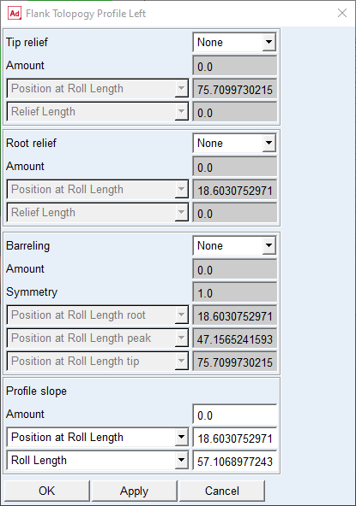
Figure 387 Profile modifications dialog box
The positions of modifications amount along tooth profile are typically expressed relative to roll length. In addition, a user has an option to enter Position at Diameter resp. Position at Roll angle instead of Position at Roll Length value. The different input options are linked together and express the same point on involute point, see Figure 388.
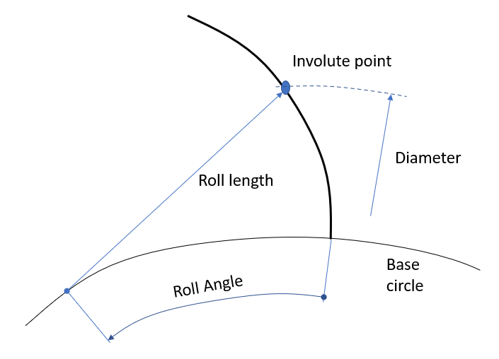
Figure 388 Roll Length, Diameter and Roll Angle relation
Tip and Root Relief
The use of tip relief will cause less noise during gear meshing. Tip relief is the most economical and most common method.
For the options | Do the following |
|---|---|
Tip Relief / Root Relief | The tip and root relief can have Linear, Quadratic or Cubic shape. The Quadratic shape is in most cases equivalent to circular and parabolic shape. Selecting None option deactivates the relief. Defaul option = None |
Amount (C_aa / C_af) | This parameter defines how much material is added or removed by the relief. Positive value means material is removed. Default value = 0.0 |
Tip / Root Relief Position: Position at Roll Length (L_Caa / L_Caf) Position at Diameter (d_Caa / d_Caf) Position at Roll Angle @Tip Form / Root Form | The amount of relief is applied at the position defined by this parameter. It has the meaning of tooth roll length starting on the base circle and spanning between tip and root form circle. Besides the roll length the value can be entered as diameter or roll angle. In addition to the user input, the Position at Roll Length option, there is predefined value of position on the tip / root form circle, the Position Tip Form Roll Length / Position Root Form Roll Length. Usually, the value should reflect the active tip and root circle, respectively. Tip relief: Default value = Position Tip Form Roll Length Root relief: Default value = Position Root Form Roll Length |
Tip / Root Relief Length: Relief Length (L_Ca / L_Cf) Start at Diameter (d_Ca / d_Cf) Start at Roll Angle | This parameter defines the start position of the relief which is measured from the relief reference position. Default value = 0.0 |
The Tip and Root Relief modifications with the principal parameters are depicted on figure Figure 389.
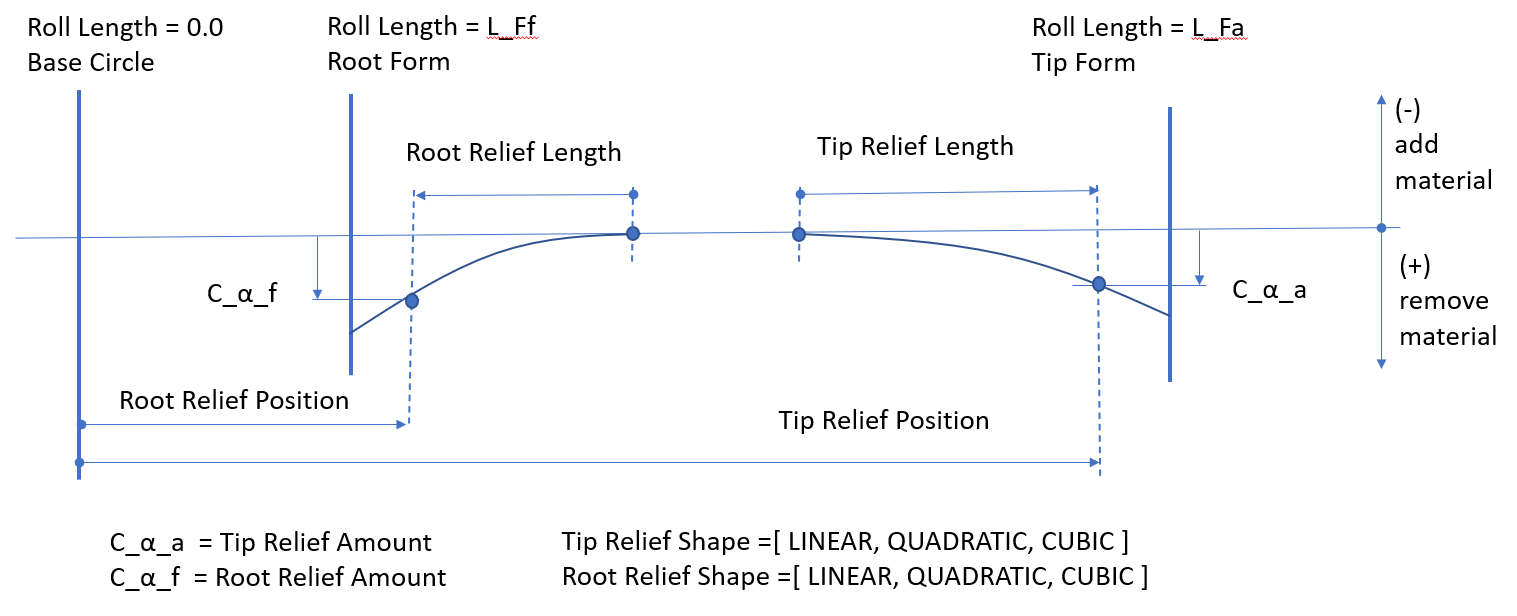
Figure 389 Tip and Root relief definition
Barreling
Profile barreling is a convex shape added to the involute curve to prevent hard contact near the tip and root.
For the options | Do the following |
|---|---|
Barreling | The barreling can have Linear, Quadratic or Cubic shape. The Quadratic shape is in most cases equivalent to circular and parabolic shape. Selecting None option deactivates the barreling Defaul option = None |
Amount (C_a1) | It defines how much material is added/removed by the barreling at the Reference Tip and Root Position respectively. Positive value means that material is removed. Default value = 0.0 |
Symmetry (C_a2 / C_a1) | This parameter defines the distribution of barreling amount between tip and root. The amount applied at root is multiplied by this value. The value of 1.0 defines symmetrical barreling. Defaul valule = 1.0 |
Reference Root Position: Position at Roll Length root (L_Ca2) Position at Diameter root (d_Ca2) Position at Roll Angle root @Root Form | The amount of barreling is applied at the root position defined by this parameter. It has the meaning of tooth roll length starting on the base circle, spanning between tip and root form circle. Besides the roll length the value can be entered as diameter or roll angle. In addition to the user input, the Position at Roll Length root option, there is predefined value of position on the root form circle, the Position Root Form Roll Length. Usually, the value should reflect the active root circle. Default value = Position Root Form Roll Length |
Reference Peak Position: Position at Roll Length peak Position at Diameter peak Position at Roll Angle peak @Middle | This parameter defines position of the barreling peak, that is, the point where no material is removed of the flank surface. It has the meaning of tooth roll length starting on the base circle and having spanning between tip and root form circle. Besides the roll length the value can be entered as diameter or roll angle. In addition to the user input, the Position at Roll Length peak option, there is predefined position in the middle of the roll length, the Position Middle Roll Length, that is, between tip and root. Default value = Position Middle Roll Length |
Reference Tip Position: Position at Roll Length tip (L_Ca1) Position at Diameter tip (d_Ca1) Position at Roll Angle tip @Tip Form | The amount of barreling is applied at the reference tip position defined by this parameter. It has the meaning of tooth roll length starting on the base circle, spanning between tip and root form circle. Besides the roll length the value can be entered as diameter or roll angle. In addition to the user input, the Position at Roll Length tip option, there is predefined value of position on the tip form circle, the Position Tip Form Roll Length. Usually, the value should reflect the active tip circle. Default value = Position Tip Form Roll Length |
The Barreling modification with the principal parameters is depicted on figure Figure 390.
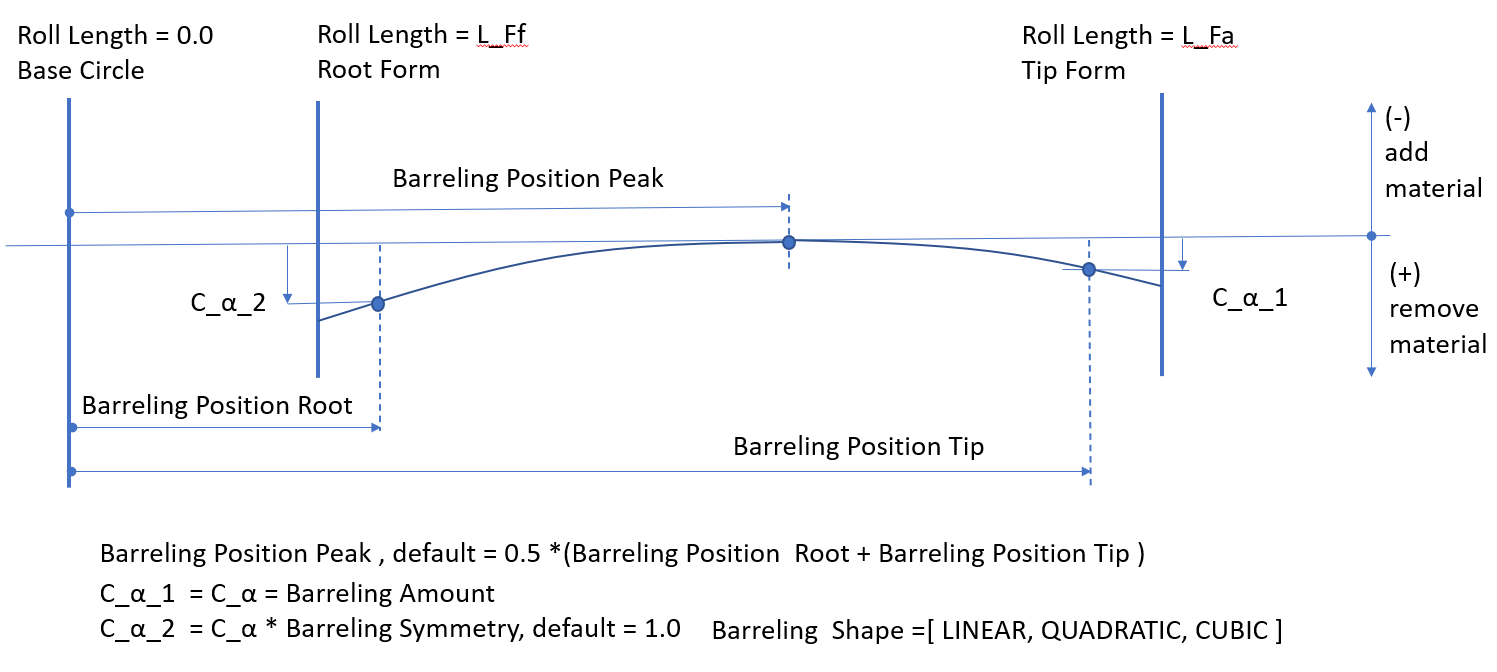
Figure 390 Barreling definition
Profile Slope
Profile slope is used to compensate for tooth deflection differences between the two meshing gears and to compensate for system deflections that would otherwise result in hard contact near the root or the tip of the tooth. It effectively defines correction of pressure angle.
For the options | Do the following |
|---|---|
Amount (C_Ha) | Along with Slope Length it defines the slope by which the flank deviates from the original involute curve. Positive value has the meaning of added material at the tooth tip for both internal and external gears, resp. decreasing the pressure angle. Default value = 0.0 |
Slope Reference Position: Position at Roll Length (L_CHa) Position at Diameter (d_CHa) Position at Roll Angle @Root Form / Tip Form / Auto | The parameter adjusts the position of zero flank change. It has the meaning of tooth roll length starting on the base circle and having limits between tip and root form circle. In addition to the user input there are predefined values of position on the tip and root form circle. The Auto Position option adjusts the value in the way the sum of all profile modifications is tangent to the original flank surface at a certain point. Default value = Position Root Form Roll Length |
Slope Length: Roll Length (L_a) Full Roll Length | The parameter defines the tooth roll length where the slope is evaluated. Beside the user input, the Roll Length option, a full roll length is a predefined length value. Default value = Full Roll Length |
The Profile slope modification with the principal parameters is depicted on Figure 391.
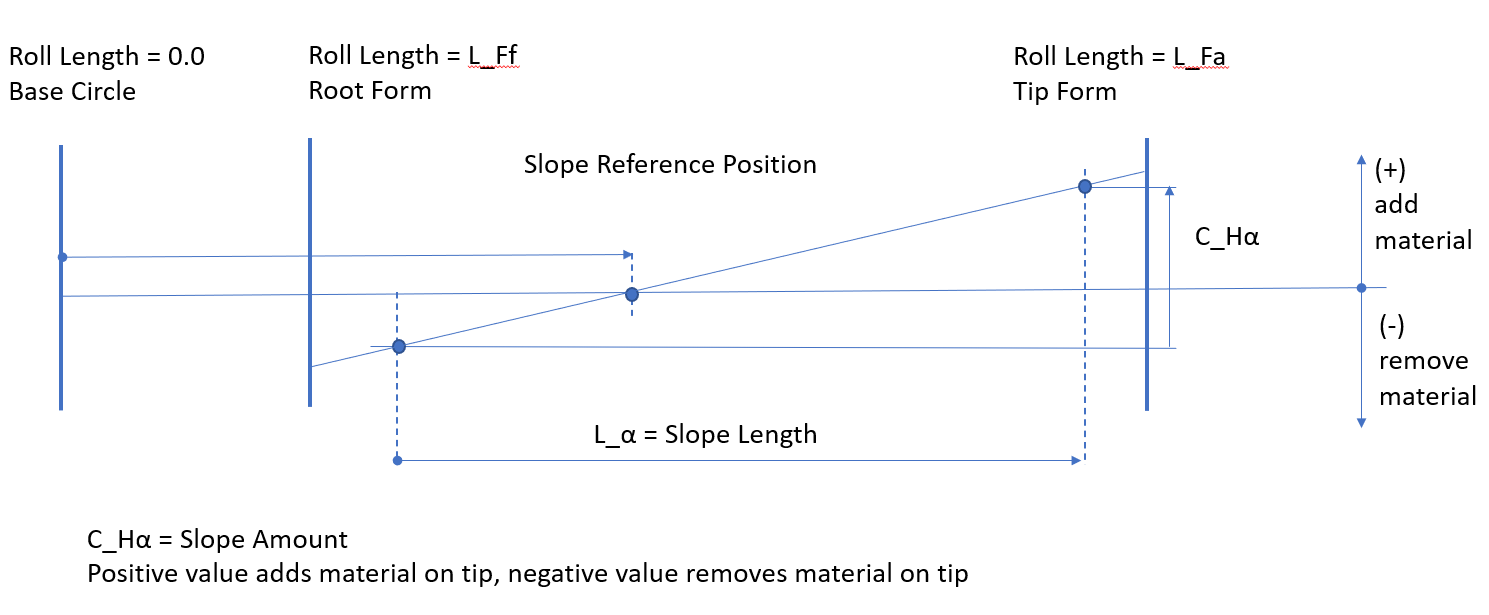
Figure 391 Profile Slope definition
Flank Modifications
Flank modifications affect the flank topology in both the lead and profile direction. In Gear AT we support profile and lead twist modification. The Figure 392 shows the flank modifications dialog box layout for the left flank.
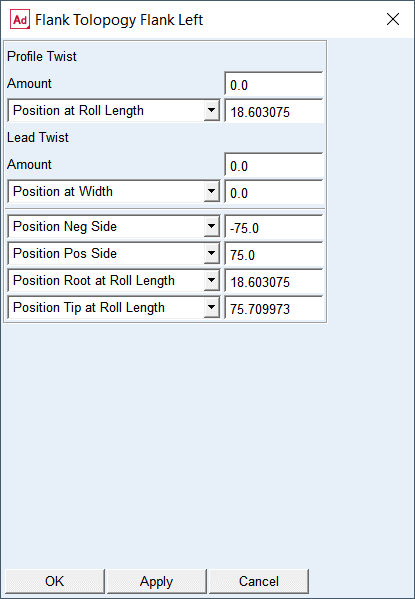
Figure 392 Flank modification dialog box
Profile and Lead Twist
The Profile Twist modification is a flank surface torsion along the tooth width. The twist is applied in correlation with the profile slope but always with opposite sign on tooth sides. The Lead Twist modification is a flank surface torsion along the tooth height. The twist is applied in correlation with the lead slope but always with opposite sign on a tooth tip and root.
For the options | Do the following |
|---|---|
Profile Twist: | |
Amount (S_a) | The value represents the difference of profile slope between datum and non-datum tooth side. The positive value corresponds to positive profile slope at datum face. The profile slope at non-datum side has opposite sing as the non-datum side Default value = 0.0 |
Profile Reference Position: Position at Roll Length Position at Diameter Position at Roll Angle @ Root Form / Tip Form / Middle | This parameter defines the position of zero flank change. It has the meaning of tooth roll length starting on the base circle, spanning between tip and root form circles. Besides the roll length the value can be entered as diameter or roll angle. In addition to the user input, the Position at Roll Length option, there are predefined values of position on the tip and root form circle and in the middle of the roll length . Default value = Position Root Form Roll Length |
Lead Twist: | |
Amount (S_b) | The value represents the difference of lead slope between tip and root circle. The positive value corresponds to positive lead slope at tip circle. The profile slope on the root circle has opposite sign as on the tip circle Default value = 0.0 |
Lead reference Position: Position at Width Position Neg Gear Side Position Pos Gear Side Position Middle | The value adjusts the position of zero flank change. It has the meaning of tooth width starting in the middle of a gear width, spanning between positive resp. negative gear sides. In addition to the user input, the Position at Width option, there are predefined values of position at the gear negative or positive side and in the middle of a gear width. Default value = Position Middle |
Lead reference position to apply amount of Profile Twist and Lead Twist | |
Position Neg Side Position Neg Gear Side | The parameter defines the amount of twist applied on the flank surface defined along the tooth width at negative position. It has the meaning of tooth width starting in the middle of a tooth width, spanning to negative gear side. In addition to the user input, the Position Neg Side option, there is predefined value of position at the negative half width, the Position Neg Gear Side. Default value = Position Neg Gear Side |
Position Pos Side Position Pos Gear Side | The parameter defines the amount of twist applied on the flank surface defined along the tooth width at positive position. It has the meaning of tooth width starting in the middle of a gear, spanning to positive gear side. In addition to the user input, the Position Pos Side option, there is predefined value of position at the positive half width, the Position Pos Gear Side Default value = Position Pos Gear Side |
Profile reference position to apply amount of Profile Twist and Lead Twist | |
Position Root at Roll Length Position Root at Diameter Position Root at Roll Angle @ Root Form | The parameter defines the amount of twist applied on the flank surface defined along the roll length at root position. It has the meaning of tooth roll length starting on the base circle, spanning between tip and root form circle. Besides the roll length the value can be entered as diameter or roll angle. In addition to the user input, the Position Root at Roll Length option, there is predefined value of position on the root form circle, the Position Root Form Roll Length. Usually, the value should reflect the active root circle. Default value = Position Root Form Roll Length |
Position Tip at Roll Length Position Tip at Diameter Position Tip at Roll Angle @ Tip Form | The parameter defines the amount of twist applied on the flank surface defined along the roll length at tip position. It has the meaning of tooth roll length starting on the base circle, spanning between tip and root form circle. Besides the roll length the value can be entered as diameter or roll angle. In addition to the user input, the Position Tip at Roll Length option, there is predefined value of position on the tip form circle, the Position Tip Form Roll Length. Usually, the value should reflect the active tip circle. Default value = Position Tip Form Roll Length |
The Profile twist modification and Lead twist modification with the principal parameters is depicted on Figure 393 and on Figure 394., respectively.
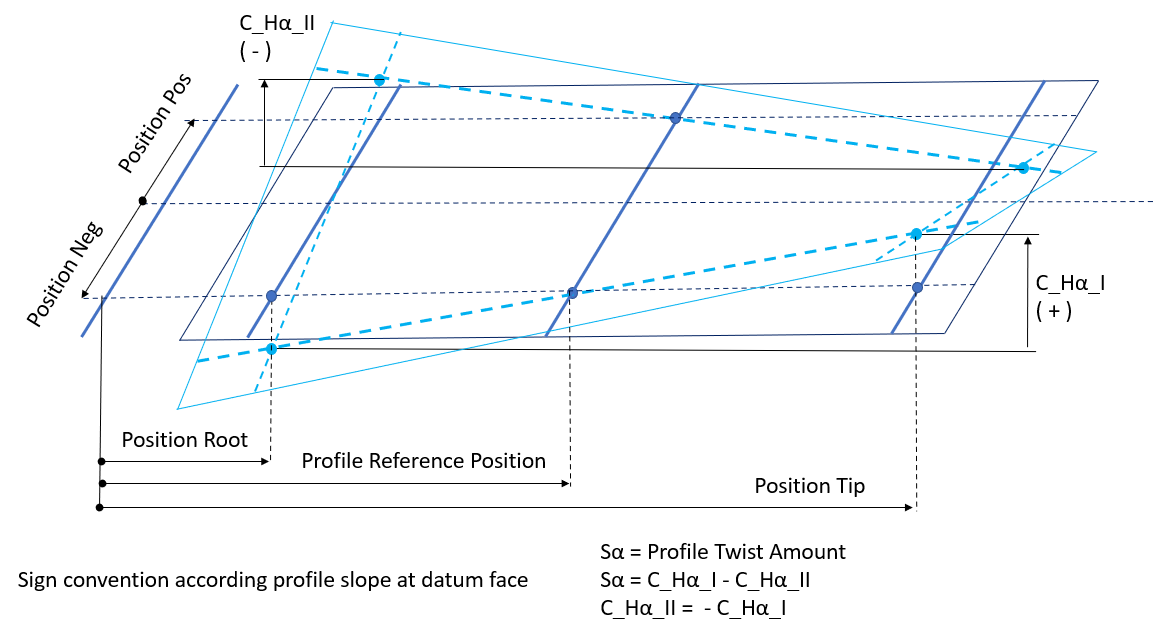
Figure 393 Profile Twist definition
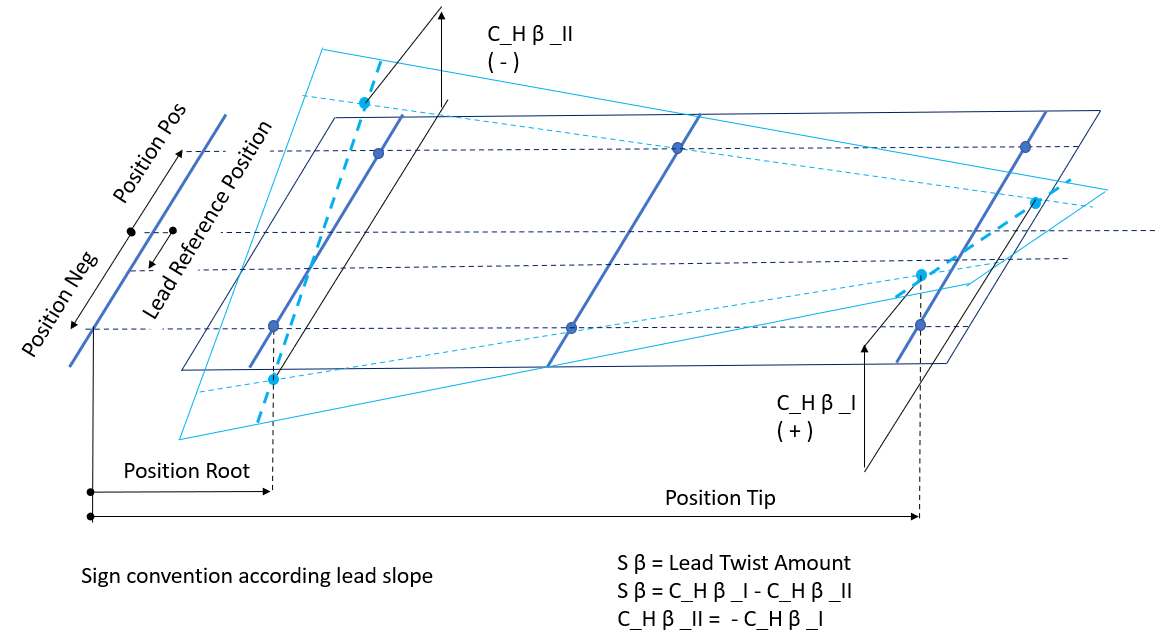
Figure 394 Lead Twist definition
Topology Preview
You can preview applied modifications either individually or superimposed over the tooth flank as shown in Figure 395.
The individual modifications can be switched On or Off in the Topology display container in the Microgeometry tab so only selected ones are displayed in the preview dialog box.
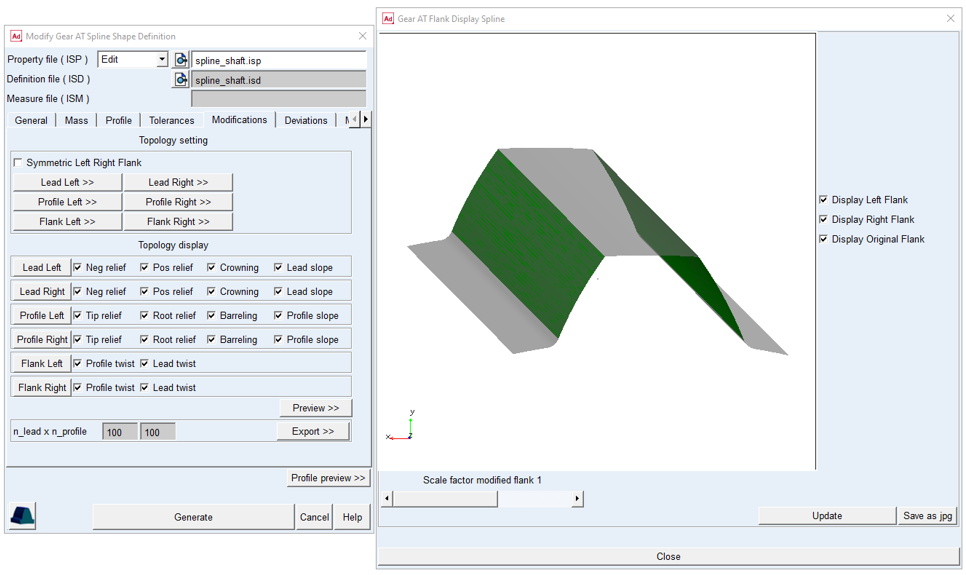
Figure 395 Topology preview
Topology Export
You can export all applied microgeometry in form of lead, profile and flank reliefs to a text file with name isp_name_microgeometry.txt by pressing the Export >> button on the Modification tab. The data for left and right flank are exported separately. Additionally, one can adjust the resolution for the underlying reference grid in the fields n_lead x n_profile. The underlying grid has the dimensions full_width x full_roll_length in model units, the topology is in micrometers.
Deviations
You can define spline manufacturing errors to be considered in the contact simulation. Enter Runout Error for every tooth to describe deviations from ideal pitch circle or enter Cumulative Pitch Error for every tooth to describe deviations from ideal pitch, see Figure 397.
In case you don‘t have any measurement data you can also calculate harmonic distribution with cosine function by entering amplitude and phase shift, or apply generator of random numbers to get random distribution from interval of <-Amplitude, +Amplitude >. Positive value of Runout Error results in larger tooth radius and positive Pitch Error rotates tooth in counter clockwise direction according to the right hand rule. The Errors can be entered for each tooth flank individually. Both deviations represent the effect of non-uniform flank location on gear wheel, only one of their values should be applied, hence pitch error creates runout and vice versa. The Pitch Error is entered as arc length on circle with Measurement Diameter. This diameter is usually close to middle of active tooth flank height.
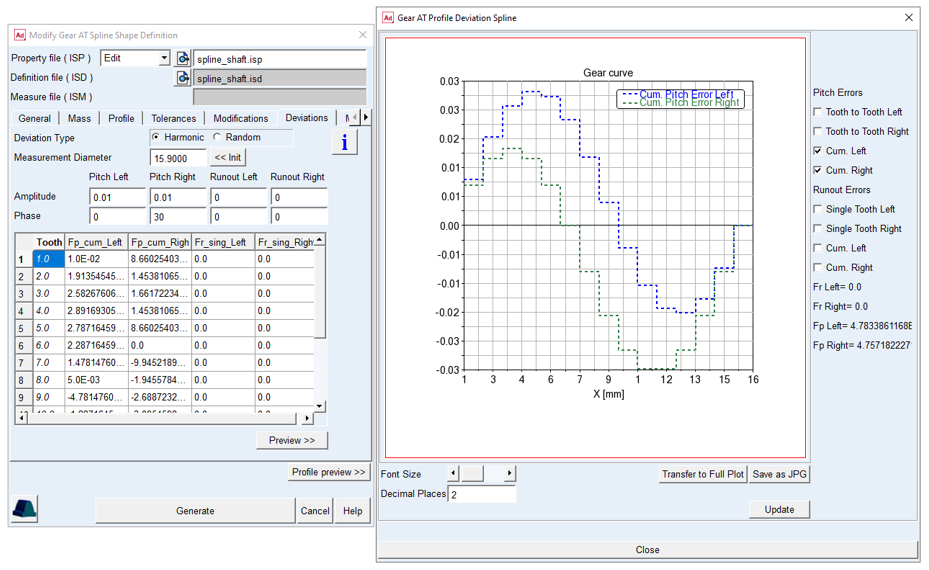
Figure 396 Deviations preview
You can display plot of error distributions as well as cumulative error by Deviations Preview button (Figure 396).
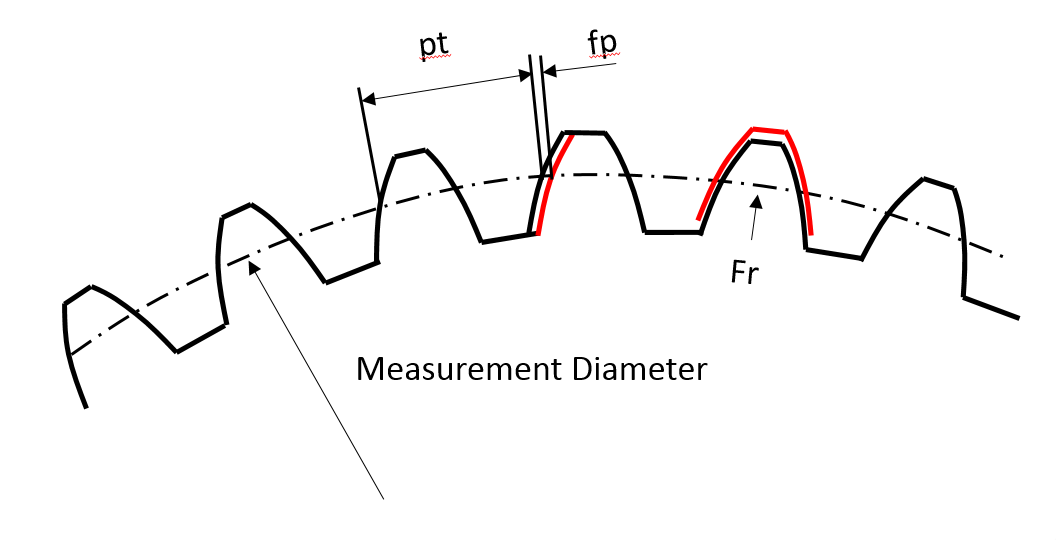
Figure 397 Pitch deviation and Runout at Tooth
Measure
The usage of measured flank topology is temporarily deactivated in this release for spline component.