Preprocess Tapered Roller Bearing FE mesh
Machinery → Bearing AT → Tapered Roller Bearing → Preprocessing → Mesh
Bearing AT has a built-in catalogue of many bearings, and after selecting any bearing based on the internal diameter, the macro-geometry of the selected bearing is automatically calculated.
In Create mode you define a new property file by selecting one of available bearings from catalogue and calculating the macro-geometry by using Compute geometry button. This can be also done by entering the basic bearing dimensions (inner diameter, outer diameter, bearing width) and the static load rating.
In Edit mode is possible to load already existing property file and change the macro-geometric parameters of the bearings manually. How to proceed not only in the Edit mode case, is explained in the following steps in Bearing AT Online Help. Meaning of all required input parameters is explained below.
In both modes, it is possible to make a preview of bearing macro-geometry. There are also sketches, which show the meaning of each macro-geometry parameter.
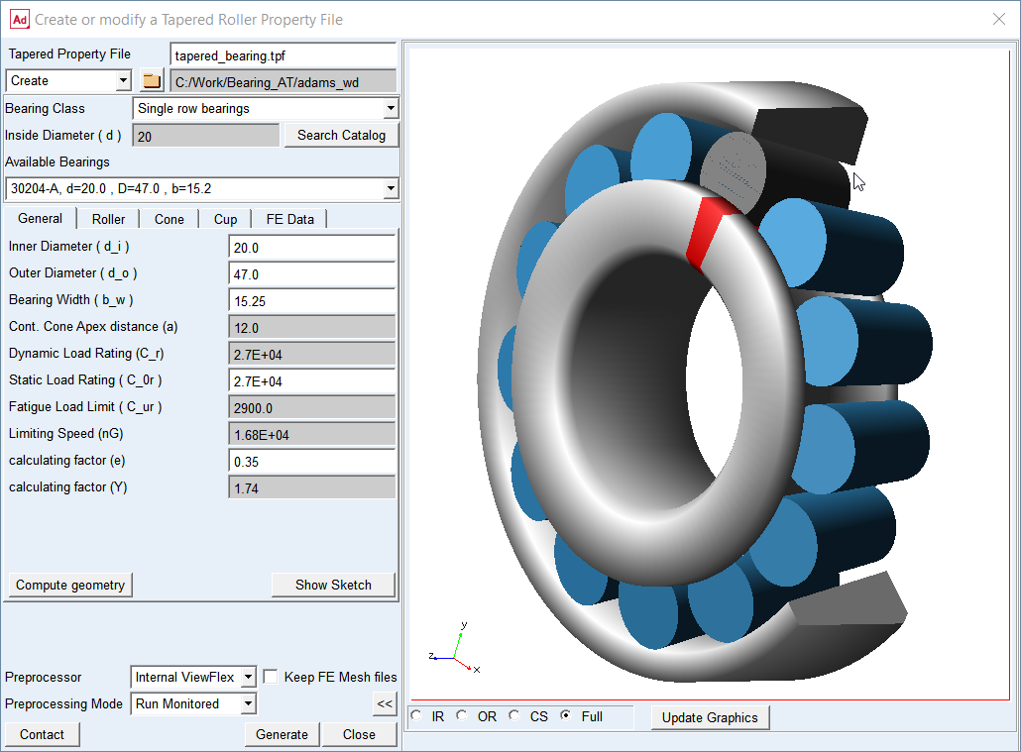
Figure 54 Tapered roller bearing geometry preview
This dialog box allows you to create taper roller bearing property file (*.tpf) or modify existing one. There are geometrical data of the bearing stored in this file. This preprocessing step will automatically generate FE meshes of bearing inner and outer ring and rolling element and submit Nastran computation (SOL101) which provides intermediate results (*.PCH) required for contact preprocessing.
Main
For the options | Do the following |
|---|---|
Tapered Roller Property File | Enter the name or browse for the tapered roller bearing property file (*.tpf). It contains input for geometry and material data. |
Create/Edit mode | Choose one of the options. In Create mode you can choose from a wide range of catalogue bearings. In Edit mode you can load existing *.tpf file and adjust bearing macro-geometrical parameters. |
Destination folder | It is possible to select the destination folder for saving the property files via the button with the folder icon |
Bearing Class | Select from available classes |
Inside Diameter (d) | Enter the required inner diameter of the bearing |
Search Catalogue | Click on this button after the internal diameter of the bearing has already been entered |
Available Bearings | From option menu select one of required bearings |
Compute geometry | Click on Compute geometry button - all required values in all tabs will be calculated |
Preview >> | Show preview of bearing geometry after filling all parameters (Figure 54) |
Preprocessor | Select one of following options.• ■External ViewFlex: use this option when there is no Nastran installation available. On background there is SOL101 running by Adams embedded Nastran Solver ■External Nastran: use this option when you have Nastran installation available. This option allows you to continue working since standalone Nastran is executed in external shell window hence the main window remains active. Please note that additional Nastran license is required. It makes use of Nastran SMP license if available. This option is not available on linux ■Internal Nastran: use this option when you have Nastran installation available. It makes use of Nastran SMP license if available ■Mesher Only: use this option to verify that FE Mesh is valid before running SOL101 |
Preprocessing Mode | Select one of following options for running mesh pre-processor. ■Run Quiet: executes mesher without any output to the screen ■Run Monitored: executes mesher with output to the screen ■Files Only: the batch file is created but not submitted to execution, one has to launch it manually |
Contact | Open contact preprocessing dialog box after FE meshes are created and Nastran SOL101 is completed (Preprocess Tapered Bearing Roller Contact) |
General
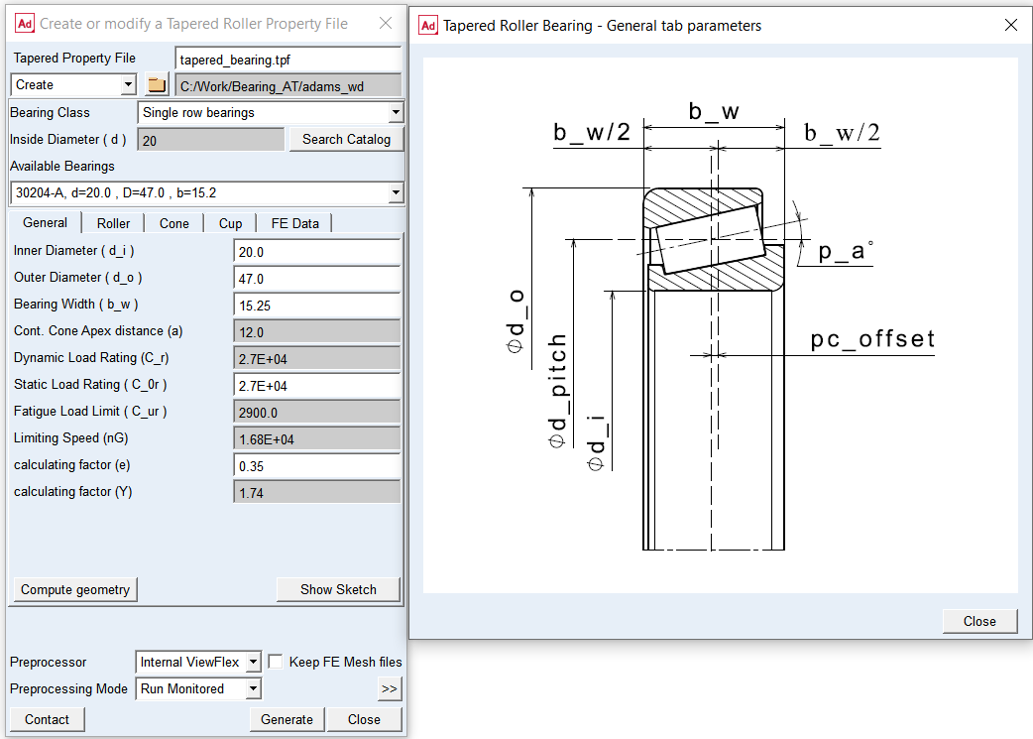
Figure 55 General tab and geometry
For the options | Do the following |
|---|---|
Inner Diameter ( d_i ) | Enter the inner bearing diameter No default. |
Outer Diameter ( d_o ) | Enter the outer bearing diameter No default. |
Bearing Width ( b_w ) | Enter bearing width which is the total width of the bearing. No default. |
Cont. Cone Apex distance (a) | Enter the value of contact cone apex angle distance No default |
Dynamic Load rating (C_r) | Enter the value of dynamic load rating No default |
Static Load Rating (C0_r) | Enter the value of static load rating No default |
Fatigue Load Limit (C_ur) | Enter the value of fatigue load limit No default |
Limiting Speed (nG) | Enter the value of limiting speed No default |
Calculating factor (e) | Enter the value of calculating factor e No default |
Calculating factor (Y) | Enter the value of calculating factor Y No default |
Roller
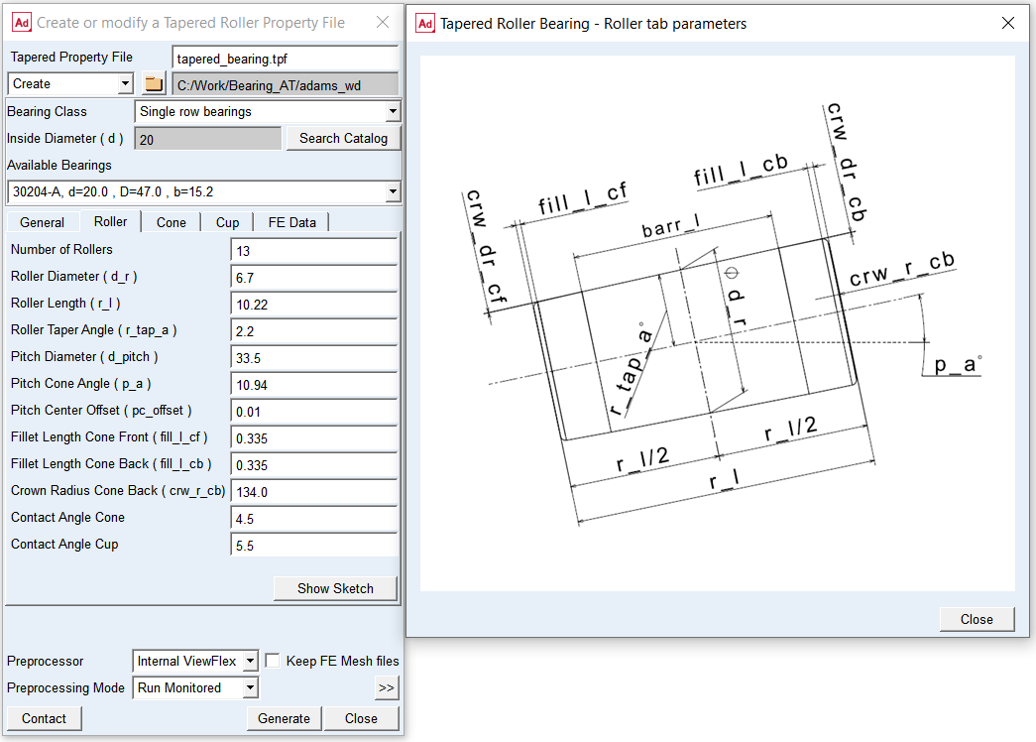
Figure 56 Roller tab and geometry
For the options | Do the following |
|---|---|
Number of Rollers | Enter number of rollers No default value. Input must be a positive integer |
Roller Diameter ( d_r ) | Enter roller diameter The roller diameter is measured in the center of the roller (in terms of the geometric roller length). No default value. |
Roller Length ( r_l ) | Enter roller length It defines the total length of the roller along its rotational axis. No default value. |
Roller Taper Angle ( r_tap_a ) | Enter roller taper angle It defines the angle between the race surface and the rotation axis of the roller. No default value. |
Pitch Diameter (d_pitch) | Enter bearing pitch diameter. The center of the roller (spoken in terms of the geometric roller length) is located on the pitch diameter and in the XY-plane of the bearing marker. No default value |
Pitch Cone Angle (p_a) | Enter pitch cone angle. It defines the angle between the rotation axis of the bearing and the rotation axis of the roller. No default |
Pitch Center Offset | Enter pitch center offset. It defines the axial position of the geometric bearing center with respect to the XY-plane of the bearing marker along the bearing Z-axis. Default = 0.0 |
Fillet Length Cone Front ( fill_l_cf ) | Enter fillet length cone front It determines the axial position from roller end, where the crowning drop is measured. A fillet radius is computed, which is tangent to the crowing drop. The default value is set to 5 percent of roller diameter. Supported values must fall between 2 and 10 percent of the roller diameter. |
Fillet Length Cone Back ( fill_l_cb ) | Enter fillet length cone back It determines the axial position from roller end, where the crowning drop is measured. A fillet radius is computed, which is tangent to the crowing drop. The default value is set to 5 percent of roller diameter. Supported values must fall between 2 and 10 percent of the roller diameter. |
Crown. Radius Cone Back ( crw_r_cb ) | Enter the crowning radius at the back of a cone The surface of the roller at the side of the back side of the cone shows generally a crowning; this crowning radius cone back is usually large. A value of zero means no crowning. The default value is 0.0. Supported values have to be higher than 10 times the roller diameter. Note: The value of Front Crown Drop (crw_dr_cf) and Back Crown Drop (crw_dr_cb) are defined in the contact preprocessing dialog box (Microgeometry tab). |
Contact Angle Cone | Enter contact angle of the roller it comes to contact with the cone. The Contact Angle Cone defines the angular width of the contact surface on the roller for the inner race. The angle represents half of the angular width (Figure 57). The input Angular Mesh Density in the FE Data tab sets the mesh division for the contact angle. Supported values are from range of 3 and 6 degrees. Default = 5.0 degrees |
Contact Angle Cup | Enter contact angle of the roller it comes to contact with the cup. The Contact Angle Cup defines the angular width of the contact surface on the roller for the outer race. The angle represents half of the angular width (Figure 57). The input Angular Mesh Density in the FE Data tab sets the mesh division for the contact angle. Because of the contact type concave/concave for the outer ring (cup), a smaller penetration (smaller contact angle) of the roller will lead to a similar roller load compared to the inner ring (cone). Therefore it may be a good practice, that the contact angle for the cup is taken somewhat (for example by a half of degree) smaller. Supported values are from range of 3 and 6 degrees. Default: 4.5 degrees |
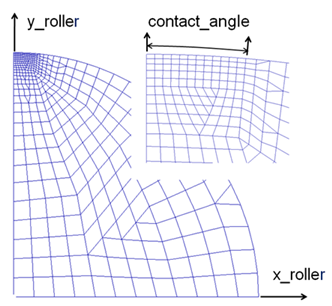
Figure 57 Contact angle of roller with cone and cup
Cone
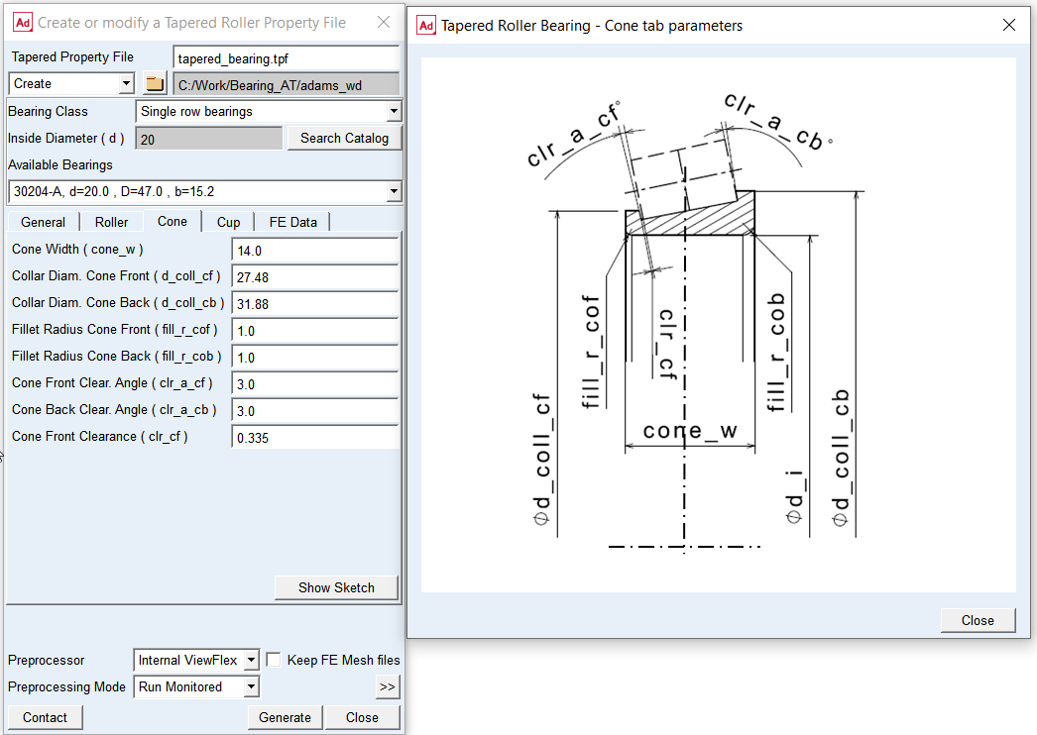
Figure 58 Cone tab and geometry
For the options | Do the following |
|---|---|
Cone Width ( cone_w ) | Enter Cone Width dimension which corresponds to the distance between the cone front and cone back face. No default. |
Collar Diameter Cone Front ( d_coll_df ) | Enter collar diameter cone front. If the Collar Diameter Cone Front is set to zero, no collar will be generated. Default = 0.0 |
Collar Diameter Cone Back ( d_coll_db ) | Enter collar diameter cone back. If Collar Diameter Cone Back is set to zero then, no collar will be generated. Default = 0.0 |
Fillet Radius Cone Front ( fill_r_cof ) | Enter value of fillet radius of the cone front face. It is limited between 10 and 50 percent of the minimum radial distance between the inner diameter and the minimum diameter on the inner race. If the input value falls outside this range, it will be set to the closest limit. Default: none |
Fillet Radius Cone Back ( fill_r_cob ) | Enter value of fillet radius of the cone back face. It is limited between 10 and 65 percent of the minimum radial distance between the inner diameter and the minimum diameter on the inner race. If the input value falls outside this range, it will be set to the closest limit. Default: none |
Cone Front Clearance Angle ( clr_a_cf ) | Enter value of clearance angle of the roller at the front end of cone. This angle creates a clearance between the theoretical roller face and the collar at the cone front side. Default = 3.0 degrees |
Cone Back Clearance Angle ( clr_a_cb ) | Enter value of clearance angle of the roller at the back end of cone. This angle creates a clearance between the theoretical roller face and the collar at the cone back side. Default = 3.0 degrees |
Cone Front Clearance ( clr_cf ) | Enter cone front clearance If a collar for the cone front is defined, the surface of the collar showing to the roller will be offset by this value. Default is set to 5 percent of the roller diameter. |
Cup
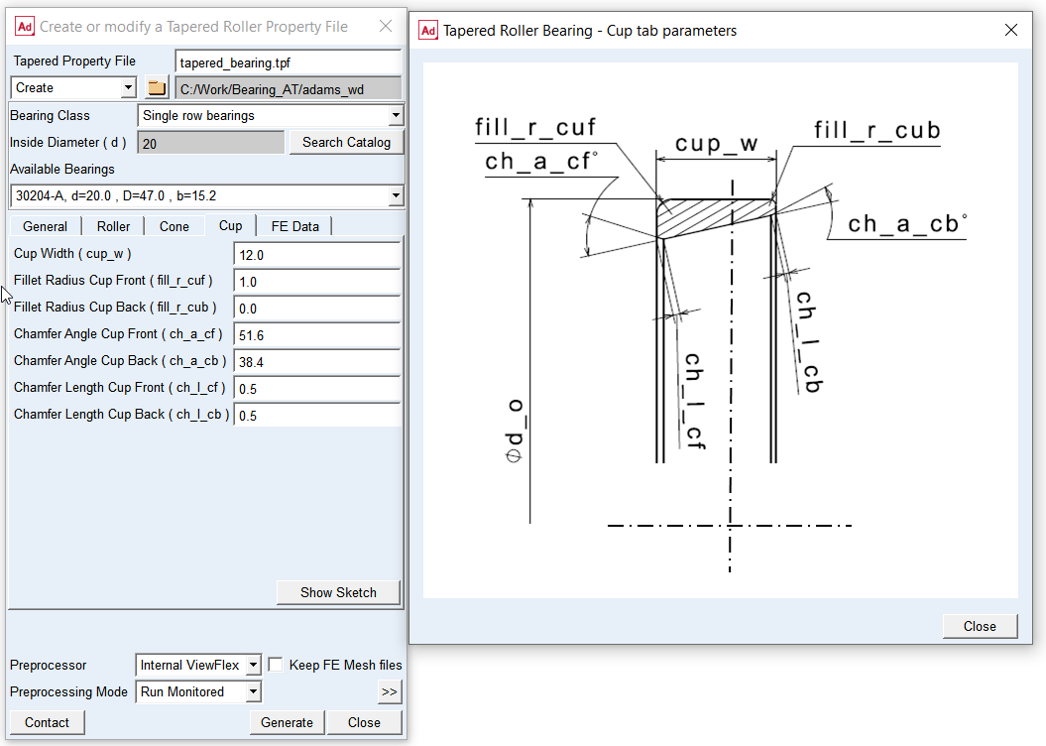
Figure 59 Cup tab and geometry
For the options | Do the following |
|---|---|
Cup Width ( cup_w ) | Enter cup width It corresponds to the distance between the cup front and cup back face. No default. |
Fillet Radius Cup Front ( fill_r_cuf ) | Enter value of fillet radius of the cup front face. The fillet radius of the cup front face is limited between 10 and 65 percent of the minimum radial distance between the outer diameter and the maximum diameter on the outer race. If the input value falls outside this range, it will be set to the closest limit. Default: none |
Fillet Radius Cup Back ( fill_r_cub ) | Enter value of fillet radius of the cup back face. The fillet radius of the cup back face is limited between 10 and 50 percent of the minimum radial distance between the outer diameter and the maximum diameter on the outer race. If the input value falls outside this range, it will be set to the closest limit. Default: none |
Chamfer Angle Cup Front ( ch_a_cf ) | Enter value of chamfer angle of the cup front face. The chamfer angle is measured against the race surface. Default: 0 degree |
Chamfer Angle Cup Back ( ch_a_cb ) | Enter value of chamfer angle of the cup back face. The chamfer angle is measured against the race surface. Default: 0 degree |
Chamfer Length Cup Front ( ch_l_cf ) | Enter value of chamfer length of the cup front face. This length is measured in the axial direction of the bearing. It has to be selected in such a way that the length of the race is not reduced in the contact area. Default: 0.0 |
Chamfer Length Cup Back ( ch_l_cb ) | Enter value of chamfer length of the cup back face. This length is measured in the axial direction of the bearing. It has to be selected in such a way that the length of the race is not reduced in the contact area. Default: 0.0 |
FE Data
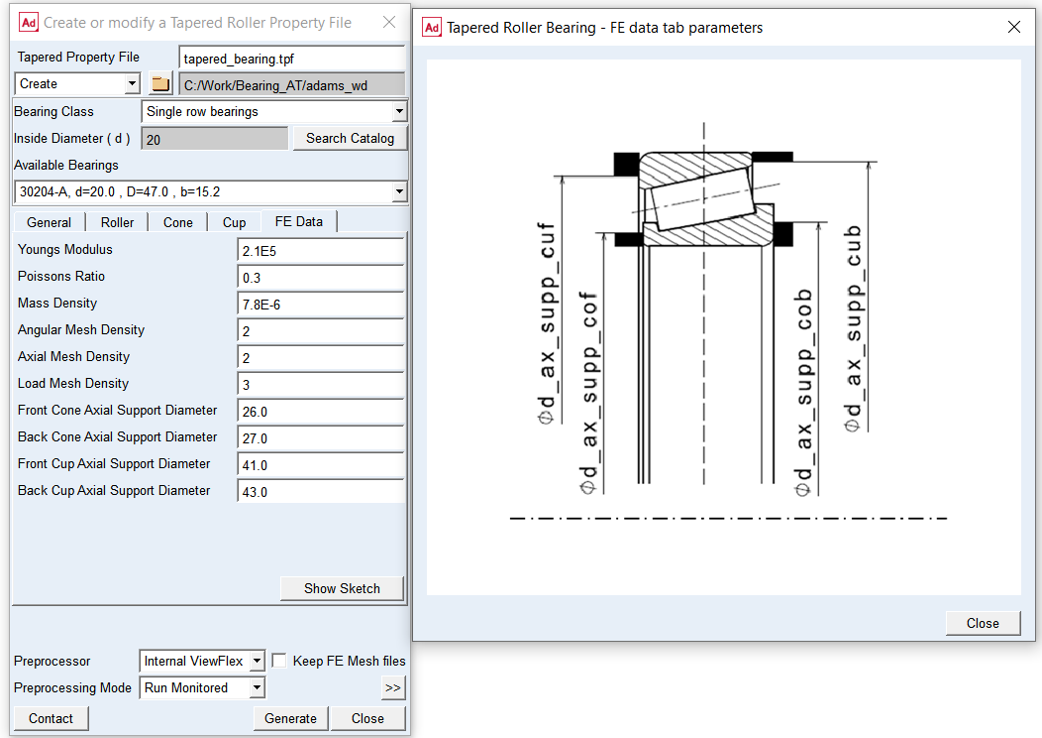
Figure 60 FE data tab and boundary conditions
For the options | Do the following |
|---|---|
Young’s Modulus | Enter Young’s Modulus bearing material The Young‘s Modulus E defines the relation between tensile strain e and tensile stress S by Hooke‘s law; see equation below. For more detailed information: see literature about ‘theory of elasticity’ S = E * e Young's modulus for steel is around 2.1E5 N/mm^2 |
Poisson’s Ratio | Enter Poisson's Ratio bearing material An extension ex of a linear elastic material is accompanied by lateral strains ey and ez. Poisson's ratio ν defines this relation by following equations ey = -ν * ( ex / E ) ez = -ν * ( ex / E ) Poisson's ratio can also be derived from the shear modulus G, please look at the literature for more details. G = E / ( 2 * ( 1 + ν) ) Poisson's ratio for steel is around 0.3. |
Mass Density | Enter Mass Density bearing material The mass m of a solid body is computed from its volume V multiplied by the Mass Density r. m = V * r Mass Density for steel is around 7.8E-6 kg/mm^3 |
Angular Mesh Density | Enter value of Angular Mesh Density Angular Mesh Density (supported values are 1 to 6) defines the number of elements along the Contact Angle of the roller (Figure 57). The values of 1 to 6 correspond to 10, 12, 14, 16, 18 and 20 elements. A higher value will result in a finer FE-mesh. Cone and cup have the same Angular Mesh Density. Default = 2.0 |
For the options | Do the following |
|---|---|
Axial Mesh Density | Enter value of Axial Mesh Density Axial Mesh Density controls the approximate number of elements in axial direction of the contact surface of the roller; supported values are 1 to 5. A low value means a low number of elements in axial direction. The element length in axial roller direction is a multiple of the element length in tangential direction (see Contact Angle and Angular Mesh Density); the multiplication factor decreases with increasing Axial Mesh Density. Default = 2.0 |
Load Mesh Density | Enter value of Load Mesh Density Load Mesh Density controls the fineness of the contact computations, what influences the CPU-time for the FEA-analysis and for the compliance analysis. Supported input values are 1 to 5. A high value of load mesh density means more finite elements per load element in axial direction. Default = 3.0 |
Front Cone Axial Support Diameter ( d_ax_supp_cof ) | Enter front cone axial support diameter The cone is generally constrained in axial motion. This diameter defines the area between inner diameter and front cone axial support diameter, where the axial motion is constrained. It has to be assured that grids on front face fall within this area; otherwise the FE-analysis will fail. Default = none |
Back Cone Axial Support Diameter ( d_ax_supp_cob ) | Enter back cone axial support diameter The cone is generally constrained in axial motion. This diameter defines the area between inner diameter and back cone axial support diameter, where the axial motion is constrained. It has to be assured that grids on back face fall within this area; otherwise the FE-analysis will fail. Default = none |
Front Cup Axial Support Diameter ( d_ax_supp_cuf ) | Enter front cup axial support diameter The cup is generally constrained in axial motion. This diameter defines the area between outer diameter and front cub axial support diameter, where the axial motion is constrained. It has to be assured that grids on front face fall within this area; otherwise the FE-analysis will fail. Default = none |
Back Cup Axial Support Diameter ( d_ax_supp_cub ) | Enter back cup axial support diameter The cup is generally constrained in axial motion. This diameter defines the area between outer diameter and back cub axial support diameter, where the axial motion is constrained. It has to be assured that grids on back face fall within this area; otherwise the FE-analysis will fail. Default = none |