Welcome to Adams Mechatronics
About Adams Mechatronics
Adams Mechatronics is a plug-in to Adams which can be used to easily incorporate control systems into mechanical models. Adams Mechatronics has been developed based on the Adams Controls functionality and contains modeling elements which transfer information to/from the control system. For example, using Adams Mechatronics in Adams Car, you can quickly create assemblies of vehicle systems including control systems, and then analyze them to understand their performance and behavior.
Using Adams Mechatronics you can create control systems with different level of complexity. You can use function builder to build a simple control function. If you have your control system defined in a control package such as Easy 5 or Matlab/Simulink or using the Functional Mock-up Interface (FMI), then you can perform a co-simulation between mechanical model defined in Adams and control system defined in the control package. Alternatively, you can generate the control system code as a dynamic link library file (a dll file in Windows, also known as external system library or simply ESL file in Adams Mechtronics) using the control package and then do all calculations with Adams.
You will also be able to include control system parameters in a design study in Adams Insight for simultaneous optimization of both control system and mechanical system. Furthermore, you will be able to switch the control code in the model by selecting ESL (external system library) property files which refer to different ESL files.
You can, for instance, use Adams Mechatronics together with Adams Car to:
■Tune both control parameters and suspension/driveline parameters to optimize shunt-and-shuffle phenomena
■Investigate the influence of active damping control on the forces in the suspension components or body structure
■Validate your complete vehicle model including control system with a corresponding model for Hardware-In-The-Loop studies
Based on the analysis results, you can quickly adjust the chassis characteristics or control parameters and redo the analysis to evaluate the effects of the adjustment. For example, you can quickly change control code to investigate the best handling characteristics for your vehicle.
Once you complete the analysis of your model, you can easily share your work with others. You can also create different plots of the controller input/output signals and vehicle dynamic responses. In addition, you can access other users' models without overwriting their data.
Benefits of Adams Mechatronics
Adams Mechatronics enables you to work faster and smarter with control systems, facilitate understanding the effects of design change in the controls systems and mechanical system on total system performance.
From a modeling perspective, Adams Mechatronics has following benefits:
■A control system has to be setup and coupled to mechanical system only once
■Control systems and control signals are handled as components among others
■The model can easily be used by different users, including those who are not familiar with the control systems
■Automatic signal unit conversions
■Easy to connect transducer and actuator signals to the control systems
■Overview and modify the control system input and output specifications
Model and Data Reuse
A key benefit of using Adams Mechatronics is that it shares data and simulation components of control system with Adams. This means that complete system-level optimization becomes easier for complex problems such as shunt-and-shuffle, ABS impact on ride/judder and so on. For instance, you can load the Adams Car assembly containing a control system as any other assembly, without having to perform several manual tasks to run the coupled simulation.
In addition, Adams Mechatronics includes a Signal Manager for setting up the connection (transducer and actuator signals) between the mechanical system and the control systems. The settings you choose in the Signal Manager are automatically saved with the subsystems of the assembly, so that the next time the assembly is opened, no further settings are needed before submitting the simulation.
Starting Adams Mechatronics
Because Adams Mechatronics is a plug-in to Adams, you first start Adams and then load Adams Mechatronics.
In Windows, you start Adams Car or Adams View from the start menu. For more information, see Starting Adams Car or Starting Adams View (Classic).
In Linux, you start Adams Car or Adams View from the Adams Toolbar. For information on the Adams Toolbar, see Running and Configuring Adams.
To start Adams Mechatronics:
1. Start Adams Car or Adams View as explained in respective documentation.
2. From the Tools menu, select Plug-in Manager.
3. Find Adams Mechatronics in plug-in list, and then select one or both of the following options.
♦Load: loads Adams Mechatronics in the current session.
♦Load at Startup: instructs Adams to load Adams Mechatronics in all future Adams sessions.
4. Select OK.
Adams Mechatronics will be loaded into Adams. The Adams interface now includes Mechatronics menu in last position.
Please also note that the Mechatronics plug-in will load automatically if you open an assembly which refers to a subsystem which contains a control system related object.
File Architecture in Adams Mechatronics
In Adams Car case, figure below shows the database table directories in the shared database of Adams Mechatronics.
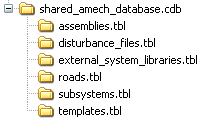
Note that:
■external_system_libraries.tbl contains property files related to external system files generated by control software like Matlab/Simulink, Easy5, or Functional Mockup Unit (FMU)
■disturbance_files.tbl contains property files containing control signal disturbance data in ASCII, RPCIII or DAC format
In Adams View case, as there is no database table, dynamic link file is stored in a user-specified target folder.