Property Editor - Axes
In treeview -> plot -> vaxis/haxis or xaxis/yaxis/zaxis
Lets you edit parameters for horizontal (haxis) and vertical (vaxis) axes of two-dimensional plots and the x-, y-, and z-axes of three-dimensional plots.
Select a tab:
■Tics
Format Tab
Sets scaling of the axes. By default, Adams PostProcessor automatically scales the axes in a plot based on the curves.
For the option: | Do the following: |
|---|---|
Auto Scale | Select to have Adams PostProcessor automatically set the minimum and maximum values, or clear the selection to set the limits manually in the Limits text boxes. By manually setting minimum and maximum values for the axis, you can zoom in on different areas of your plot. For example, to view the values between 0 and 10, you can set the minimum value to 0 and the maximum value to 10. Adams PostProcessor then only displays the values between these numbers in your plot. |
Auto Time Limit | Select to have Adams PostProcessor use the current time range as the axis limits, or clear the selection to set the time limits manually in the Time Limits text boxes. Note: Setting time limits is only useful when working with the independent (horizontal) axis. Tip: For linear- and dB-scaled axes, enter lower and upper limits. For logar-scaled axes, enter log base 10 for lower and upper limits. (See Scale below.) |
Scale | Set to the type of scaling. By default, Adams PostProcessor displays the axis values linearly, starting at 0. You can also change the scaling to: ■Logarithmic - Scales the axis values so that each power of 10 is separated by the same distance. For example, the values 1, 10, 100, 1000, and 10,000 are equally spaced. ■Decibel (dB) - Displays 20 * log10(value) for each value. |
Placement | Set to where you want to place the axis. The options available depend on whether you are modifying the horizontal or vertical axis. You can place an axis on the right or left or at the top or bottom. |
Offset | Set how far from the border of the plot you want to display the axis. |
Color | Select the color for the axis. |
Labels Tab
Sets label parameters. By default, Adams PostProcessor displays a label next to an axis to help identify the values in the axis. The label identifies the unit of measurement in the axis. You can change the text of the label, its placement, font size, and color.
Note: | You can also modify the label text using the instructions in Adding Notes and Modifying Text, which enables you to create multi-line labels. |
For the option: | Do the following: |
|---|---|
Label | Enter the text for the label. |
Font Size | Enter a font size. The font size you can enter depends on the type of font you selected. |
Horizontal/Vertical | Set the orientation of the label, either: ■Horizontal - text ■Vertical -  |
Left/Center/Right | Select how you want the label to be aligned relative to its anchor position, which is the center of the text. See the figure below. You can select: ■Left - Left-justifies the text from the anchor position. ■Center - Centered the text on its anchor position. ■Right - Right-justifies the text from the anchor position. 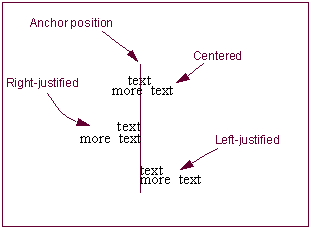 |
Color | Select the color for the axis. |
Auto Place/Offset/ No Choice | Select to have Adams PostProcessor place the text, or clear the selection of Auto Place and, in the Offset text box, enter an offset value to define the distance the label is offset from the border of the plot. |
Numbers Tab
Sets the display of numeric values for an axis. By default, Adams PostProcessor displays numeric values for an axis at each major increment. You can change the way in which Adams PostProcessor displays the values, such as the number of decimal places displayed and whether or not Adams PostProcessor uses scientific notation.
For the option: | Do the following: |
|---|---|
Trailing Zeros | Select to have Adams PostProcessor display zeros after the numbers in the axis. The number of zeros depends on the number of decimal places you selected as explained next. |
Decimal Places | Enter the number of decimal places to which the numbers in the axes should be displayed. |
Scientific Range | Enter the exponential form for scientific notation. This controls the lower and upper powers of ten where the format for real numbers switches from a fixed point format to scientific notation. The default values are -4 and 5, meaning that any number less than or equal to 1.0E-04 or greater than or equal to 1.0E+05 will be written in scientific notation. |
Font Size | Enter a font size. The font size you can enter depends on the type of font you selected. |
Color | Select the color for the numbers. |
Tics Tab
By default, Adams PostProcessor displays short lines, called tic marks, at regular intervals across the axis. The tic marks help to define the scale of the axis. Adams PostProcessor displays the major tic marks at every unit value and the minor tic marks halfway between the major tic marks.
For major tic marks, you can set the spacing by setting:
■Increments - Specifies intervals across the axis, such as at every unit value, every second unit value, and so on, at which tic marks should appear.
■Divisions - Divides the axis evenly into a number of segments and places a tic mark at every division.
For minor tic marks, you can set how many minor tic marks appear between each major tic mark.
For the option: | Do the following: |
|---|---|
Auto Divisions | To turn off automatic divisions, clear the selection of Auto Divisions and select how you want the major tic marks spaced from the pull-down menu. Enter the number of increments or divisions in the text box. |
Minor Divisions | Enter the number of divisions between each major tic mark. The number of divisions sets the number of minor tic marks. For example, if you set the number of divisions to two, Adams PostProcessor places one minor tic mark between each major tic mark. |
Color | Select the color for the numbers. |