About Force Graphics
Force graphics are arrows whose magnitudes and directions are proportional to the magnitudes and directions of the forces acting on your model during a Simulation. Force graphics help you gauge how large your forces become and in what directions they are applied during a simulation.
Force Graphics on an Animation
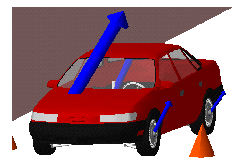
To see force graphics during Animations, you must specify those force elements in your model for which you would like to see the associated force graphics. To turn force graphics on or off for particular forces, refer to the Adams View documentation that describe how to modify a force or a motion.
You can specify the following for the display of force graphics during an animation:
■Scale factor used to control the graphic’s relative size compared to the objects in the model.
■Whether or not the force magnitudes are displayed numerically. The numerical values appear near the arrowheads.
■Whether or not the force graphics are drawn in Wireframe render mode or Shaded rendering mode when the model is animated in shaded mode.
■Whether the force graphic is always drawn in front of other geometry. This is particularly useful when viewing forces inside geometry, such as three-dimensional contacts.
There are two different scale factors: one for forces and one for torques. Adams applies the force scale factor to all force graphics in your model to maintain their proper relative sizing, while it applies the torque scale factor to all torque graphics in your model.
Finding force and torque scale factors that are good for the entire animation might require some trial and error. It is often useful to set your scale factors while viewing the frame for which the largest force reaches its peak value.
Learn more:
■Force Graphics Settings Dialog Box