OUTPUT
The OUTPUT statement controls the generation of request and graphics files. It also controls the form, format, coordinates, filtering, and scaling of request data in the tabular output file (.out).
The OUTPUT statement has been extended to control generation and format of output files from FEMDATA or REQUEST statements. For example, it lets you generate RPC III and DAC files of Adams Solver (FORTRAN) request data.
Format
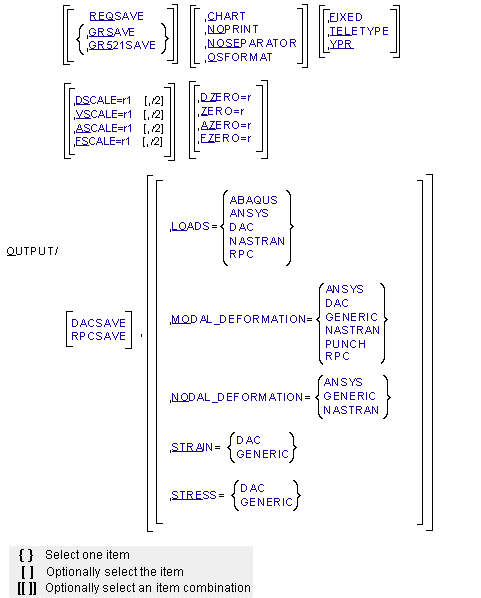
Arguments
ABAQUS | Specifies the output of FEM data to an ABAQUS-readable format. Load data are written out as ABAQUS input commands. |
ANSYS | Specifies the output of FEM data to an ANSYS-readable format. Load data or nodal deformations are written out as ANSYS input commands. Modal deformations are written out to a file format supported by the Adams MSR ANSYS-customized macro, available in Adams Durability. |
ASCALE=r1[,r2] | Scales the translational and rotational accelerations Adams Solver (FORTRAN) outputs. Define r1 to scale the translational accelerations and r2 to scale the rotational accelerations. Both r1 and r2 default to 1.0. |
AZERO=r | Specifies that output accelerations less than r in magnitude are to be set equal to zero. The value of r must be greater than zero. The value of r defaults to 1.0E-7 for output in scientific notation and to 0.001 for output in fixed-point notation. |
CHART | Produces x-y charts of the request data for the tabular output file. If you do not specify CHART, Adams Solver (FORTRAN) does not produce charts of the request data for the tabular output file. |
DAC | Specifies the output of FEM data to DAC files. DAC is a file format supported by nCode/nSoft. A DAC file is generated for each component of load, stress or strain, or modal coordinate. |
DACSAVE | Saves all request output in DAC format. If you do not specify DACSAVE, Adams Solver (FORTRAN) does not save request data in DAC format. |
DSCALE=r1[,r2] | Scales the translational and rotational displacements Adams Solver (FORTRAN) outputs. Define r1 to scale the translational displacements and r2 to scale the rotational displacements. Both r1 and r2 default to 1.0. |
DZERO | Specifies that output displacements less than r in magnitude are to be set equal to zero. The value of r must be greater than zero. The value of r defaults to 1.0E-7 for output in scientific notation and to 0.001 for output in fixed-point notation. |
FIXED | Formats numerical output in fixed-point notation. Any values that are too small or too large for fixed-point notation are output in scientific notation. If you do not specify FIXED, Adams Solver (FORTRAN) formats numerical output in scientific notation. |
FSCALE=r1[,r2] | Scales the translational and rotational forces Adams Solver (FORTRAN) outputs. Define r1 to scale the translational forces and r2 to scale the rotational forces. Both r1 and r2 default to 1.0E0 in scientific notation and to 1.0 in fixed-point notation. |
FZERO | Specifies that output forces less than r in magnitude are to be set equal to zero. The value of r must be greater than zero. The value of r defaults to 1.0E-7 for output in scientific notation and to 0.001 for output in fixed-point notation. |
GENERIC | Specifies the output of FEM data to a human readable (ASCII) text file. |
GRSAVE | Saves graphics output in the graphics file so a postprocessor can be used to display graphics. If neither GRSAVE nor GR521SAV is specified, Adams Solver (FORTRAN) does not save graphics output in the graphics file. |
GR521SAVE | Saves graphics output in the graphics file in Adams 5.2.1 format. Graphics files written by Adams 6.0 and later (when GRSAVE is specified) contain more information than those written by Adams 5.2.1. Consequently, applications written to use the older files may no longer work with 6.0 and later files. If the application does not accept 6.0 and later files, you can specify GR521SAV to create a 5.2.1 format file. A 5.2.1 graphics file does not contain curve graphics, road surface graphics, or floating markers. If neither GRSAVE nor GR521SAV is specified, Adams Solver (FORTRAN) does not save graphics output in the graphics file. |
LOADS | Controls output of FEM data to the specified format. If you do not specify LOADS, Adams Solver (FORTRAN) does not process any FEMDATA/LOADS statements. |
MODAL_DEFORMATION | Controls output of modal deformation data to the specified format. If you do not specify MODAL_DEFORMATION, Adams Solver (FORTRAN) does not process any FEMDATA/MODAL_DEFORMATION statements. |
NASTRAN | Specifies the output of FEM data to a NASTRAN readable format. Load data or nodal deformations are written out as NASTRAN input commands. Modal deformations are written out to NASTRAN OUTPUT2 (binary) format. |
NODAL_DEFORMATION | Controls output of nodal deformation data to the specified format. If you do not specify NODAL_DEFORMATION, Adams Solver (FORTRAN) does not process any FEMDATA/NODAL_DEFORMATION statements. |
NOPRINT | Suppresses printing of all time-response-request tables. If you do not specify NOPRINT, Adams Solver (FORTRAN) prints these tables (one table for each request) in the tabular output file after the simulation is complete. |
NOSEPARATOR | Specifies that Adams Solver (FORTRAN) is not to write separators to the request, graphics, results, and tabular output files when you modify the model topology in the middle of a simulation. You can change the model topology by using interactive commands to activate an element, deactivate an element, change a marker position, or change the type or point of application of a force or constraint during a simulation. When you change the model topology, by default, Adams Solver (FORTRAN) writes a separator and new header to the request, graphics, results, and tabular output files. Adams Solver (FORTRAN) then writes subsequent simulation output after the new headers. This ensures that the changes are correctly reflected in the output files, but it creates two sets of output that cannot be plotted or animated continuously. The NOSEPARATOR argument prevents Adams Solver (FORTRAN) from breaking up the files; instead it creates a continuous set of output that can be plotted and animated from beginning to end. Note: This output may be misleading because the graphics file does not include the effects of any changes in marker, force, or constraint positions during the simulation. While the part motions are correct, the force, joint, and marker graphics remain in their original positions, even if you move them during the simulation. |
OSFORMAT | Writes output-step-request (OS) tables to the tabular output file immediately after completion of each output step for dynamic, kinematic, or quasi-static equilibrium analysis. If OSFORMAT is specified, Adams Solver (FORTRAN) outputs an OS table at each output time step during simulation. If OSFORMAT is not specified, Adams Solver (FORTRAN) does not output request data in this form for these analysis types. When a static equilibrium analysis is requested, Adams Solver (FORTRAN) always outputs an OS table whether or not you specify OSFORMAT. Use OSFORMAT to view the values of all requests at a particular output time or to provide printed output in cases where the simulation might not run to completion. A simulation may not run to completion because the model or user-written subroutines are not fully debugged. OSFORMAT might provide information useful in debugging the model or user-written subroutines. |
PUNCH | Specifies modal deformations to be output to NASTRAN PUNCH (text file) format. |
REQSAVE | Saves request output in the request file so that you can use a postprocessor to display x-y plots. If you do not specify REQSAVE, Adams Solver (FORTRAN) does not save the request output in the request file. |
RPC | Specifies the output of FEM data to an RPC III file. RPC III is a file format supported by MTS. Each channel in the RPC file represents a load component acting on the part. |
RPCSAVE | Saves all request output in RPC III format. If you do not specify RPCSAVE, Adams Solver (FORTRAN) does not save request data in RPC III format. |
STRAIN | Controls output of strain data to the specified format. If you do not specify STRAIN, Adams Solver (FORTRAN) does not process any FEMDATA/STRAIN statements. Note: An Adams Durability license is required to output STRAIN. |
STRESS | Controls output of stress data to the specified format. If you do not specify STRESS, Adams Solver (FORTRAN) does not process any FEMDATA/STRESS statements. Note: An Adams Durability license is required to output STRESS. |
TELETYPE | Indicates that Adams Solver (FORTRAN) is to format tabular output for printers with 72 columns per line, rather than for printers with 132 columns per line. |
VSCALE=r[,r2] | Scales the translational and rotational velocities Adams Solver (FORTRAN) outputs. Define r1 to scale the translational velocities, and define r2 to scale the rotational velocities. Both r1 and r2 default to 1.0. |
VZERO | Specifies that output velocities less than VZERO in magnitude are to be set equal to zero. The value of r must be greater than zero. VZERO defaults to 1.0E-7 in scientific notation and to 0.001 in fixed-point notation. |
YPR | Outputs rotational displacement values in yaw, pitch, and roll coordinates, rather than in psi, theta, and phi coordinates. Using dashed lines to represent original orientations and using solid lines to represent new orientations, Figure 1 below shows how these coordinates define a rotational orientation. Figure 1. Successive Yaw, Pitch, and Roll Rotations 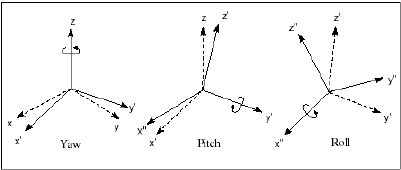 First, Adams Solver (FORTRAN) rotates about the z-axis. Next, it makes a negative rotation about the new y-axis (y'), and then about the second new x-axis (x"). If you do not specify YPR, Adams Solver (FORTRAN) outputs rotational displacement values in psi, theta, and phi coordinates. YPR only affects rotational displacement output. Adams Solver (FORTRAN) always outputs angular velocities and accelerations as vectors, with orthogonal x, y, and z components. |
Extended Definition
The OUTPUT statement controls the generation of request and graphics files. In addition, it controls the form, format, coordinates, filtering, and scaling of request data in the tabular output file. Also, the OUTPUT statement controls the generation and format of REQUEST or FEM data. Specifically, the OUTPUT statement controls the following:
Forms of Request Data in the Tabular Output File
X-Y charts of the request data for the tabular output file — the output is in the same order as the requests are in the dataset. The information about each request (including those created by an MREQUEST command/statement) is in two parts. The left side of the first part contains a table of simulation time and the translational information output by the request, and the right side contains a plot of the translational information against time. The left side of the second part contains a table of simulation time and the rotational information output by the request, and the right side contains a plot of the rotational information against time (see Figure 2). (The column titles may vary according to the type of request information and other arguments on the OUTPUT command/statement.)
These plots differ in two important ways from the plots created with Adams Solver (FORTRAN) or most postprocessors. First, time is along the vertical axis in the chart plots and request data is along the horizontal axis. Second, the chart plots are normalized; that is, each curve is scaled independently of the others from the highest value to the lowest value for that curve. Therefore, use care when comparing curves to one another. You can compare the shapes but not the magnitudes of the curves.
■Time-response-request tables — A time-response-request table lists all values for a single request throughout the simulation. One line appears in the table for each output time step; the lines are in ascending order of time.
■Output-step-request (OS) table — An OS table lists the values of all requests at each output time step. One line appears for each output time step, followed by one line per request.
Formats of Request Data in the Tabular Output File
Columns per line:
■72 columns
■132 columns
Numerical Notation of Request Data in the Tabular Output File
■Fixed-point - Fixed-point notation expresses a decimal or an integer number without an exponent.
■Scientific - Scientific notation expresses a number as a value between 1 and 10 (the mantissa) multiplied by the appropriate power of 10 (the exponent). Adams Solver (FORTRAN) uses E between the mantissa and exponent, and a decimal number as the value.
Coordinates of Rotational Request Data in the Tabular Output File
■Yaw, pitch, and roll angles
■Psi, theta, and phi angles
Scales for Request Data in the Tabular Output File
■Scale for displacements
■Scale for velocities
■Scale for accelerations
■Scale for forces
Filters for Request Data in the Tabular Output File
■Zero filter for displacements
■Zero filter for velocities
■Zero filter for accelerations
■Zero filter for forces
Output of FEMDATA
With LOADS, the ABAQUS, ANSYS, or NASTRAN format option creates a text file of the input commands of the respective FEA package (case control and bulk data in the case of NASTRAN) of all the part forces.
With NODAL_DEFORMATION, the ANSYS or NASTRAN option creates a text file of input commands for defining enforced displacements in the respective FEA package (for example, SPC* cards in the case of NASTRAN).
With MODAL_DEFORMATION, the NASTRAN option produces an OUTPUT2 (NASTRAN binary) file. This file can be imported by NASTRAN for stress recovery on the flexible body using the Adams Durability Modal Stress Recovery. Note that this file format is machine dependent. NASTRAN will not be able to read the file if it was created on a platform different than the one running NASTRAN.
Alternatively, the PUNCH format option for MODAL_DEFORMATIONS produces a text file that can be imported by NASTRAN for stress recovery. This file format is not as compact as the OUTPUT2 format (see NASTRAN option), but it is machine independent. If NASTRAN is run on a different platform than Adams, the modal deformations can be transferred via this file format for subsequent NASTRAN runs.
Also, with MODAL_DEFORMATIONS, the ANSYS option produces a file of modal deformations. This file can be processed by ANSYS using a custom macro provided by Adams Durability (Reading Modal Deformations File (MDF)). Modal deformations can be combined with the modal stress shapes stored in the ANSYS database to recover dynamic stresses in ANSYS using modal superposition.
Output of Request Data in RPCIII and DAC Formats
You can save request data in RPC III and DAC format.
■RPC III format- Adams Solver (FORTRAN) creates one RPC file of all data components specified in the REQUEST statements.
The RPC III file is named according to the naming convention:
Prefix.rsp
where:
■Prefix is the prefix specified when you set up Adams results.
■DAC format - Adams Solver (FORTRAN) can only store one channel of data in a DAC file. Therefore, Adams Solver (FORTRAN) creates six DAC files, one per request component. The files are named according to the DAC file naming convention:
prefix_request name_component label.dac
where
■prefix is the prefix you specified when you set up the Adams results.
■request name is the request name you specified when you created a new request.
■component label is the reserved label assigned to the six components of request data by Adams (one of X, Y, Z, R1, R2, R3).
Caution: | ■TELETYPE or CHART cannot be used with OSFORMAT because OSFORMAT prints records 132 characters wide and because CHART prints information next to a plot. |
Examples
OUTPUT/GRSAVE, REQSAVE
This OUTPUT statement causes Adams Solver (FORTRAN) to save both graphics and request output.
FEMDATA/1, STRESS, FLEX_BODY=201
, FILE=adams
, NODE=100, 200, 300
OUTPUT/STRESS=DAC
DAC files are created with the job name adams in the FLEX_BODY_201 subdirectory. Each DAC file contains the time history of one of the six stress components (Sx, Sy, Sz, Txy, Tzx, Tyz) at a node. Since three nodes are specified, a total of eighteen DAC files are created.
OUTPUT/MODAL=NASTRAN, NODAL=GENERIC
A NASTRAN binary file will be created of each FEMDATA statement with modal deformations. No output files will be generated for loads, strain or stress since no OUTPUT specification was given for these types of FEMDATA.
REQUEST/1, DISPLACEMENT, I=201, J= 103, TITLE=REQ01
OUTPUT/DACSAVE
OUTPUT/DACSAVE
This OUTPUT statement causes Adams Solver (FORTRAN) to save request output defined in the above REQUEST statement to DAC files only. Adams Solver (FORTRAN) creates a total of six DAC files in the current working directory with the following names:
adams_req01_x.dac
adams_req01_y.dac
adams_req01_z.dac
adams_req01_r1.dac
adams_req01_r2.dac
adams_req01_r3.dac
adams_req01_y.dac
adams_req01_z.dac
adams_req01_r1.dac
adams_req01_r2.dac
adams_req01_r3.dac
REQUEST/1, FORCE, I=201, J=103, TITLE=REQ01
REQUEST/2, FORCE, I=202, J=104, TITLE=REQ02
REQUEST/3 FORCE, I=203, J=105, TITLE=REQ03
OUTPUT, RPCSAVE
REQUEST/2, FORCE, I=202, J=104, TITLE=REQ02
REQUEST/3 FORCE, I=203, J=105, TITLE=REQ03
OUTPUT, RPCSAVE
This OUTPUT statement causes Adams Solver (FORTRAN) to save request output defined in the three REQUEST statements to an RPC III file. Adams Solver (FORTRAN) creates one RPC III file named Adams.rsp, containing 18 channels of data (six per REQUEST statement).
See other Output available.