REQUEST
The REQUEST statement indicates a set of data you want Adams Solver (FORTRAN) to write in the tabular output file, the request file, and the XML formatted results file. Using a REQUEST statement, you can output a set of displacements, velocities, accelerations, or forces with respect to markers in the system. FUNCTION keywords allow you to explicitly define the output variables or employ a user-written subroutine REQSUB to define nonstandard output.
Format
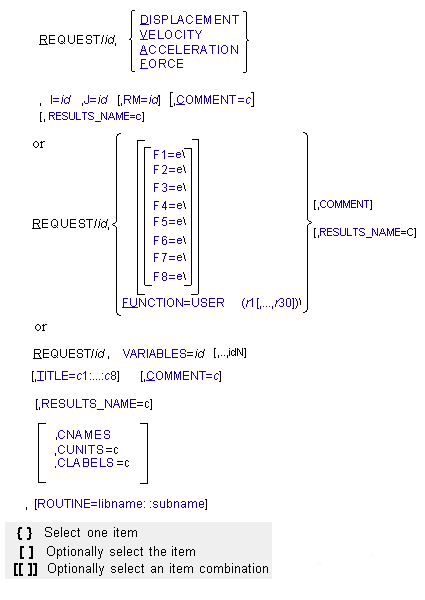
Arguments
ACCELERATION | Outputs the acceleration of the I marker with respect to the J marker. This argument generates nine headings and nine columns of output in the tabular output file. The columns include the time (TIME), the magnitude of translational acceleration (ACCM), the translational x component (ACCX), the translational y component (ACCY), the translational z component (ACCZ), the magnitude of rotational acceleration (WDTM), the rotational x component (WDTX), the rotational y component (WDTY), and the rotational z component (WDTZ). The same data without the magnitudes are written to the Request file. Adams Solver calculates this acceleration data (the second derivative of the displacement of the I marker with respect to the J marker) in the global coordinate system. If you specify RM, Adams Solver (FORTRAN) resolves the translational x component, the translational y component, the translational z component, the rotational x component, the rotational y component, and the rotational z component in the coordinate system of the RM marker. |
CNAMES | (Component Names) Sets one or more strings that identify the names of the result set components produced by this REQUEST in XML results files. For example, by default a result set for a request looks like: <entity name="REQUST_1" objectId="11"> <component name="mag" id="42"> <component name="x" id="43"> ... By default, there are 8 components per result set. Specifying CNAMES=MG, X_comp, Y_comp, the XML results file will look like this instead: <entity name="REQUST_1" objectId="11"> <component name="Mg" id="42"/> <component name="X_comp" id="43"/> Result set components can be deleted from storage in the database and in the XRF by omitting them in the CNAMES argument. For example, the following CNAMES argument will remove the first and fourth components from the result set: CNAMES=””, X_Comp, Y_Comp, Z_Comp, ““, R1, R2, R3 This can be helpful if you want to reduce the memory overhead of the simulation data. |
COMMENT=c | Specifies a title for the top of each set of information the REQUEST statement outputs. The entire comment must be on one line. Because input lines can be only eighty characters long at most, the comment can be from seventy-two characters long (if you do not abbreviate COMMENT=) to seventy-eight characters long (if you abbreviate COMMENT= to C=). Blank spaces and all alphanumeric characters can be used. However, the comma (,), the semicolon (;), the ampersand (&), and the exclamation point (!) cannot be used. The COMMENT data is printed in the request file only. |
CUNITS | (Component Units) Sets one or more strings that identify the unit dimension of the result set components in XML result files. If the CUNITS argument is omitted, then the units of the components are predefined based upon standard request type (for example, displacement, velocity, and acceleration) or they are considered user units and no unit conversion will be performed. The legal choices for the CUNITS parameter are: MASS AREA TIME VOLUME FORCE TORQUE LENGTH PRESSURE VELOCITY DENSITY ACCELERATION ENERGY ANGLE TORSION_STIFFNESS ANGULAR_VELOCITY TORSION_DAMPING ANGULAR_ACCELERATION FREQUENCY INERTIA AREA_INERTIA STIFFNESS FORCE_TIME DAMPING TORQUE_TIME |
CLABELS | (Component Labels) Sets one or more strings that identify the label to be used when plotting the result set components. Labels may be strings that include white space. However, quotes must be used to define the string if special characters or white space are used. This option is only used with XML result files. |
DISPLACEMENT | Outputs the displacement of the I marker with respect to the J marker. This argument generates eight headings and eight columns of output in the tabular output file. The columns include: ■time (TIME) ■translational magnitude (MAG) ■x component (X) ■y component (Y) ■z component (Z) ■psi angle (PSI) ■theta angle (THETA) ■the phi angle (PHI) The same data without the magnitude are written to the request file. The psi, theta, and phi angles are the Euler angle displacements of the I marker with respect to the J marker. Adams Solver (FORTRAN) calculates this displacement data in the global coordinate system. If you specify RM, Adams Solver (FORTRAN) resolves the translational x-component, the translational y component, and the translational z-component in the coordinate system of the RM marker. RM does not affect psi, theta, and phi. If the YPR argument is placed in the OUTPUT statement, the psi, theta, and phi rotations are converted to yaw, pitch, and roll rotations. |
F1=e | Defines the first component of the request that is being specified. If the F1 argument is used, it must either be the last argument in the REQUEST statement or be followed by a backslash (\) (not a comma). The value of the expression is written in the corresponding column of the tabular output file. |
F2=e | Defines the second component of the request that is being specified. If the F2 argument is used, it must either be the last argument in the REQUEST statement or be followed by a backslash (\) (not a comma). The value of the expression is written in the corresponding column of the tabular output file. It is also sent to the request file. |
F3=e | Defines the third component of the request that is being specified. If the F3 argument is used, it must either be the last argument in the REQUEST statement or be followed by a backslash (\) (not a comma). The value of the expression is written in the corresponding column of the tabular output file. It is also sent to the request file. |
F4=e | Defines the fourth component of the request that is being specified. If the F4 argument is used, it must either be the last argument in the REQUEST statement or be followed by a backslash (\) (not a comma). The value of the expression is written in the corresponding column of the tabular output file. It is also sent to the request file. |
F5=e | Defines the fifth component of the request that is being specified. If the F5 argument is used, it must either be the last argument in the REQUEST statement or be followed by a backslash (\) (not a comma). The value of the expression is written in the corresponding column of the tabular output file. |
F6=e | Defines the sixth component of the request that is being specified. If the F6 argument is used, it must either be the last argument in the REQUEST statement or be followed by a backslash (\) (not a comma). The value of the expression is written in the corresponding column of the tabular output file. It is also sent to the request file. |
F7=e | Defines the seventh component of the request that is being specified. If the F7 argument is used, it must either be the last argument in the REQUEST statement or be followed by a backslash (\) (not a comma). The value of the expression is written in the corresponding column of the tabular output file. It is also sent to the request file. |
F8=e | Defines the eighth component of the request that is being specified. If the F8 argument is used, it must either be the last argument in the REQUEST statement or be followed by a backslash (\) (not a comma). The value of the expression is written in the corresponding column of the tabular output file. It is also sent to the request file. |
FORCE | Outputs the force associated with the I and the J markers or, if the I marker and not the J marker is given, outputs the action-only forces on the I marker. When both the I and the J markers are given, Adams Solver (FORTRAN) sums the forces on the I marker due to the forces associated with the I and the J markers. These forces can include both applied forces (such as spring dampers and bushings) and reaction forces from constraint elements (such as joints and motions). When the I marker and not the J marker is given, Adams Solver (FORTRAN) sums all of the action-only forces applied to the I marker. If RM is specified, Adams Solver (FORTRAN) reports the components of the resulting vectors in the reference frame of the RM marker. If RM is not specified, Adams Solver (FORTRAN) reports the components in the ground coordinate system (GCS). The FORCE argument generates nine columns of output in the tabular output file. The columns include the time, the translational force magnitude, the three components of the translational force, the rotational force (torque) magnitude, and the three components of the torque. The same data without the magnitudes are written in the request file. |
FUNCTION=USER{r1[,...,r30]} | Defines and passes constants to the user-written subroutine REQSUB to define the request. Follow FUNCTION with an equal sign, the character string USER, and the values (r1[,...,r30]) that you want Adams Solver (FORTRAN) to pass to REQSUB. If the FUNCTION argument is used, it must either be the last argument in the REQUEST statement or be followed by a backslash (\). All eight columns of the data that can be defined in a REQSUB are written in the tabular output file. Only columns 2, 3, and 4 and columns 6, 7, and 8 are written in the request file. |
I=id, J=id | Identifies the fixed or floating marker(s) for which Adams Solver (FORTRAN) outputs data. Both markers for DISPLACEMENT, VELOCITY, and ACCELERATION must be identified. For force requests, the I marker and the J marker must have on them either applied forces, such as bushings and sforces, or constraints, such as joints and jprims, or both. You should identify both markers for force unless you are outputting data for an action-only force. In the last case, only the I marker needs to be identified. |
RM=id | Identifies the marker with respect to which you want to resolve information. Adams Solver (FORTRAN) computes the data identified by the I marker and the J marker, then reports the data as x, y, and z components in the reference frame of the RM marker. Angular displacements, which are not vectors, are not affected by RM. RM defaults to zero, which causes Adams Solver (FORTRAN) to resolve components in the ground coordinate system (GCS). |
RESULTS_NAME | Specifies the name of the result set in which all result set components produced by this request are placed when the result file is written in XML. If there is an existing result set with this name, then the result set components are placed in that result set. If there isn't an existing result set, then a new one is created and all the result set components are placed there. This is helpful if you wish to group the output from multiple requests into a single result set. For example, you might have several different requests measuring driver input for a vehicle, and you might wish to place them all within a result set named Driver_Inputs for easier viewing in Adams PostProcessor. |
ROUTINE=libname::subname | Specifies an alternative library and name for the user subroutine REQSUB. Learn more about the ROUTINE Argument. |
TITLE=c1:...:c8 | Specifies up to eight alphanumeric headings for columns of request output. Each heading can have as many as eight alphanumeric characters and underscores. (Use an underscore to indicate a space.) The first character in each heading must be alphabetic. All alphanumeric characters can be used. However, the comma (,), the semicolon (;), the ampersand (&), and the exclamation point (!) cannot be used. If the TITLE argument requires more than one line, it can be broken before a colon. In this situation, put a comma with the colon (,:) on the next line to continue. As with any argument, TITLE cannot lack values. Therefore, even if you do not wish to specify a heading for a particular column, at least one alphanumeric character for each heading in the argument must be used as a spaceholder between the colons. A value before the first colon and after the last colon must also be assigned. |
VARIABLES | It identifies one or more VARIABLES that represent the components associated with this REQUEST. The VARIABLES argument requires one or more VARIABLE id references. This option is only used in XML result files. |
VELOCITY | Outputs the velocity of the I marker with respect to the J marker. This argument generates nine headings and nine columns of data for velocity. The nine columns in the tabular output file include: ■time (TIME) ■translational magnitude (VM) ■translational x component (VX) ■translational y component (VY) ■translational z component (VZ) ■rotational magnitude (WM) ■rotational x component (WX) ■rotational y component (WY) ■rotational z component (WZ) The same data without the magnitudes are written in the request file. Adams Solver (FORTRAN) calculates this velocity data (the first derivative of the displacement of the I marker with respect to the J marker) in the global coordinate system. If you specify RM, Adams Solver (FORTRAN) resolves the translational and rotational velocities vector in the coordinate system of the RM marker. |
Extended Definition
The REQUEST statement indicates a set of data you want Adams Solver (FORTRAN) to write in the request file. REQUEST is also printed in the result file if the XRF option was selected in the RESULTS statement. Using a REQUEST statement, you can output a set of displacements, velocities, accelerations, or forces with respect to markers in the system. FUNCTION keywords allow you to explicitly define the output variables or employ a user-written subroutine REQSUB to define nonstandard output.
Adams Solver (FORTRAN) calculates all time derivatives in the ground coordinate system (GCS), although you can specify that the data be resolved in another reference frame. This is of no importance in the case of force data, but it can be very important in the case of velocities and accelerations. For example, joint velocities are actually translational and rotational velocity difference vectors of the joint I marker and the joint J marker in ground. Joint accelerations are actually translational and rotational acceleration difference vectors of the joint I marker in ground and the joint J marker in ground. When requesting force information, you must specify the identifiers of markers on which there are forces. The forces on these markers can be either applied or reaction forces.
Adams Solver (FORTRAN) writes REQUEST data to the tabular output file. The OUTPUT statement contains several options controlling the format of the output. If you include an OUTPUT statement with the REQSAVE argument, Adams Solver (FORTRAN) also writes REQUEST data to the Request file. You may load the request file into Adams PostProcessor and plot the request data.
Tip: | ■Note that the units for rotational displacement data in the request output of the tabular output file default to degrees. The units for all other angular output data default to radians. ■Adams Solver (FORTRAN) outputs UCON reaction forces only to the results file. If you wish UCON forces information, you must include a RESULTS statement in the dataset. ■You only need to enter as many of the eight function expressions F1,...,F8 as required. Adams Solver (FORTRAN) outputs zeros for any function left unspecified. |
Caution: | ■Applied forces and torques are those generated by beams, bushings, fields, general forces (GFORCEs), multi-point forces (NFORCEs), single-component forces (SFORCEs), spring dampers (SPRINGDAMPERs), vector forces (VFORCEs), and vector torques (VTORQUEs). Adams Solver outputs the applied forces and torques acting at the request I marker (which may be either the applied force I marker or the applied force J marker). The magnitude and point of force application on the part containing the applied force J marker varies according to the type and source of the force. For spring dampers, action-reaction single-component forces, general forces, vector forces, and vector torques, the forces and torques acting at the J marker are equal and opposite to the forces and torques acting at the I marker. For action-only single-component forces, there is no force or torque acting at the applied force J marker. For beams, fields, bushings, and multi-point forces, the forces acting at the applied force J marker are equal and opposite to the forces acting at the applied force I marker. As long as the applied force I marker and the applied force J marker are coincident, the torques acting at the applied force J marker are equal and opposite to the torques acting at the applied force I marker. If there is a finite separation between the I and the J markers, the torques acting at the applied force J marker are calculated by solving the moment balance equation at the J marker. |
■Reaction forces and torques are those generated by constraint-inducing elements. For revolute, spherical, and universal joints and for atpoint, orientation, parallel axes, and perpendicular joint primitives, Adams Solver (FORTRAN) outputs the reaction forces and torques acting at the request I marker (which may be either the constraint I marker or the constraint J marker). The force and torque acting at the request J marker are equal and opposite to the force and torque acting at the request I marker. Depending on the type of constraint, some or all of the torques acting at the I marker are zero. Determining reaction forces and torques for cylindrical, planar, rack-and-pinion, screw, and translational joints and for inline and inplane joint primitives is more complex. If the request I marker corresponds to the constraint I marker, then Adams Solver (FORTRAN) outputs the force and torque acting at the constraint I marker. If the request I marker corresponds to the constraint J marker, then Adams Solver (FORTRAN) outputs the force and torque acting at the instantaneous location of the constraint I marker, but on the part containing the constraint J marker. The force translated to the constraint J marker is the same as computed above. If the I and the J markers are coincident, the torque translated to the constraint J marker is the same as computed above. But if there is a finite separation between the I and the J markers, the torque translated to the constraint J marker is different from the one computed above (because of the moments contributed by the reaction forces). | |
■Rotational displacement information differs from all other standard output. Whether this information is in psi, theta, and phi coordinates or in yaw, pitch, and roll coordinates, the rotation sequence is not a vector. As a result, no magnitude column is in the output. In addition, the sequence of coordinates is independent of any frame external to the I and the J markers. Therefore, the RM argument has no effect on the angular coordinates. | |
■You must be careful when requesting a force with the I and the J markers reversed from those specified in the force-producing element. Adams Solver (FORTRAN) reports the force as if it were applied to the J marker of the force-producing element. The translational force on the J marker of the force element is equal and opposite to the translational force on the I marker of the force element if it is not action-only. The force is zero if it is action only. The torque on the J marker of the force element has components that may have significance. The torque is the sum of two contributions. The first contribution is the opposite of the torque on the I marker. The second contribution is due to the force acting across the separation between the I and the J markers. If the force acts along the line of sight of the two markers, this extra torque is zero. To minimize misunderstandings, attach the REQUEST markers in the same order as the markers on the force-producing element. | |
■When computing velocity and acceleration for a marker pair that includes a floating marker, Adams Solver (FORTRAN) computes the velocity and acceleration as though the floating marker were permanently attached to the part at its current position. ■Adams Solver (FORTRAN) does not write output for functions F1 and F5 to the request file. To plot requests from the Request file, you should not use F1 or F5. Adams Solver (FORTRAN) writes output for F1 and F5 to the tabular output file and the results file. |
Examples
REQUEST/01, DISPLACEMENT, I=0201, J=0103
, COMMENT=CRANK CENTER OF MASS DISPLACEMENT
, COMMENT=CRANK CENTER OF MASS DISPLACEMENT
This REQUEST statement requests displacement data for Marker 0201 with respect to Marker 0103. Adams Solver outputs the comment CRANK CENTER OF MASS DISPLACEMENT, eight headings, and eight columns of data to the tabular output file. The information is duplicated in the request file.
REQUEST/08, FORCE, I=0304, J=0204
, COMMENT=ROD/CRANK REACTION
, COMMENT=ROD/CRANK REACTION
This REQUEST statement requests data for an action-reaction force on Marker 0304 from Marker 0204. Adams Solver outputs the comment ROD/CRANK REACTION, nine headings, and nine columns of data to the tabular output file. The information is duplicated in the request file.
REQUEST/21, F2=VARVAL(1)/ F3=DIF1(1)*5/ F4=DX(2109,409)/
, TITLE=NULL:VAR 1:DERIV5:DISP:NULL:NULL:NULL:NULL
, TITLE=NULL:VAR 1:DERIV5:DISP:NULL:NULL:NULL:NULL
This REQUEST statement requests the value of VARIABLE/1 to be placed in the second column, the first time derivative of DIFF/1 multiplied by five to be placed in the third column, and the x component of the displacement of Marker 2109 relative to Marker 409 to be placed in the fourth column. The titles for the eight columns from left to right are: NULL, VAR_1, DERIV5, DISP, NULL, NULL, NULL, NULL.
REQUEST/1, DISPLACEMENT, I=100, J=102
,CNAMES="", X_100, Y_100
,RESULTS_NAME=PQT
REQUST/2, DISPLACEMENT, I=200, J=202
,CNAMES="", X=200, Y=200
,RESULTS_NAME=PQT
,CNAMES="", X_100, Y_100
,RESULTS_NAME=PQT
REQUST/2, DISPLACEMENT, I=200, J=202
,CNAMES="", X=200, Y=200
,RESULTS_NAME=PQT
If using XML, these two REQUEST statements generate a combined result set named "PQT" containing only 4 channesl names X_100,Y_100, X_200 and Y_200. The result set would look as follows:
<entity name="PQT" objectId="25">
<component name="X_100" id="67"/>
<component name="Y_100" id="68"/>
<component name="X_200" id="69"/>
<component name="Y_200" id="70"/>
</entity>
<component name="X_100" id="67"/>
<component name="Y_100" id="68"/>
<component name="X_200" id="69"/>
<component name="Y_200" id="70"/>
</entity>
Instead of generating 2 result sets with 8 channels each (default XML behaviour), only one result set with 4 channels is created.
Applications
Requests are used whenever a particular output is desired from Adams Solver (FORTRAN). The output generated from the request can be in two forms: a tabular output file for tables and a request file that contains data needed for plotting in a postprocessor. The writing of these files is controlled by the OUTPUT statement.
When you are interested in a series of requests that are quite similar, MREQUEST may be easier to use. This statement is very similar to the REQUEST statement, but allows a shorthand method of statement entry.
A third alternative is the RESULTS statement, which causes all the results for the analysis to be saved to a results file (see RESULTS). This file can then be used in a postprocessor. The major drawbacks to using the RESULTS statement is the size of the file, and having the data in a form that needs to be translated by a postprocessor.
When using a REQUEST statement, you must also have an OUTPUT/REQSAV statement in order to create a request file (.req). The request tables in the tabular output file (.out) are written regardless of the existence of the OUTPUT statement.
Data from certain Adams Solver (FORTRAN) statements is accessible only through the request functions (F1,...,F8). The statements include PINPUT, POUTPUT, VARIABLE, ARRAY, LSE, GSE, TFSISO, and DIFF. To request information on PINPUT, POUTPUT, ARRAY, or VARIABLE, you should write the function expression referencing PINVAL, POUVAL, ARYVAL, and VARVAL, respectively. To request information on LSE, GSE, TFSISO, you should write the function expression referencing ARYVAL. To request information on DIFF, you should write the function expression referencing DIF for the value of the independent variable associated with a user-defined differential equation, and DIF1 for the value of the time derivative of the independent variable of the user-defined differential equation.
See other Output available.