ARRAY
The ARRAY statement defines a list of input variables (U), state variables (X), output variables (Y), or initial conditions (IC) associated with system modeling elements such as GSE, LSE, and TFSISO (see GSE, LSE and TFSISO). IC ARRAY's or ARRAY's without a type can also be used to define a list of constants. These values may be accessed in function expressions or user-written subroutines.
Format
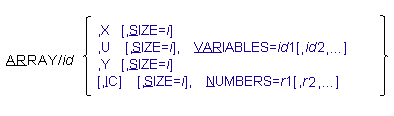
Arguments
IC | Creates a one-dimensional array of real numbers that can be accessed in user-written subroutines. You can use IC to designate an initial conditions array for an LSE or GSE. In that case, you should ensure that t he SIZE is the same as the X (state variable) array of the associated LSE or GSE. |
NUMBERS=r1[,r2,...,] | Allows you to enter a one-dimensional array of real numbers when using the IC array. |
SIZE=i | Allows you to define the size of the array. In cases where Adams Solver (C++) calculates the SIZE differently from the SIZE that you supply, Adams Solver (C++) returns an error or warning message. |
VARIABLES=id1[,id2,...] | Defines a list of identifiers of VARIABLE statements to group in an array. The VARIABLES argument is used with only an input array (U). Range: Any valid VARIABLE id |
X | Designates an ARRAY statement to be the state variable array for a systems modeling element, LSE, GSE, or TFSISO. To use these arrays, you must reference the ARRAY statement as the state variable array in a system element statement. You can use a single X array with only a single systems element. When you choose X, the only other argument available is SIZE. When you don’t specify SIZE, the associated systems element automatically sets the size. |
U | Creates an array that groups together a set of VARIABLES, normally to define the inputs for a systems element, either LSE, GSE, or TFSISO. When you choose U, SIZE and VARIABLES are the only other available arguments. |
Y | Designates an ARRAY statement as the output array for a systems element, either LSE, GSE, or TFSISO. To use these arrays, you must reference the ARRAY statement as the output array in the system element definition in the dataset. When you choose Y, SIZE is the only other argument available. You can use a single Y array with only a single systems element. The SIZE value, if supplied, must be consistent with the associated systems element. When you don’t specify SIZE, the associated systems element automatically sets it. |
Extended Definition
The ARRAY statement defines a list of input variables (U), state variables (X), output variables (Y), and initial conditions (IC) associated with system modeling elements such as GSE, LSE, and TFSISO. ARRAY may also be used to define a list of constants. These values may be accessed in function expressions or user-written subroutines.
There are three basic variations of the ARRAY statement:
■The X and Y arrays designate the state and output variable arrays for a systems element. Adams Solver (C++) computes these values during a simulation.
■The U array defines an array of inputs for a systems element. Adams Solver (C++) computes these values from the specified VARIABLE statements.
■The IC array defines an array of constants used as initial conditions.
For the X and Y arrays, the corresponding systems modeling element automatically determines the size of the array and checks it against the ARRAY statement’s SIZE value (if given).
The IC and SIZE parameters are optional. Adams Solver (C++) determines the actual size of the array during input-file parsing as it counts the NUMBERS argument. However, if you provide a value for SIZE, Adams Solver (C++) checks the count for consistency.
For X and Y arrays, you should reference the array as the state variable array or output variable array of one of the system elements in the dataset, either LSE, GSE, or TFSISO. U and IC arrays may exist independently. Grouping VARIABLES in a U array does not offer any computational advantage, although it might have a convenience value.
The SIZE argument, if used, should match the number of entries in the VARIABLES or NUMBERS arguments or the size needed for the associated element. Adams Solver (C++) provides the SIZE argument mainly for your convenience in dataset creation. For LSE arrays, the X size is the row dimension of the A and B matrix, and the Y size is the row dimension of the C and D matrix. For TFSISO arrays, the transformation from the transfer function form to canonical state space form determines the X size; the size of Y and U is always one. For GSE arrays, X is size NS as defined in the matching GSE statement and Y is size NO, as defined in the same GSE statement.
Both function expressions and user-written subroutines can access the array values. Function expressions use the function ARYVAL (id, nseq ) (see ARYVAL) to access the values. The id specifies the identifier of the ARRAY, and nseq specifies the position of the desired value in the ARRAY statement. To access all the elements of an array from a user written subroutine, you should call the subroutine SYSARY (see the SYSARY subroutine). To access one element of an ARRAY in a subroutine, you should call the subroutine SYSFNC (see the SYSFNC subroutine).
Examples
The following are three simple examples of the ARRAY statement.
ARRAY/1, X
ARRAY/2, U, VARIABLES=2
ARRAY/3, IC, NUMBERS= 0.0, 0.0
ARRAY/2, U, VARIABLES=2
ARRAY/3, IC, NUMBERS= 0.0, 0.0
See other Reference data available.